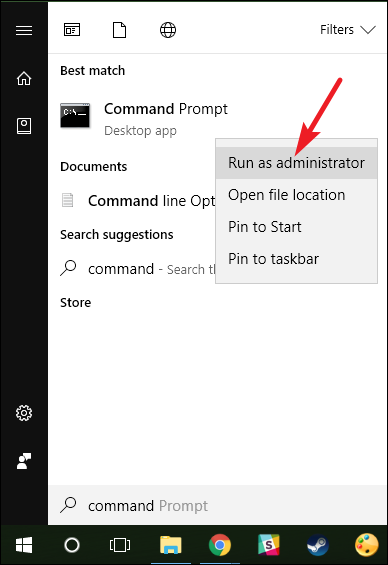
Fix ZOOM Error 104114 Windows 7/8/10 Data 09/10/2020 Autor Tiberiu Gache Categorie Configurare program, Aplicații, Stații de lucru 0 534 Rezolvare problema (Fix IT) SituatieAplicatia Zoom nu porneste Solutie Pasi de urmat Deschideti CMD cu drepturi de administrator Rulati urmatoarele comenzi: ipconfig /flushdns -> apasati enter netsh winsock reset – > apasati enter exit -> apasati enter Tip solutiePermanent Etichetare: Fix ZOOM Error 104114 Windows 7/8/10 ShareTweetShare Despre Autor Tiberiu Gache Solutii Asemanatoare How to clean temporary files on Windows 11 -3 Cum deschidem un RDP in full screen folosind Command Prompt in Windows 10 7 Cum deschidem fereastra Sound folosind Run in Windows 10 1 Cum pot activa modul Dark in Microsoft Office? -1 Cum pot rezolva problema cu conexiunea la retea in Windows 10? 0 Reducerea deseurilor rezultate din echipamente electronice (e-waste): corectarea software a disfunctionalitatilor butoanelor perifericelor -2 Leave A Comment? × Cancel Reply Save my name, email, and website in this browser for the next time I comment. two + = 8
Leave A Comment?
