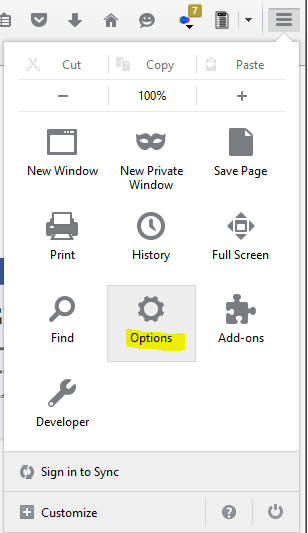
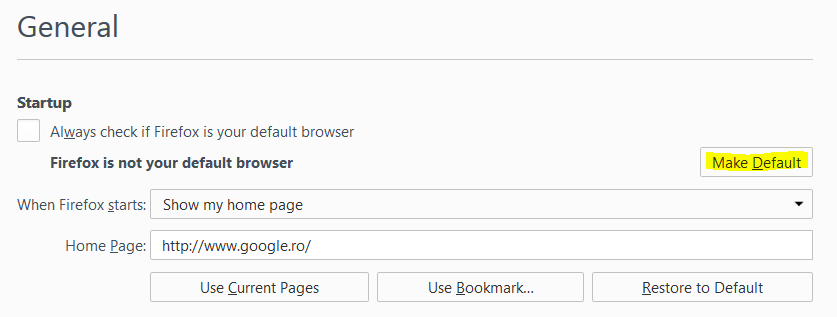
Setare Firefox ca browser principal Data 14/07/2015 Autor Sorin O Categorie Configurare browser, Aplicatii specifice, Stații de lucru -15 4180 Configurare noua (How To) SituatieSetare Firefox ca browser principal Solutie Pasi de urmat Se navigheaza in “Options”: In tab-ul “General” se alege ” Make Default” : Tip solutiePermanent Voteaza Up Down (30 din 75 persoane apreciaza acest articol) ShareTweetShare Despre Autor Sorin O Solutii Asemanatoare How to clean temporary files on Windows 11 2 Cum deschidem un RDP in full screen folosind Command Prompt in Windows 10 1 Cum deschidem fereastra Sound folosind Run in Windows 10 2 Cum pot activa modul Dark in Microsoft Office? -2 Cum pot rezolva problema cu conexiunea la retea in Windows 10? 4 Reducerea deseurilor rezultate din echipamente electronice (e-waste): corectarea software a disfunctionalitatilor butoanelor perifericelor -2 Leave A Comment? × Cancel Reply Save my name, email, and website in this browser for the next time I comment. + 2 = eleven

Leave A Comment?