
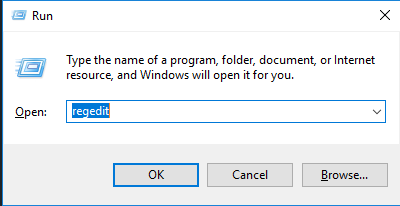
Cum se dezactiveaza butonul Quick Actions din Action Center Data 11/09/2016 Autor Cristian V Categorie Aplicații -10 1839 Configurare noua (How To) SituatieDorim sa dezactivam butonul Quick Actions din Action Center Solutie Pasi de urmat Apasam WIN + R si scriem regedit Navigam cheia de registri HKEY_LOCAL_MACHINESOFTWAREMicrosoftShellActionCenterQuick Actions In partea dreapta, modificam valoarea cheii PinnedQuickActionSlotCount cu 0. Tip solutiePermanent Etichetare: Action Centeraskitaskit.roCum se dezactiveaza butonul Quick Actions din Action CenterQuick Actionsregeditvaloarea cheii PinnedQuickActionSlotCount cu 0Win + R Voteaza Up Down (25 din 61 persoane apreciaza acest articol) ShareTweetShare Despre Autor Cristian V Solutii Asemanatoare O metoda de vizualizare a valorii frecventelor orizontale si verticale de reimprospatare a imaginii in Windows 4 Adding emotes to a personal Twitch channel 4 How to stop awkward Games showing up on next year’s Steam replay 0 How to use LAMBDA in Excel to create your own functions 0 How to customize the Always-on Display on a Samsung Galaxy Phone -5 How to create a New File in macOS Finder 6 Leave A Comment? × Cancel Reply Save my name, email, and website in this browser for the next time I comment. + one = two
Leave A Comment?