Follow Us

Soluții pentru problemele tale IT

Home /Stații de lucru/OS - Windows/Is not accessible. You might not have permission to use this network resource. Account restriction
Home /Stații de lucru /Is not accessible. You might not have permission to use this network resource. Account restriction
Home /OS - Windows/Configurare Sistem de operare/Is not accessible. You might not have permission to use this network resource. Account restriction

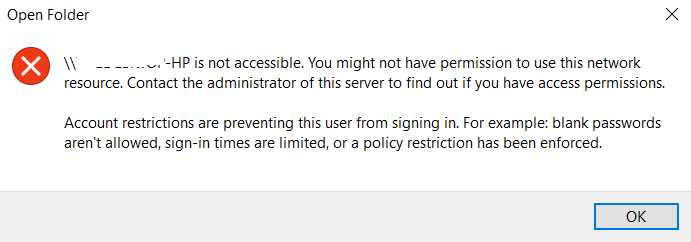
Is not accessible. You might not have permission to use this network resource. Account restriction

  • Data 25/06/2019
  • Autor Tiberiu Gache
  • Categorie Configurare Sistem de operare, OS - Windows, Stații de lucru
  • -5
  • 695
Rezolvare problema (Fix IT)

Situatie

Doriti sa accesati un PC din aceeasi retea si nu reusiti sa va conectati.

Simptome
Solutie

Pasi de urmat

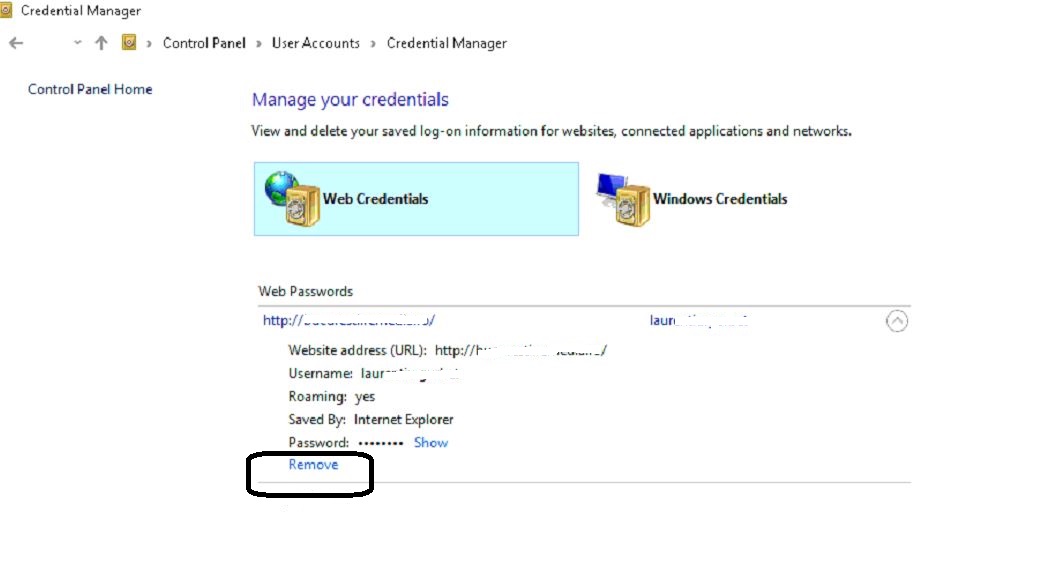
Accesati Control Panel – User Accounts – Manage your credentials.

La Web Credentials, in ultimul rand aveti Remove

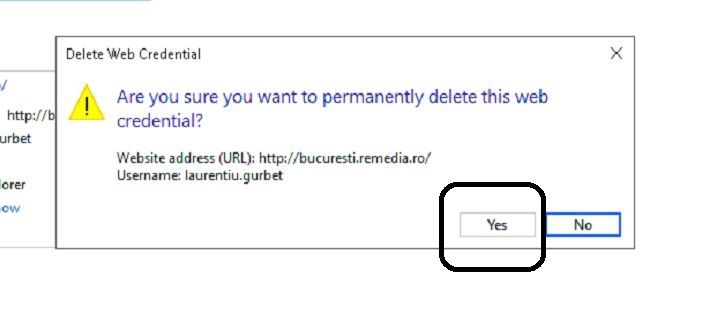
Click Yes.
Mergeti la PC-ul pe care doriti sa-l accesati, verificati daca are parola de logare. La aceasta eroare, cel mai probabil nu are si va trebui sa-i setati o parola de logare.

Cand veti incerca sa-l accesati in retea, automat va cere parola. Introduceti userul si parola, si PC-ul este accesibil.

Tip solutie

Permanent
Etichetare: Account restrictionaccount restrictions are preventing this user from signing in win 10Is not accessible.Is not accessible. You might not have permission to use this network resource. Account restriction

Voteaza

Up Down
(16 din 38 persoane apreciaza acest articol)
Share
Tweet
Share

Despre Autor

Tiberiu Gache

Solutii Asemanatoare

  • How to clean temporary files on Windows 11 -3
  • Cum deschidem un RDP in full screen folosind Command Prompt in Windows 10 7
  • Cum deschidem fereastra Sound folosind Run in Windows 10 1
  • Cum pot activa modul Dark in Microsoft Office? -1
  • Cum pot rezolva problema cu conexiunea la retea in Windows 10? 0
  • Reducerea deseurilor rezultate din echipamente electronice (e-waste): corectarea software a disfunctionalitatilor butoanelor perifericelor -2

Leave A Comment? × Cancel Reply

29534

Soluții Disponibile

0 Articole

In ultima saptamana

Cele mai recente soluții

  • How to clean temporary files on Windows 11
    • 234
    • 17/04/2025
  • How to update iOS on your iPhone
    • 276
    • 17/04/2025
  • Cum deschidem un RDP in full screen folosind Command Prompt in Windows 10
    • 292
    • 16/04/2025
  • Cum deschidem fereastra Sound folosind Run in Windows 10
    • 257
    • 16/04/2025
  • How to enter text with your voice on a Chromebook
    • 436
    • 16/04/2025
© Askit.ro, 2014 - 2025. All rights reserved. Done by Class IT
Share
Tweet
Share