
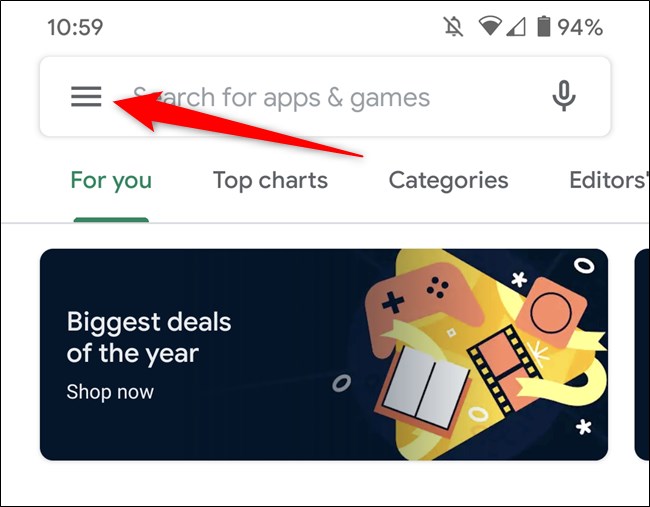
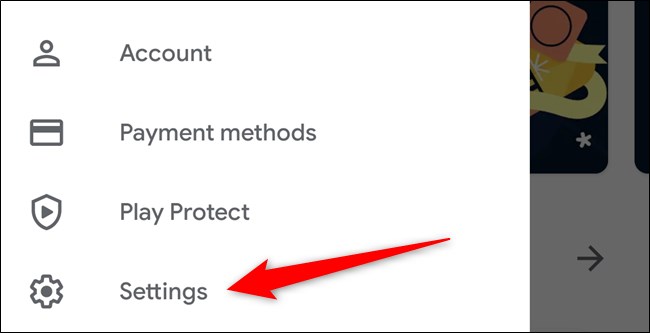
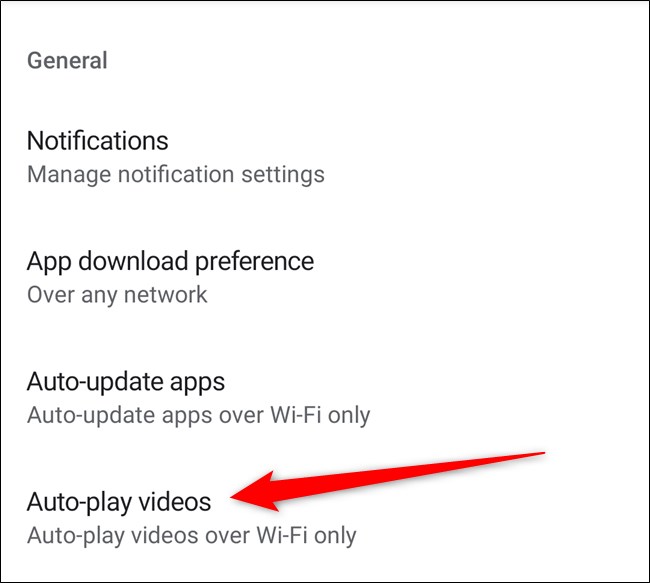
Dezactivare redare automata video in Google Play Data 10/01/2020 Autor Catalin Patulea Categorie Mobile -12 496 Configurare noua (How To) SituatieCum sa dezactivam redarea automata a videoclipurilor in Google Play Store Android. Solutie Pasi de urmat Accesam Play Store pe dispozitivul android. Deschidem meniul, apasand pe iconita din colt. Cautam in lista si accesam Settings. In sectiunea General, selectam Auto-play videos. Aici selectam Don’t auto-play videos si apasam butonul Done. Tip solutiePermanent Voteaza Up Down (11 din 34 persoane apreciaza acest articol) ShareTweetShare Despre Autor Catalin Patulea Solutii Asemanatoare How to update iOS on your iPhone -2 Cum reduceți consumul de date fără a pierde conectivitatea 2 How to customize the Always-on Display on a Samsung Galaxy Phone -2 Cum se blocheaza reclamele Pop-Up pe Android si IPhone -5 Can Google Wallet Work without Wi-Fi or Mobile Data? 3 Cum realizezi un restart fortat pe un iPhone sau iPad -3 Leave A Comment? × Cancel Reply Save my name, email, and website in this browser for the next time I comment. × six = twenty four
Leave A Comment?