
By default, Windows 10 has a 10-second delay during boot before all your apps and programs become accessible. This is called the “Startup Delay,” and it helps make sure everything works as it should when you start up your PC. If, however, you have a powerful PC, or not many startup programs in Windows 10, then you can try to reduce or even disable the startup delay altogether to help your PC start up faster.
[mai mult...]Skip the Annoying “Use the Web service to find the correct program” Dialog
If you’ve used Windows for any length of time, you’ve likely tried to open a file with an unknown extension. When you double-click on a file with an unknown extension, Windows presents you with this irritating dialog:
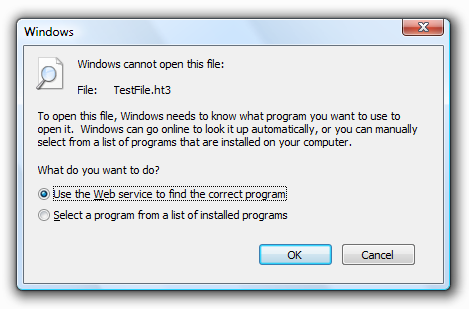
If you selected “Select a program from a list of installed programs”, you would get this much more useful dialog instead:
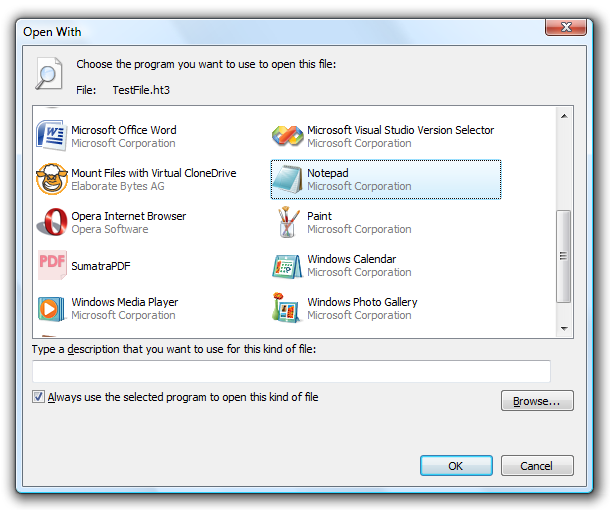
The registry hack will show you the second Open With dialog instead of that irritating first one.
[mai mult...]How to Disable Bing in the Start Menu in Windows 10
Windows 10, by default, sends everything you search for in the Start Menu to their servers to give you results from Bing search.
[mai mult...]Show Detailed Information on Windows Startup
If your PC is experiencing slowdowns or inexplicable crashes, then you should make it your priority to diagnose what’s causing those problems. One possible way to do this is to set Windows 10 startup to “Verbose Mode”, which will give you a much more detailed breakdown of the processes happening on your PC as you boot.
[mai mult...]Disable Windows 10 Lockscreen
The lock screen is a nice added layer of security on your Windows PC, requiring a password or PIN for you to log back in. If you feel secure in the security of your PC, then you can turn the lock screen off altogether.
[mai mult...]File Search Tips For Finding Files on Windows 10
These tips will be useful for all files.
[mai mult...]Locating Images using Parameters in Windows Explorer
Below we have a number of tips exclusive for images on your PC.
[mai mult...]Windows Closed Captions feature
If you struggle to read white subtitles on a video, movie or television show, especially on a light background, you can use the Closed Captions feature to edit the colors and backgrounds of any caption text.
[mai mult...]Windows High Contrast feature
People with visual impairment or colorblindness can use this feature to alter the overall color scheme so it’s easier to read text, images, icons and application windows. Items on the screen also become more distinct and easier to identify.
[mai mult...]Make your text cursor easier to find
The text cursor indicator adds a splash of color to your text cursor, making it easier to find in a sea of text.
[mai mult...]