Cum activezi securizarea (criptarea) comunicatiei in Instagram?
Daca doriti sa aveti o discutie securizata pe Instagram,puteti urma pasii de mai jos:
[mai mult...]
Soluții pentru problemele tale IT

Daca doriti sa aveti o discutie securizata pe Instagram,puteti urma pasii de mai jos:
[mai mult...]Here are a few fast, easy ways to link and unlink Spotify from PS4 or PS5.
While it’s fun to listen to personalized playlists when gaming, a Spotify Premium account can only play music on a maximum of three devices. Not only does that add up fast, but if multiple people are listening to music from the same account, they may experience audio interruptions. Therefore, you may need to shuffle around your linked devices and unlink your PlayStation console from time to time, especially if you’ve upgraded to a new gaming console.
[mai mult...]The Asus ROG Phone 5 and 5S are among the best phones for gamers. Not only do they look the part, but they are packed with features that make them fantastic handheld gaming devices. When you aren’t playing games, the two are excellent Android smartphones. Nothing is perfect, though, and the Asus flagships have their fair share of issues.
[mai mult...]Klez is a worm that spreads via the Internet by attaching itself to mass-mailed emails using SMTP to pass itself along. The worm virus itself is a Windows PE EXE file of about 65Kb in size and is written in Microsoft Visual C++. The subject line of the email carrying the virus payload is randomly selected from a list of possible choices.
The email message “From:” field will contain either one of the addresses found in a search of address books and files on the computer or an address taken from a list inside the virus body.
[mai mult...]How do I install GNU/GCC compiler and related tools (such as make, debugger, man pages) collection under Debian Linux system using command line options?
You need to install the following packages on a Debian and Ubuntu Linux:
build-essential package. Installs the following collection to compile c/c++ program on Debian/Ubuntu Linux.
Basically, build-essential package contains an informational list of packages which are considered essential for building Debian packages including gcc compiler, make and other required tools. This package also depends on the packages on that list, to make it easy to have the build-essential packages installed.
Open the Terminal and then type the following apt-get command as root user or use the apt command:
$ sudo apt-get update

$ sudo apt-get install build-essential
OR
$ sudo apt update

$ sudo apt install build-essential
Sample outputs:
Reading package lists... Done
Building dependency tree
Reading state information... Done
The following extra packages will be installed:
  dpkg-dev fakeroot g++ g++-4.7 gcc gcc-4.7 libalgorithm-diff-perl libalgorithm-diff-xs-perl libalgorithm-merge-perl libc-dev-bin libc6-dev libdpkg-perl
  libfile-fcntllock-perl libitm1 libstdc++6-4.7-dev libtimedate-perl linux-libc-dev make manpages-dev
Suggested packages:
  debian-keyring g++-multilib g++-4.7-multilib gcc-4.7-doc libstdc++6-4.7-dbg gcc-multilib autoconf automake1.9 libtool flex bison gdb gcc-doc gcc-4.7-multilib
  libmudflap0-4.7-dev gcc-4.7-locales libgcc1-dbg libgomp1-dbg libitm1-dbg libquadmath0-dbg libmudflap0-dbg libcloog-ppl0 libppl-c2 libppl7 binutils-gold glibc-doc
  libstdc++6-4.7-doc make-doc
The following NEW packages will be installed:
  build-essential dpkg-dev fakeroot g++ g++-4.7 gcc gcc-4.7 libalgorithm-diff-perl libalgorithm-diff-xs-perl libalgorithm-merge-perl libc-dev-bin libc6-dev libdpkg-perl
  libfile-fcntllock-perl libitm1 libstdc++6-4.7-dev libtimedate-perl linux-libc-dev make manpages-dev
0 upgraded, 20 newly installed, 0 to remove and 0 not upgraded.
Need to get 26.5 MB of archives.
After this operation, 67.6 MB of additional disk space will be used.
Do you want to continue [Y/n]? y
Get:1 http://mirrors.kernel.org/debian/ stable/main libitm1 amd64 4.7.2-5 [36.6 kB]
Get:2 http://mirrors.kernel.org/debian/ stable/main libc-dev-bin amd64 2.13-38 [224 kB]
.....
....
....
Setting up manpages-dev (3.44-1) ...
Setting up g++-4.7 (4.7.2-5) ...
Setting up g++ (4:4.7.2-1) ...
update-alternatives: using /usr/bin/g++ to provide /usr/bin/c++ (c++) in auto mode
Setting up build-essential (11.5) ...
Setting up libstdc++6-4.7-dev (4.7.2-5) ...
You can verify gcc compiler and make tool using the following syntax:
$ whereis gcc make

$ gcc -v

$ make -v
Sample outputs:
gcc: /usr/bin/gcc /usr/lib/gcc /usr/bin/X11/gcc
make: /usr/bin/make /usr/bin/X11/make /usr/share/man/man1/make.1.gz
...
..
gcc version 4.7.2 (Debian 4.7.2-5)
...
..
GNU Make 3.81
..
Now, you should able to compile software, create Debian packages or simply write a code using C / C++ compilers.
Type the following command:
$ sudo apt-get install manpages-dev
Sample outputs:
Reading package lists... Done
Building dependency tree
Reading state information... Done
The following additional packages will be installed:
  manpages
Suggested packages:
  man-browser
The following NEW packages will be installed:
  manpages manpages-dev
0 upgraded, 2 newly installed, 0 to remove and 0 not upgraded.
Need to get 3,134 kB of archives.
After this operation, 5,042 kB of additional disk space will be used.
Do you want to continue? [Y/n] y
Get:1 http://archive.ubuntu.com/ubuntu xenial/main amd64 manpages all 4.04-2 [1,087 kB]
Get:2 http://archive.ubuntu.com/ubuntu xenial/main amd64 manpages-dev all 4.04-2 [2,048 kB]
Fetched 3,134 kB in 6s (500 kB/s)
Selecting previously unselected package manpages.
(Reading database ... 22189 files and directories currently installed.)
Preparing to unpack .../manpages_4.04-2_all.deb ...
Unpacking manpages (4.04-2) ...
Selecting previously unselected package manpages-dev.
Preparing to unpack .../manpages-dev_4.04-2_all.deb ...
Unpacking manpages-dev (4.04-2) ...
Setting up manpages (4.04-2) ...
Setting up manpages-dev (4.04-2) ...
Verify installation by reading some man pages:
$ man ls

$ man printf
The procedure to build (compile) and install the latest Linux kernel from source is as follows:
Step 1. Get the latest Linux kernel source code
Visit the official project site and download the latest source code. Click on the big yellow button that read as “Latest Stable Kernel“:
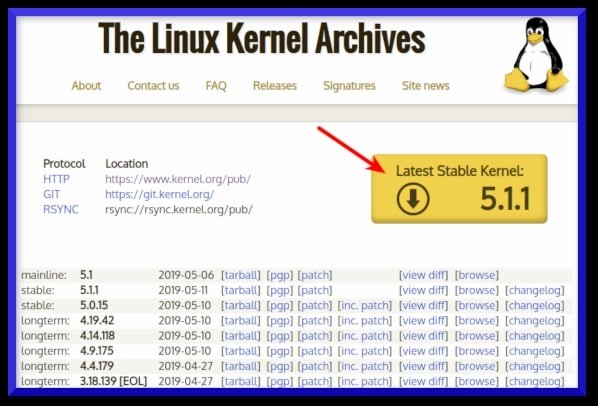
The filename would be linux-x.y.z.tar.xz, where x.y.z is actual Linux kernel version number. For example file linux-5.16.9.tar.xz represents Linux kernel version 5.16.9. Use the wget command to download Linux kernel source code:
$ wget https://cdn.kernel.org/pub/linux/kernel/v5.x/linux-5.16.9.tar.xz
You really don’t have to extract the source code in /usr/src. You can extract the source code in your $HOME directory or any other directory using the following unzx command or xz command:
$ unxz -v linux-5.16.9.tar.xz
OR
$ xz -d -v linux-5.16.9.tar.xz
First grab the PGP signature for linux-5.16.9.tar:
$ wget https://cdn.kernel.org/pub/linux/kernel/v5.x/linux-5.16.9.tar.sign
Try to verify it:
$ gpg --verify linux-5.16.9.tar.sign
Sample outputs:
gpg: assuming signed data in 'linux-5.16.9.tar'
gpg: Signature made Sun 12 Aug 2018 04:00:28 PM CDT
gpg:                using RSA key 79BE3E4300411886
gpg: Can't check signature: No public key
Grab the public key from the PGP keyserver in order to verify the signature i.e. RSA key ID 79BE3E4300411886 (from the above outputs):
$ gpg --recv-keys 79BE3E4300411886
Sample outputs:
gpg: key 79BE3E4300411886: 7 duplicate signatures removed
gpg: key 79BE3E4300411886: 172 signatures not checked due to missing keys
gpg: /home/vivek/.gnupg/trustdb.gpg: trustdb created
gpg: key 79BE3E4300411886: public key "Linus Torvalds <torvalds@kernel.org>" imported
gpg: no ultimately trusted keys found
gpg: Total number processed: 1
gpg:               imported: 1
Now verify gpg key again with the gpg command:
$ gpg --verify linux-5.16.9.tar.sign
Sample outputs:
gpg: assuming signed data in 'linux-5.16.9.tar'
gpg: Signature made Sun 12 Aug 2018 04:00:28 PM CDT
gpg:                using RSA key 79BE3E4300411886
gpg: Good signature from "Linus Torvalds <torvalds@kernel.org>" [unknown]
gpg:                 aka "Linus Torvalds <torvalds@linux-foundation.org>" [unknown]
gpg: WARNING: This key is not certified with a trusted signature!
gpg:          There is no indication that the signature belongs to the owner.
Primary key fingerprint: ABAF 11C6 5A29 70B1 30AB  E3C4 79BE 3E43 0041 1886
If you do not get “BAD signature” output from the “gpg –verify” command, untar/extract the Linux kernel tarball using the tar command, enter:
$ tar xvf linux-5.16.9.tar
Before start building the kernel, one must configure Linux kernel features. You must also specify which kernel modules (drivers) needed for your system. The task can be overwhelming for a new user. I suggest that you copy existing config file using the cp command:
$ cd linux-5.16.9

$ cp -v /boot/config-$(uname -r) .config
Sample outputs:
'/boot/config-4.15.0-30-generic' -> '.config'
You must have development tools such as GCC compilers and related tools installed to compile the Linux kernel.
Type the following apt command or apt-get command to install the same:
$ sudo apt-get install build-essential libncurses-dev bison flex libssl-dev libelf-dev
How to install GCC and development tools on a CentOS/RHEL/Oracle/Scientific Linux
Try yum command:
$ sudo yum group install "Development Tools"
OR
$ sudo yum groupinstall "Development Tools"
Additional packages too:
$ sudo yum install ncurses-devel bison flex elfutils-libelf-devel openssl-devel
Run the following dnf command:
$ sudo dnf group install "Development Tools"

$ sudo dnf install ncurses-devel bison flex elfutils-libelf-devel openssl-devel
Now you can start the kernel configuration by typing any one of the following command in source code directory:
For example, run make menuconfig command launches following screen:
$ make menuconfig

Start compiling and tocreate a compressed kernel image, enter:
$ make
To speed up compile time, pass the -j as follows:
## use 4 core/thread ##

$ make -j 4

## get thread or cpu core count using nproc command ##

$ make -j $(nproc)
Compiling and building the Linux kernel going take a significant amount of time. The build time depends upon your system’s resources such as available CPU core and the current system load. So have some patience.
Install the Linux kernel modules
$ sudo make modules_install
So far we have compiled the Linux kernel and installed kernel modules. It is time to install the kernel itself:
$ sudo make install
It will install three files into /boot directory as well as modification to your kernel grub configuration file:
Step 6. Update grub config
You need to modify Grub 2 boot loader configurations. Type the following command at a shell prompt as per your Linux distro:
CentOS/RHEL/Oracle/Scientific and Fedora Linux
$ sudo grub2-mkconfig -o /boot/grub2/grub.cfg

$ sudo grubby --set-default /boot/vmlinuz-5.16.9
You can confirm the details with the following commands:
grubby --info=ALL | more

grubby --default-index

grubby --default-kernel
Debian/Ubuntu Linux
The following commands are optional as make install does everything for your but included here for historical reasons only:
$ sudo update-initramfs -c -k 5.16.9

$ sudo update-grub
How to build and install the latest Linux kernel from source code
You have compiled a Linux kernel. The process takes some time, however now you have a custom Linux kernel for your system. Let us reboot the system.
Just issue the reboot command or shutdown command:
# reboot
Verify new Linux kernel version after reboot:
$ uname -mrs
Sample outputs:
Linux 5.16.9 x86_64[mai mult...]