

Social
The Best Hidden Features in Samsung Galaxy Note 10 and 10+
With the Samsung Note 10 and Note 10+, Samsung once again managed to pack more power than anyone ever dreamed possible into a handheld device. With the larger screen and the S Pen, the Note and Note 10+ are powerhouses of productivity.
[mai mult...]How to turn off OneDrive in Windows 8.1
[mai mult...]Utilizare iPhone/iPad/Android Phone ca si Webcam pentru Zoom/Teams
Lipsa stocurilor pentru camerele web, datorită efectelor pandemiei, laptopurile de gaming ce nu au camere web, sunt două motive pentru care munca utilizatorilor de acasă este îngreunată, mai ales dacă este necesară colaborarea pe Zoom sau Teams, sau ședințele se desfășoară folosind video. Cei ce dețin un iPhone, un telefon cu Android sau un iPad, din fericire, își pot folosi device-ul ca și webcam.
[mai mult...]How to Fix Crypt32.dll Not Found or Missing Errors
Crypt32.dll errors are caused by situations that lead to the removal or corruption of the crypt32 DLL file. In some cases, crypt32.dll errors could indicate a registry problem, a virus or malware issue, or even a hardware failure.
[mai mult...]How to enable Tab Scrolling in Microsoft Edge
Microsoft Edge is a Chromium-based web browser, and as such limited to the same default tab handling mechanics as other Chromium-based browsers. By default, tabs get smaller and smaller the more you open, but there is no option to scroll them. Microsoft did introduce support for vertical tabs in the recent release of Edge 89 Stable, and the feature is suggested to users when too many tabs are opened. If you prefer to use a horizontal tab bar on the other hand, you are left with little when it comes to managing lots of tabs in Edge. You could install a browser extension to improve tab management, or, if you run the Canary version, enable tab scrolling.
Tab Scrolling is not a feature that Microsoft added to the browser; instead, it is a feature that is added to the Chromium core. You can enable it in Google Chrome development versions right now, but when you check the flags page in Edge, you will notice that the flag is missing. It appears that Microsoft did remove it, but not all is lost, as you can still enable the feature in Edge Canary.
All you need to do is add a startup parameter to Microsoft Edge to enable it in the browser.
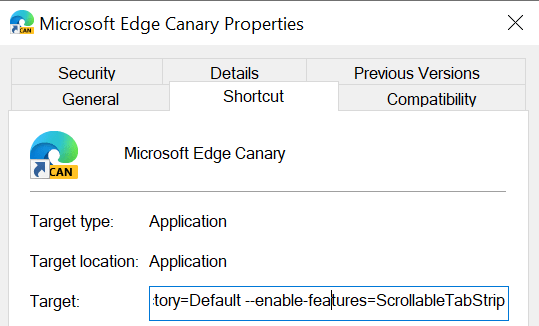
Here is how that is done:
Right-click on the Edge icon on the taskbar, right-click again on Microsoft Edge, and select Properties from the menu.
Locate the target field, add a space at the end, and paste the following parameter afterwards:
–enable-features=ScrollableTabStrip
It should show up like that (apart from the username “example”): “C:\Users\example\AppData\Local\Microsoft\Edge SxS\Application\msedge.exe” –enable-features=ScrollableTabStrip
Click on OK to save the change.
Restart Microsoft Edge Canary.
Once restarted, the following things happen:
- Edge does not reduce the width of tabs below a minimum threshold anymore (that is larger than the default).
- Not all tabs may be visible anymore at once because of that.
- You may use the mousewheel to scroll tabs in the browser’s tab bar when you hover the cursor over the bar.
Note: the feature is experimental at this point in time. It is possible that Microsoft is removing support for it entirely in the browser, or that it is adding support for it at one time. For now, it works in development versions of Edge but not in stable versions.
[mai mult...]