Soluții

Cum schimbi fundalul desktop-ului și culorile

Puteți alege o imagine demnă de fundalul desktop-ului sau puteți schimba culoarea de accent pentru Start, bara de activități și alte elemente.

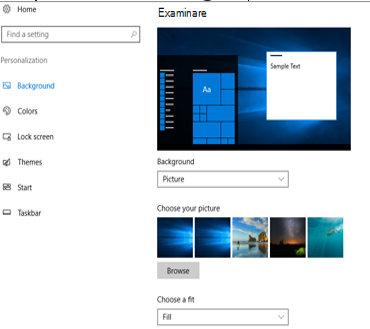
  • Selectați Start  > Setări > Personalizare  . Fereastra de previzualizare vă oferă o imagine a modificărilor în timp ce le faceți.
  • În Fundal, puteți să selectați o imagine sau o culoare compactă sau să creați o expunere de diapozitive cu imagini.
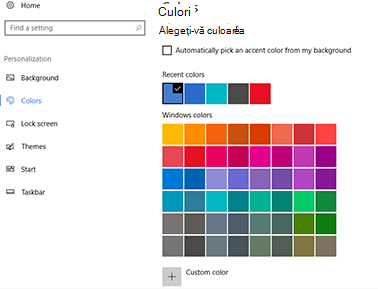
  • În Culori, puteți să Windows o culoare de accent de pe fundal sau să alegeți propria culoare.
După ce ați selectat o culoare de accent, defilați în jos pentru a decide unde doriți să vedeți cum se afișează culoarea și dacă arată mai bine cu o setare întunecată sau luminoasă.
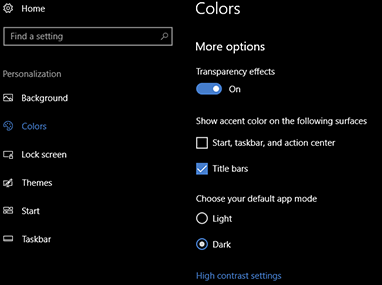
  • Ecranul de mai sus afișează setarea Întunecat.
[mai mult...]

How to stop web notifications in Chrome, Firefox, Edge on Windows 11

On Windows 11, sometimes, when you browse an interesting website, you will receive a prompt to allow notifications on the desktop when new articles are published.

If you click the “Allow” button, and you are now getting tons of notifications, or you gave the site permission by mistake, it’s possible to stop that and other websites from pushing updates to the Windows 11 or Windows 10 desktop, whether you use Microsoft Edge, Google Chrome or Mozilla Firefox.

[mai mult...]

How to Move Your Taskbar to the Top on Windows 11

Though Windows has always placed its taskbar on the bottom of the screen by default, many users prefer to put it on the top or even on the left or right side. Windows 11 doesn’t provide a menu option for moving the taskbar anywhere, but with a simple registry tweak (or two), you can place it on top of the screen.

Note that, because Microsoft doesn’t support this taskbar move, there are some bugs associated with it.  When you move the taskbar to the top, the Start menu shifts upward but aligns to the upper-left corner, even if the taskbar icons remain centered. The system tray is in the upper right where it belongs, but if you click on the clock, the speaker or on notifications, the pop-up menus for them appear in the lower right corner. The search menu, however, is still aligned to the center.

[mai mult...]