How to Find the Day of the Week From a Date in Microsoft Excel
Do you have a date in your spreadsheet that you want to turn into the day of the week? If so, Microsoft Excel has multiple features and functions to help you do that.
[mai mult...]
Soluții pentru problemele tale IT

Do you have a date in your spreadsheet that you want to turn into the day of the week? If so, Microsoft Excel has multiple features and functions to help you do that.
[mai mult...]When a site requires pop-up windows to function, you will have to turn off the pop-up blocker in your web browser to allow the site to function.
[mai mult...]A smart TV is good for more than just YouTube and Netflix. If you’ve got a game controller lying around, there’s a good chance you can connect it to your Google TV or Android TV device.
[mai mult...]With Microsoft Excel’s built-in options, you can quickly and easily convert your comma-separated values (CSV) files to Excel format (XLSX).
[mai mult...]A family recently discovered a rude surprise at their Airbnb: a hidden camera disguised as a smoke detector in the living room. Here are two ways to check for cameras—in an Airbnb or elsewhere—using only an iPhone or Android phone.
[mai mult...]If you are in this unfortunate situation where all your data and files are inaccessible, then we recommend using iToolab UnlockGo to reset the account password. Not only does it ensure you don’t have to reinstall Windows, but it also works for Local Admin and Microsoft Domain account passwords.
Follow these steps to recover your Windows account.
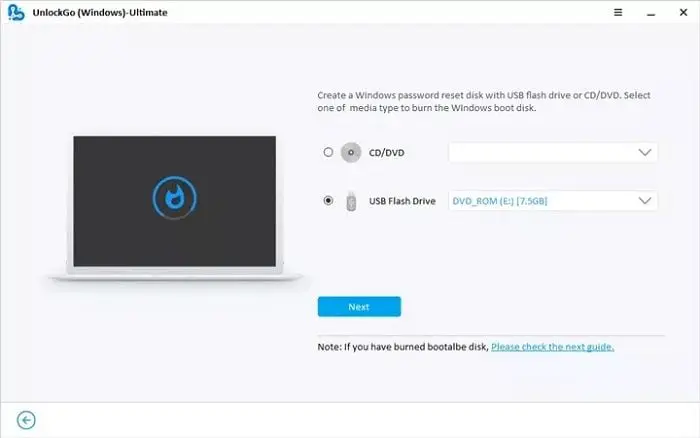
Get access to another Windows PC, download, and install this Windows 10 Password Recovery Tool. Then connect a USB drive, and ensure it’s empty as the drive will be formatted. The next step is to launch the software and click on the Start button. You can choose between a CD/DVD or USB drive on the next screen. Select USB, and then click on the Next button. Click next, confirm the prompts, and let the software create the reset disk.
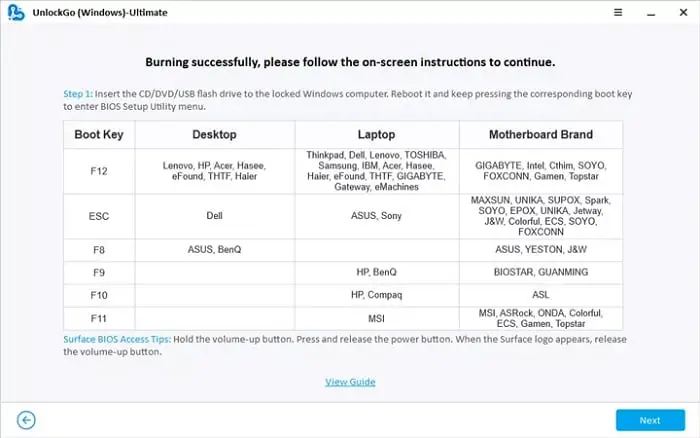
Once done, the application will display a list of keyboard keys to press to boot into the BIOS instead of Windows. Most laptops and PCs are set to boot from the storage, so we will have to change to boot from the USB. It can be done via UEFI or BIOS. Look for the Boot section, and you can change the order of the boot from there. Some modern motherboards can detect the connected USB drive as you change the option. Save the change, and restart.
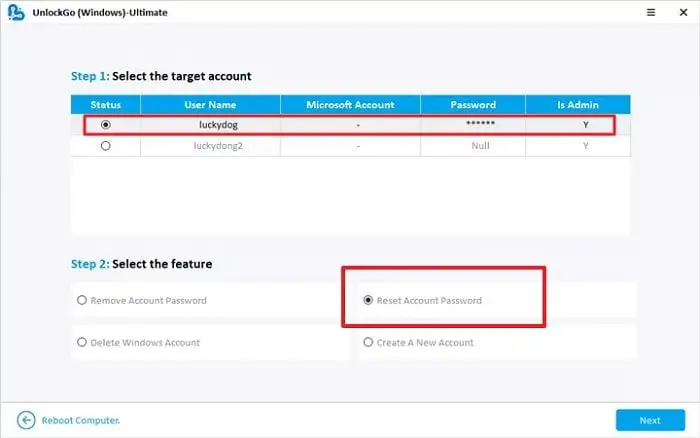
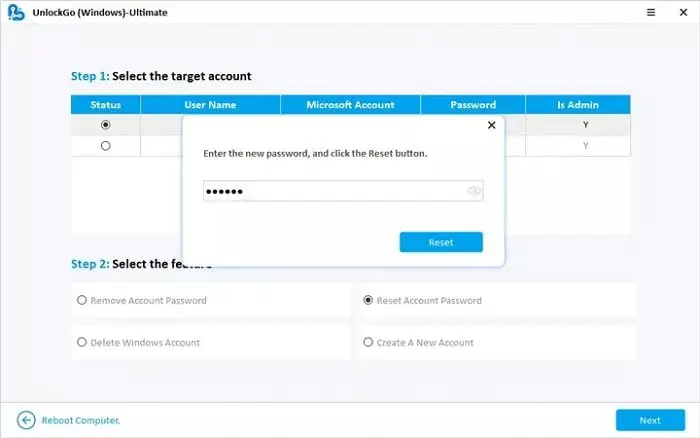
I would suggest creating another admin account even if you don’t need it. If you ever need it, you will have it right away; otherwise, you will have to reuse the software and create it again.
Make sure to note the password before you leave the recovery. If not, reset once again and record it on paper or your phone. Next, remove the USB drive and reboot the PC using the reset button. Removing the USB ensures the PC does not boot into the recovery mode. Once the PC reboots, login with the new password, or if you choose to create a new account, and then login.
[mai mult...]