
Soluții

C++ Function Overloading

With function overloading, multiple functions can have the same name with different parameters:

Example
int myFunction(int x)
float myFunction(float x)
double myFunction(double x, double y)
Consider the following example, which have two functions that add numbers of different type:
Example
int plusFuncInt(int x, int y) {
return x + y;
}
double plusFuncDouble(double x, double y) {
return x + y;
}

int main() {
int myNum1 = plusFuncInt(85);
double myNum2 = plusFuncDouble(4.36.26);
cout << “Int: “ << myNum1 << “\n”;
cout << “Double: “ << myNum2;
return 0;
}
[mai mult...]

Cum creezi ferestre de dialog in Microsoft Excel

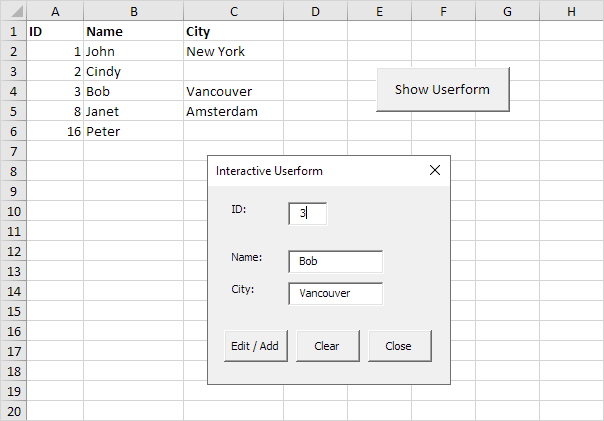
Pentru a imbunatati functionalitatea unui fisier Excel se pot crea ferestre de dialog similare cu cele din Windows, de unde utilizatorul poate selecta anumite optiuni.

De exemplu, vom crea o fereastra din care sa se poata completa o foaie de calcul Excel.

  • In aceasta fereastra, ori de câte ori introduceți o valoare în caseta de text ID, Excel VBA încarcă înregistrarea corespunzătoare. Când faceți click pe butonul Edit/Add, Excel editează înregistrarea de pe foaie sau adaugă înregistrarea când ID-ul nu există încă.
  • Butonul Clear șterge toate casetele de text. Butonul Close închide fereastra de dialog.

Pentru a crea aceasta fereastra de dialog, executați pașii următori.

[mai mult...]

C++ Syntax

Let’s break up the following code to understand it better:

Example
#include <iostream>
using namespace std;
int main() {
cout << “Hello World!”;
return 0;
}

Example explained

Line 1: #include <iostream> is a header file library that lets us work with input and output objects, such as cout (used in line 5). Header files add functionality to C++ programs.

Line 2: using namespace std means that we can use names for objects and variables from the standard library.

Don’t worry if you don’t understand how #include <iostream> and using namespace std works. Just think of it as something that (almost) always appears in your program.

Line 3: A blank line. C++ ignores white space.

Line 4: Another thing that always appear in a C++ program, is int main(). This is called a function. Any code inside its curly brackets {} will be executed.

Line 5: cout (pronounced “see-out”) is an object used together with the insertion operator (<<) to output/print text. In our example it will output “Hello World”.

Note: Every C++ statement ends with a semicolon ;.

Note: The body of int main() could also been written as:
int main () { cout << "Hello World! "; return 0; }

Remember: The compiler ignores white spaces. However, multiple lines makes the code more readable.

Line 6: return 0 ends the main function.

Line 7: Do not forget to add the closing curly bracket } to actually end the main function.

[mai mult...]

Jump la Address Bar in orice browser

Daca dorim sa accesam o alta pagina web decat cea pe care o avem deschisa, trebuie doar sa facem un click cu mouse-ul in adress bar si sa tastam adresa acelei pagini.Insa trebuie sa stiti ca exista si o a doua metoda, fara a mai fi nevoie sa ne luam degetele de pe tastatura.

[mai mult...]

Alternativa Ctrl+V in Windows

Comenzile Copy si Paste sunt folosite extrem de des in activitatea noastra de zi de zi. Banuiesc ca toti care folosim un PC/laptop stim combinatiile de taste pentru cele doua: Ctrl + C pentru Copy si Ctrl + V pentru Paste. Dar pentru Paste mai exista inca un shortcut despre care am aflat recent si pe care il impartasesc cu voi.

[mai mult...]