Soluții

Cum dezactivam autentificarea cu Windows Hello PIN, Face si Fingerprint in Windows 10

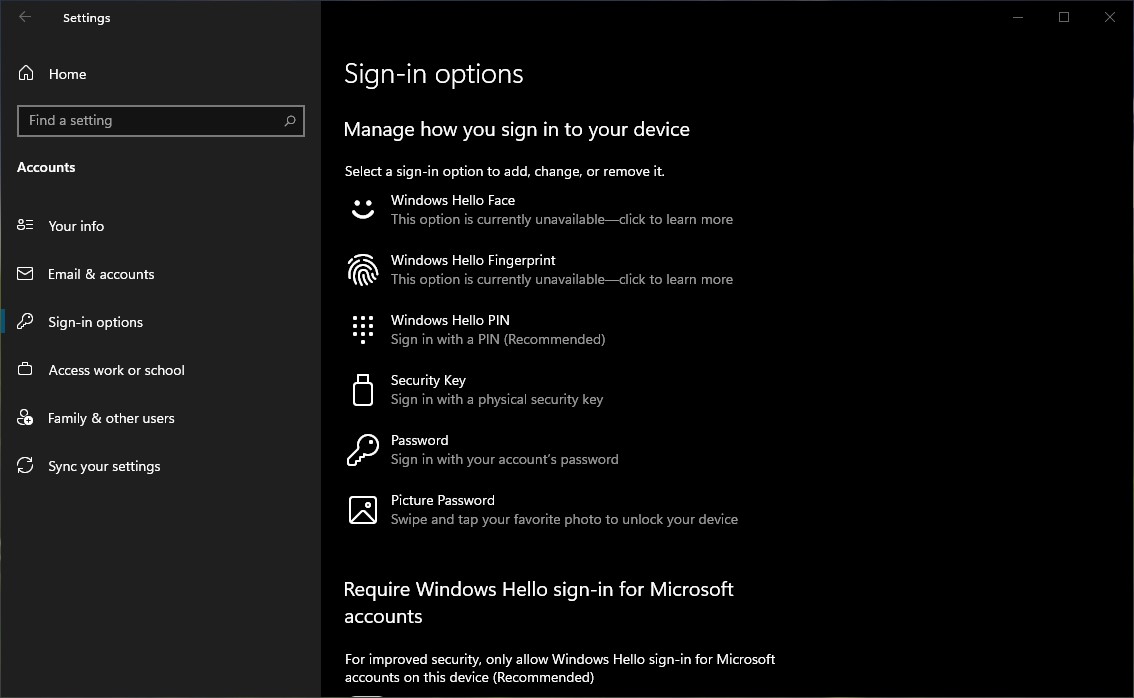
In comparatie cu versiunile precedente, Windows 10 ofera utilizatorilor mai multe optiuni de autentificare pe user-ul sistemului de operare. In loc de clasica parola din “Login Screen”, Windows 10 ne da mai multe solutii de securitate:

1. Windows Hello Face: Optiune de securitate pe baza recunosterii faciale. Este ceva asemanator cu Face ID prezent pe device-urile Apple, numai ca tehnica de recunoastere biometrica este putin diferita. Sa activati Windows Hello Face este nevoie de un laptop cu camera web compatibila Hello Face.

2. Windows Hello Fingerprint: Vorbim tot despre o masura de autentificare biometrica, amprenta digitala fiind utilizata pentru autentificarea pe Windows 10. Necesita laptop si / sau PC cu cititor de amprenta.

3. Windows Hello PIN: Este cea mai usoara si la indemana forma de autentificare pe Windows 10. Implica setarea unui cod PIN de minim 4 cifre pe care utilizatorul trebuie sa-l introduca de fiecare data cand doreste sa se autentifice pe sistemul de operare.

4. Security Key: O cheie fizica va fi utilizata de fiecare data cand dorim sa ne autentificam pe Windows 10. Nu va ganditi ca este vorba despre o cheie asemanatoare cu cea de la usa sau de la masina. Este un fisier criptat care contine un cod de securitate unic. Acest fisier ce contine cheia digitala va fi salvat pe un USB stick si folosit de fiecare data cand ne autentificam in Windows 10.

5. Password: Autentificarea pe Windows 10 se va face folosind parola contului dvs. Microsoft. Cont autentificat desigur pe user-ul sistemului de operare.

6. Picture Password: Aceasta este o metoda recomandata pe laptop-urile cu touchscreen (ecran tactil). Utilizatorul poate alege o imagine preferata pentru autentificare pe care va descrie si seta anumite gesturi. Cercuri, pucte legate si alte traictorii. Este o forma asemanatoare cu deblocarea screen-ului pe Android, cand utilizatorul tebuie sa uneasca cu degetul anumite puncte.
[mai mult...]

Nu se mai aude sunetul la “Empty Recycle Bin”

Cum facem sa activam sau sa dezactivam sunetul care se aude atunci cand stergem fisierele din cosul de gunoi Empty Recycle Bin. Dupa un update la Windows 10 am observat ca unele sunete de sistem ale Windows 10 lipsesc. De exemplu, atunci cand golesc “Recycle Bin” nu se mai aude acel sunet care imi indica ca fisierele din ele au fost sterse definitiv.

Se pare ca pentru “linistea” utilizatorilor Microsoft a eliminat de-a lungul timpului mai multe sunete de sistem. Din fericire aceste sunete ale sistemului de operare Windows pot fi activate, dezactivate sau schimbate dupa bunul plac al utilizatorilor. De la simplul sunet de notificare (Windows Notify) si pana la sunetul de pornire Windows, toate pot fi schimbate, dezactivate sau activate.

In ceea ce ne priveste, dorim sa revina sunetul specific atunci cand golim cosul de gunoi. Empty Recycle Bin.

[mai mult...]

Activare/dezactivare taste functionale laptop-uri HP

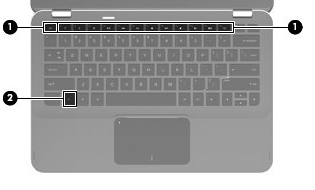
Tastele functionale se regasesc in partea de sus a tastaturii impreuna cu butoanele de la F1 la F12, ele au ca scop utilizarea mai rapida a functiilor de luminozitate, volum.

Pentru laptopurile Hp existra 2 modalitati de dezactivare dupa cum urmeaza:

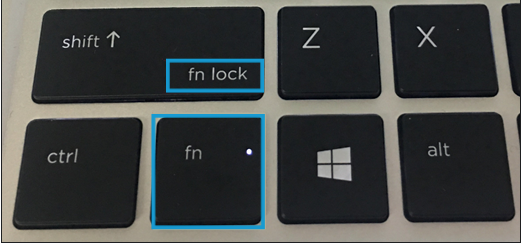
  1. Prin apasarea butonului Fn+ Shift (pe Shift trebuie sa fie mentionat “Fn Lock”

Cand pe butonul Fn este aprins ledul inseamna ca se pot folsi tastele F1, F2..F12, cand acesta este stins se pot utiliza tastele rapide, luminozitate, volum

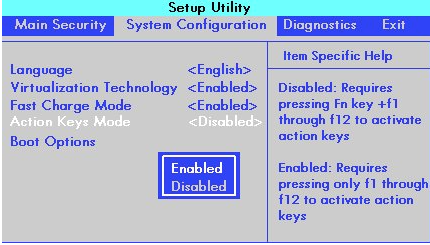
2.  Din BIOS-ul laptop-ului: In System Configuration, la meniul “Action Keys Mode”

  • Enabled: Nu necesita apasarea butonului Fn pentru utilizarea tastelor F
  • Disabled: Necesita apasarea butonului Fn pentru utilizarea tastei F4 de exemplu

La modelele de laptop din generatia G5 nu exista tasta fizica de blocare a tastelor rapide.

[mai mult...]

How to Search in All Sheets of a Spreadsheet in Google Sheets

Need to search inside multiple sheets of a Google Sheets spreadsheet at once? We’ll show you how using either “Find and Replace” or a Google Drive search tip. A quick way to search inside all sheets of a Google Sheets spreadsheet at once is to use the “Find and Replace” function. With this, you can search for a keyword in the current sheet, in a specific sheet, or all sheets of your spreadsheet.

[mai mult...]

How to Track Prices in Google Chrome on Android

There are plenty of tools you can use to track the prices of products online, but what if your browser could do it by itself? Thanks to a feature in Google Chrome for Android, you can do exactly that.

  • First, open the Google Chrome app on your Android device. Flags are available for Chrome on almost every platform, but this one is exclusive to Android.
[mai mult...]

Steam Won’t Open? Here`s how to fix it

Steam is one of the most popular gaming platforms both on Windows and Mac. However, the game client is known to be prone to various bugs, one of them being Steam won’t open. This problem bothers thousands players worldwide. The reasons are different, but typically overloaded servers and computer errors are the main causes. We’ve got you covered – follow our tips to force launch Steam and start gaming again.

Many users complain that Steam won’t open from taskbar, although they can see the icon. The problem occurs on Windows 7, 8, and 10 computers without an exception. Some people report that the program boots in Big Picture Mode and logs them in, however, a blank screen appears afterward.

The first thing we recommend checking is whether the service of the game client is down. This will help you determine whether it is a temporary issue from the service end. To check this, you can go to steamstat.us website and see the info according to your region. Additionally, please remember that Steam has scheduled maintenance routine that typically takes place every Tuesday around 1-3 p.m. Pacific time. During this time, some outages are expected.

[mai mult...]