
Soluții

How to install Windows Package Manager (winget) on Windows 10

You can install the Windows Package Manager (winget) in multiple ways, including via the Microsoft Store, GitHub, or you can wait until the update arrives automatically.

On Windows 10, the “Windows Package Manager” is a command-line tool designed to make it easier and automate the process of searching, downloading, installing, upgrading, and configuring apps on your device. If you ever had to install one or multiple apps, you know how time-consuming it is to find the links, download, and reinstall all your apps. Using the winget client, you can use a simple command to specify which apps you want to get. Then the tool will find and install the latest version automatically.

Microsoft plans to roll out the tool through the Microsoft Store on devices running Windows 10 version 1809 and higher releases. However, you can get it manually without waiting for the update by installing the latest version of the App Installer on any of the supported versions of Windows 10.

[mai mult...]

Cum se setează locații personalizate în caseta Windows „Salvare ca”

Acest ghid vă va conduce pas cu pas, deși procesul de setare a „comenzilor rapide” personalizate în caseta de dialog Windows „Salvare ca”. Este important să rețineți că nu toate aplicațiile Windows folosesc aceeași casetă „Salvare ca” – există mai multe. Deci, acest mic truc nu va funcționa pentru fiecare aplicație care are o casetă „Salvează ca”.

[mai mult...]

Ce este NAT si cum il configuram pe routerele Cisco

NAT ( Network Address Translation ) mascheaza un IP Privat intr-un IP Public.

Sunt prezente mai multe tipuri de NAT:

  1. NAT Static;
  2. NAT Dinamic;
  3. PAT (Port Address Translation)

1) NAT Static

  • Realizeaza o mapare 1-la-1 a unui IP Privat intr-un IP Public.
  • Exemplu: PC2: 192.168.1.5 -> 42.4.51.8

2) NAT Dinamic

Face o mapare m-la-n a unui IP Privat intr-un IP Public, unde m nu este obligatoriu egal cu n.

Exemplu:
PC1: 192.168.1.6 -> 23.47.5.7
PC2: 192.168.1.7 -> 23.47.5.8
PC3: 192.168.1.8 -> 23.47.5.9

3) PAT (Port Address Translation)

In cazul PAT, maparea este n-la-1. Adica, avem mai multe adrese IP Private si le “transformam” intr-o singura adresa IP Publica la care adaugam Portul Sursa al conexiunii.

Exemplu:

PC1: 192.168.1.6:22413 -> 23.47.5.5:22413
PC2: 192.168.1.7:62459 -> 23.47.5.5:62459

[mai mult...]

Enable Text Predictions in Microsoft Word

Like many new features in Microsoft Word, text predictions are enabled by default. But we’ll show you how to confirm that the feature is turned on as well as how to turn it off if you prefer. In the status bar, which is at the bottom of the Microsoft Word window, you should see “Text Predictions” near the center. It displays a status of either On or Off.

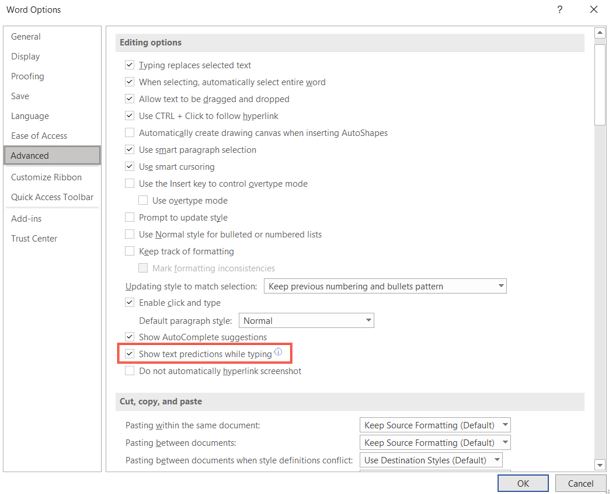
Click “Text Predictions” in the status bar to open its setting directly in your Microsoft Word options. You can also navigate there with File > Options > Advanced. Under Editing Options, check the box for “Show Text Predictions While Typing” to enable the feature and click “OK.”

Use the same action to enable or disable text predictions in Word for the web. Click “Text Predictions” in the status bar. Then, toggle on the “Suggest Words or Phrases as I Type” option to use the feature.

[mai mult...]