Soluții

Retrieve the position (X,Y) of an element using HTML

The position of (X, Y) means the co-ordinate of an element at the top-left point in a document. X represent the horizontal position and Y represent the vertical position. Use element.getBoundingClientRect() property to get the position of an element.

Example 1:

<!– HTML program to get (x, y) coordinate
of an element relative to the viewport –>
<!DOCTYPE html>
<html>
<head>
<title>
position of an element
</title>

<!– JavaScript code to display position –>
<script type=”text/javascript”>

function getPositionXY(element) {
var rect = element.getBoundingClientRect();
document.getElementById(‘gfg’).innerHTML =
‘X: ‘ + rect.x + ‘, ‘ + ‘Y: ‘ + rect.y
}
</script>
</head>

<body>

<!– Click on button to get its co-ordinate –>
<button id = ‘button1’ onclick = “getPositionXY(this)”>
Button 1
</button>

<button id = ‘button1’ onclick = “getPositionXY(this)”>
Button 2
</button>

<br><br>
<button id = ‘button1’ onclick = “getPositionXY(this)”>
Button 3
</button>

<p id = ‘gfg’></p>

</body>
</html>

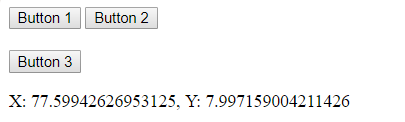
Output:

[mai mult...]

Creating A Range Slider in HTML using JavaScript

Range Sliders are used on web pages to allow the user specify a numeric value which must be no less than a given value, and no more than another given value. That is, it allows to choose value from a range which is represented as a slider.
A Range slider is typically represented using a slider or dial control rather than a text entry box like the “number” input type. It is used when the exact numeric value isn’t required to input. For example, the price slider in the filter menu of products list at flipkart.com

[mai mult...]

How to calculate the number of days between two dates in javascript?

Calculating the number of days between two dates in JavaScript required to use date object for any kind of calculation. For that, first, get the internal millisecond value of the date using the in-built JavaScript getTime() function. As soon as both the dates get converted, proceed further by subtracting the later one from the earlier one which in turn returns the difference in milliseconds. Later, the final result can be calculated by dividing the difference (which is in milliseconds) of both the dates by the number of milliseconds in one day.

[mai mult...]