How to Fix It When Face ID Isn’t Working
Because problems with Face ID can come from a variety of sources, you’ll have to try several fixes to get it going again. Here are some things to try.
:max_bytes(150000):strip_icc():format(webp)/001-how-to-fix-it-when-the-iphone-face-id-is-not-working-5074935-243c05cd333c4cf78b15a8250ccdc675.jpg)

Soluții pentru problemele tale IT

Because problems with Face ID can come from a variety of sources, you’ll have to try several fixes to get it going again. Here are some things to try.
Since the conception of Linux, so many of flavors in Linux operating systems are developed. Most of them can be downloaded from the internet. The downloaded Linux OS is usually a bootable ISO image. You can write it to either a CD or DVD or USB depending on the size of the ISO image. Nowadays, most of us use USB mass storage devices to write the bootable ISO images in Linux and Unix-like systems. There are many applications available to create bootable USB disks in Linux and each application has its own set of distinctive features. Today, we will discuss about one such tool called USBImager.
USBImager is a simple graphical application used to write the ISO images as well as compressed disk images to USB drives. Compared to its counterparts, USBImager is really really small. The size of this tiny application is around 170~ kb only. It doesn’t have any dependencies either. It makes synchronized writes, meaning, all data is on disk when the progress bar reaches 100%. It can verify writing by comparing the disk to images.
USBImager can read the RAW images, such as .img,.bin,.raw,.iso,.dd, etc., compressed images, such as .gz,.bz2,.xz,.zst etc, and archive files such zip (PKZIP and ZIP64). We can also create the backup of the entire USB drive. It is even possible to create compressed backups in raw and bzip2 formats. USBImager has an option to let the users to choose whether the backup should be compressed or not. USBImager is totally free and the source code is available under MIT license. It works under GNU/Linux, MacOS X and Windows platforms.
[mai mult...]WhatsApp is the most popular messaging app. This article describes how you can add WhatsApp share button in your website.
Note: This will work only when website is open in mobile with WhatsApp installed.
Step 1: Design a simple webpage with a hyperlink on it. Sharing will be done when user click on this link.
[mai mult...]Django provides a Python Web framework based web framework that allows rapid development and clean, pragmatic design.
[mai mult...]The ADSI Edit tool (Active Directory Service Interface Editor) is a special mmc snap-in that allows you to connect to various Active Directory database partitions (NTDS.dit) or to the LDAP server. The ADSI Edit tool allows you to create, modify, and delete objects in Active Directory, perform searches, and so on.
In Windows Server 2003, the ADSIEdit.msc snap-in was a part of the Windows Server 2003 Support Tools, which must be downloaded and installed manually. To register snap-ins, the command “regsvr32 adsiedit.dll” was used. In modern Windows versions, ADSIEdit.msc is included into RSAT and installed as a part of AD DS Snap-ins and Command Line Tools feature (Remote Server Administration Tools > Role Administration Tools > AD DS and AD LDS Tools).
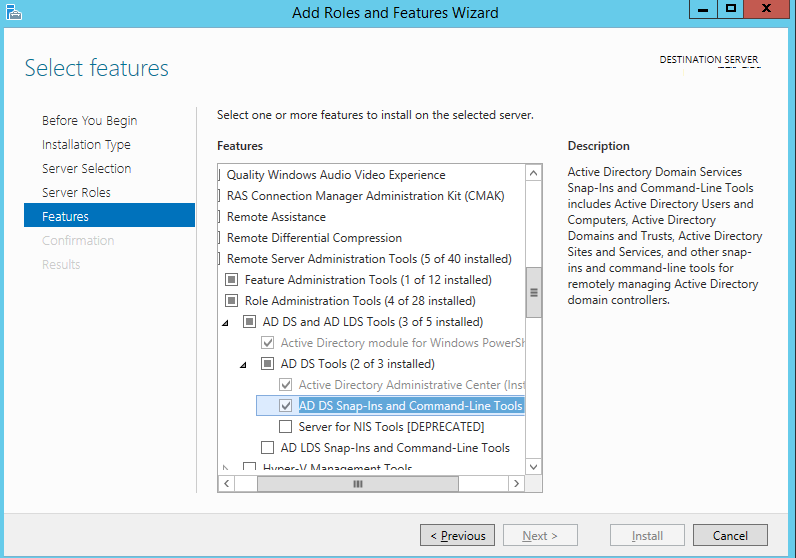
After installing the component, to start ADSI Edit press Win+R and type adsiedit.msc (or you can run ADSI Edit from Control Panel\System and Security\Administrative Tools).
[mai mult...]