
Soluții

How to Upgrade Your Router’s Firmware

Router firmware updates are as important as updating any device’s firmware. A firmware upgrade offers new features and security improvements. If you’ve had your wireless router for years, odds are good a firmware upgrade has released to market. However, unlike updating computer software, which you can usually do with a simple updater tool, router firmware upgrades are not as easy to understand.

[mai mult...]
How to Hack-Proof Your Wireless Router

There’s no such thing as hack-proof or hacker-proof, just like there is nothing out there that is completely waterproof. Therefore, in this article, we’ll show you how to make your wireless router as hacker-resistant as possible. Your wireless router is a prime target for hackers who want to infiltrate your network or just freeload off of your Wi-Fi connection. Here are some things you can do to make your wireless router harder to hack.

[mai mult...]

How to Use Apple Watch Sleep Tracking

While many fitness bands and smartwatches have had sleep tracking capabilities for years, the Apple Watch did not until recently. Starting with WatchOS 7, though, the Apple Watch officially supports sleep tracking on Apple Watch Series 3, 4, 5, and 6. If you own a compatible watch, make sure you have installed the latest version of the Apple Watch OS to track your sleep.

[mai mult...]

Opera adds the Play Music sidebar to Opera Browser for Spotify, Youtube and Apple

Opera Software released a new Developer version of its Opera web browser. The new version introduces support for music playback from the browser’s sidebar. Opera Developer is the cutting-edge development version of the browser. Features are introduced in the browser first before they land in Beta and Stable versions.

If you do like to play music in your browser, you may have noticed that it usually involves juggling between different windows, e.g. different browser tabs in a single browser, or, in the case of a dedicated desktop music player, between different program windows.

Some browsers introduced global media controls, e.g. Firefox and Chrome, to control playback in that browser without switching windows. While that is useful to some, it still requires accessing the music service’s interface for some operations, e.g. searching for music, playing a different playlist, or adding new songs to the existing playlist.

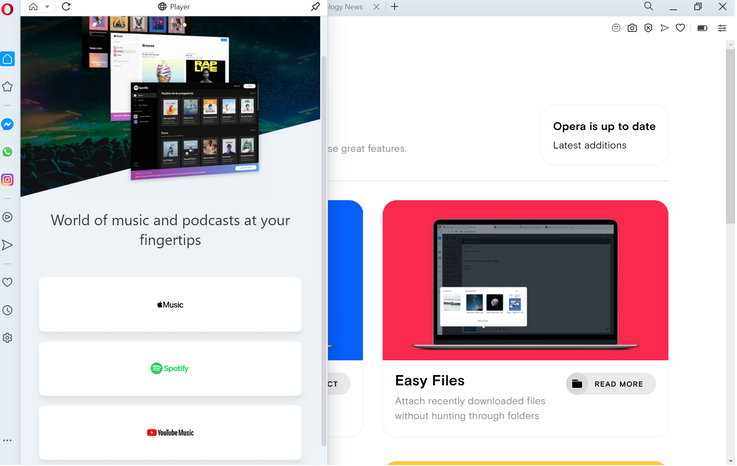
The Opera browser implementation is controlled via an icon in the browser’s sidebar. A click on it display the supported services — currently Apple Music, Spotify, and YouTube Music — that you may access from the sidebar. You can resize the interface and pin it if you want to make it stick to the screen.

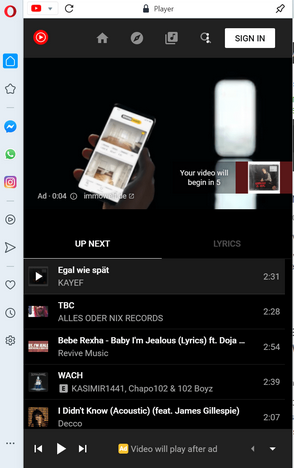
A click on a service opens its startpage. What happens next depends on that service, as you may need to sign-in to an account to start using it. A click on YouTube Music displays the service’s startpage and options to play one of the listed playlists, e.g. top 100 charts, or to search for music

A click on the play button starts playback right away. Some services may display ads to free users, and these are played even if you have enabled Opera’s built-in adblocker.

Music playback continues even if the sidebar interface is hidden; Opera indicates playback by changing the icon of the player. If a site is opened that plays music or audio as well, music playback is paused automatically by the player to avoid that multiple sounds play at the same time in the browser. Playback is resumed once all other audio stops playing in the browser.

Opera users may customize the sidebar; they may hide any service that they don’t use to avoid clicking on these unintentionally. Click on the three dots at the bottom of the sidebar and toggle the options to hide them in the interface. You can also hide the entire sidebar if you don’t use it.

Installation links:

[mai mult...]