Soluții

How to change the formatting of the complete PowerPoint Presentation

Formatting is an essential part of a PowerPoint presentation. You need to make sure that all the slides have the same format, so the presentation looks professional. However, if you have imported slides from another PPT, they adhere to the source formatting. The good thing is that you don’t need to fix the format one by one. Instead, you can change the formatting of the complete PowerPoint Presentation. In this post, we will show how you can use the Master View concept for the format to achieve the same.

Change the formatting of the complete PowerPoint Presentation

[mai mult...]

Fix MSN Page opens on Startup of Windows 10 in Chrome

popup-dialog-on-windows-10-startup

The problem gets worse if you check ‘Always use this app’ on that dialog, which adds this link http://go.microsoft.com/fwlink/?LinkID=219472&clcId=0x409 to the command line of Chrome shortcut. Visit chrome://version page to check if that’s also the case with you.

Once that happens, MSN page will automatically load in new tabs of Chrome randomly without your knowledge and sometimes. Chrome browser automatically launches without you opening it after the start of computer.

msn-site-opened-in-a-chrome-browser-tab
[mai mult...]

How To Copy Specific File Types While Keeping Directory Structure In Linux

This brief tutorial explains how to copy specific file types while keeping the directory structure in Linux. Here I have given two different ways to do this. Just pick any one that works for you.

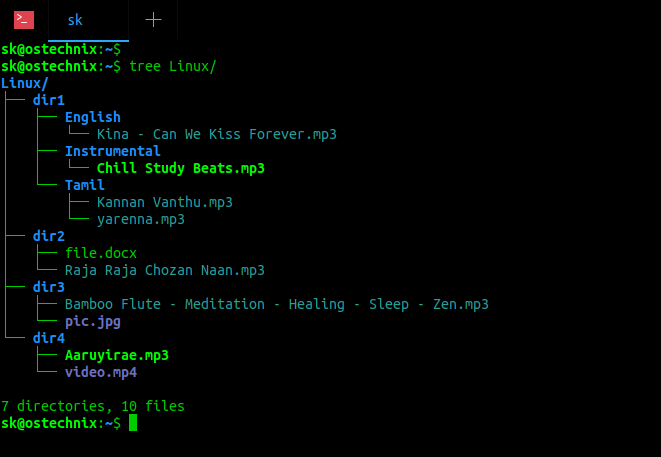
Copy Specific File Types While Keeping Directory Structure In Linux. I have a directory named Linux with different type of files saved in different sub-directories. Have a look at the following directory structure:

$ tree Linux/ Linux/ ├── dir1 │   ├── English │   │   └── Kina – Can We Kiss Forever.mp3 │   ├── Instrumental │   │   └── Chill Study Beats.mp3 │   └── Tamil │   ├── Kannan Vanthu.mp3 │   └── yarenna.mp3 ├── dir2 │   ├── file.docx │   └── Raja Raja Chozan Naan.mp3 ├── dir3 │   ├── Bamboo Flute – Meditation – Healing – Sleep – Zen.mp3 │   └── pic.jpg └── dir4 ├── Aaruyirae.mp3 └── video.mp4 7 directories, 10 files List directory contents using tree command
As you see in the above directory structure, the Linux directory has four sub-directories namely dir1, dir2, dir3 and dir4. The mp3 files are scattered across all four sub-directories. Now, I want to copy all mp3 files to another directory named ostechnix and also I want to keep the same directory structure in the target directory.

First we will see how to do this using “find” command.

[mai mult...]

Export contacte device iOS utilizand iCloud

Exportarea contactelor de pe un device iOS utilizand iCloud:

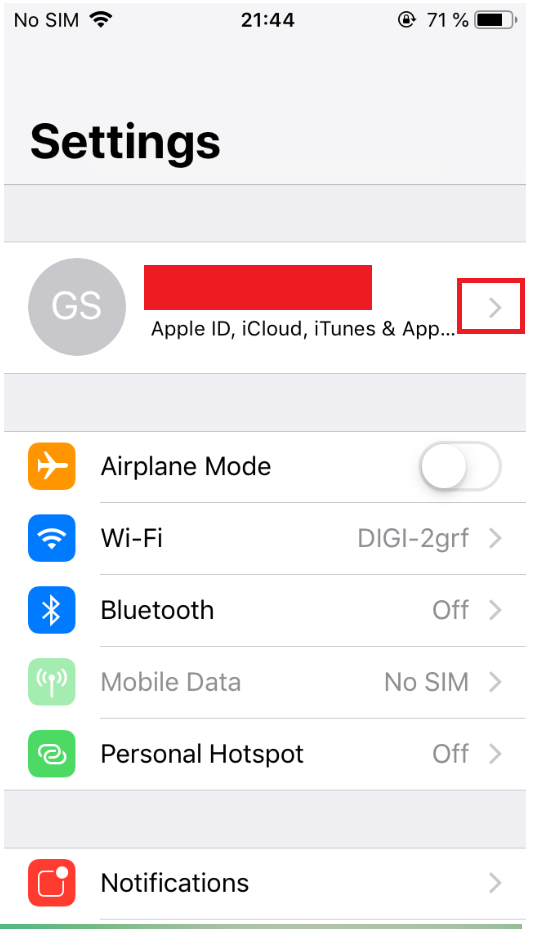
  • Accesam setarile telefonului (pentru exemplul dat):

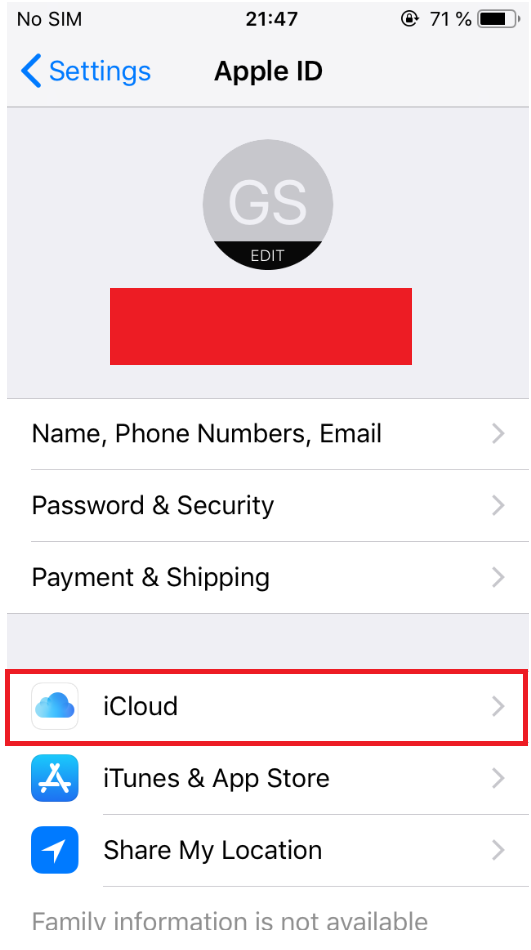
  • Accesam Apple ID, iCloud, iTunes $ App apasand pe sageata (ar trebui sa apara contul Apple):

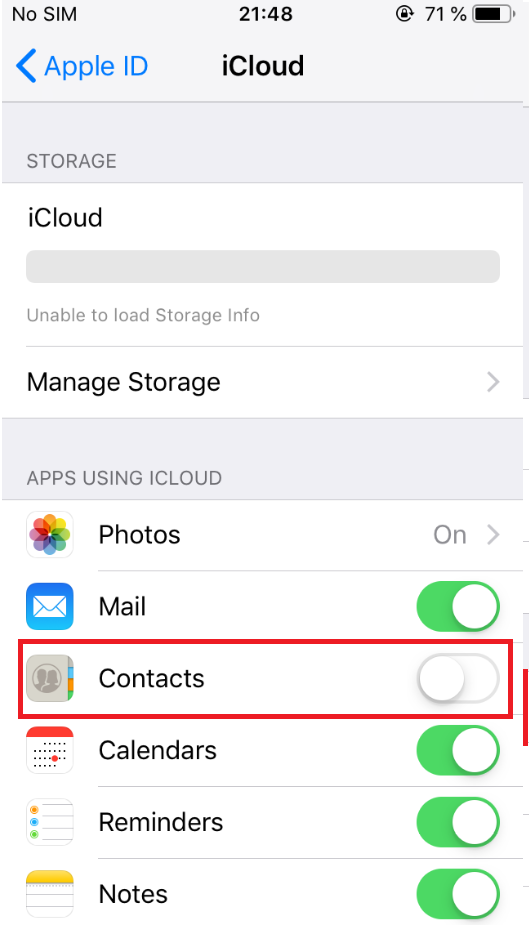
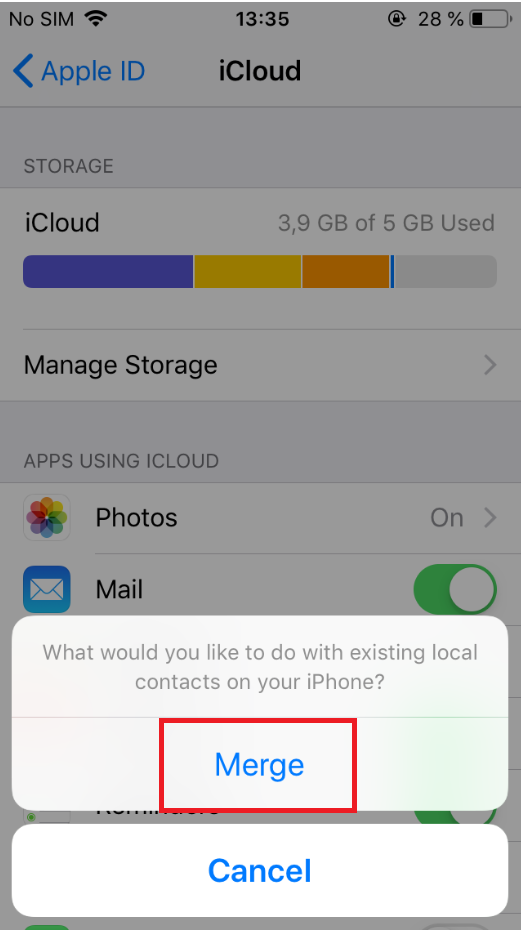
  • Accesam iCloud si ne asiguram ca optiunea Contacts este bifata (vom apasa butonul Merge dupa bifarea acesteia):

[mai mult...]

Cum să setezi un profil pe un port de switch Unifi

Pentru a seta un port din switch în modul access sau trunk, este necesar ca aceste switchporturi să fie create deja în controllerul din rețeaua locală. Am explicat cum se face acest lucru într-un tutorial pe care îl găsiți aici pe site.

Plecând de la ideea că aceste profiluri au fost create deja, vom trece mai departe la atribuirea profilelor pe porturile switchului sau a switch-urilor.

De reținut că un profil poate fi aplicat pe mai multe porturi dintr-un switch în același timp, însă nu poate fi aplicat în aceași timp pe mai multe porturi pe switch-uri multiple. Pentru a face acest lucru, fiecare switch va trebui selectat din controller și configurat.

[mai mult...]