
Soluții

Installing Komplete content to an external drive on P.C.

Native Instruments Komplete content, particularly sound libraries, can take up a lot of space, so we recommend installing that content to a dedicated external hard drive. Once you’ve downloaded and activated your Native Instruments product, you can select where the software is downloaded, standalone software location (if applicable), content location, and if you’re a Windows user, the VST plug-in location.

[mai mult...]
How to fix the DirectDraw error On Windows 11/10?

Some users have complained that the DirectDraw error occurs when they attempt to launch old games from the past on Windows 11/10 PCs. Games for Windows won’t launch when that error notice appears. As a result of the DirectDraw problem, gamers cannot play classic games like Might and Magic 7, Diablo, and Age of Empires. Software for art and design can also have the same issue.

[mai mult...]

How to fix Windows 11 Taskbar not working issue

Method 1: Restart Taskbar Services

In this case, you can restart the Windows Explorer in Task Manager and this will restart the overall services including the Taskbar.

Step 1: Press the Windows key + R to open Run command.

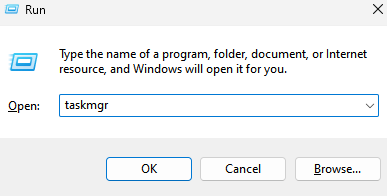
Step 2: Type in taskmgr in the search box and press OK to open the Task Manager window.

Taskmgr Min

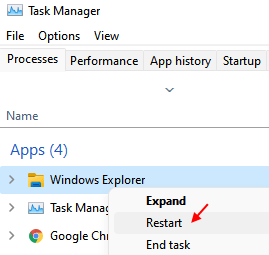
Step 3: Under the Processes tab, go to Windows processes and look for Windows Explorer.

Step 4: Select Windows Explorer and click on the Restart button below.

Restart Windows Explorer 1 Min

Close the Task Manager window and check if the taskbar shows up again.

Method 2: Repair system files

Step 1: Press the Windows + R keys together on your keyboard to open Run command.

Step 2: In the search box, type cmd and at the same time, press the Ctrl + Shift + Enter keys together to open the Command Prompt window with admin rights.

Step 3: Type the below commands in the Command Prompt in sequence and hit Enter after each one:

Dism /Online /Cleanup-Image /ScanHealth

Dism /Online /Cleanup-Image /RestoreHealth

sfc /scannow

After the commands are executed, close Command prompt and reboot your PC. The Windows Taskbar not working issue should be resolved now.

[mai mult...]

How to automatically disable Wi-Fi when Ethernet Cable is connected in Windows 11

Step 1: Search View Network connections in Taskbar search box

Step 2 – Click on View network connection

Step 3: Network Connections window would now open. Here you have to right click on your Wi-Fi connection and then click on the Properties option.

Step 4: In the Wi-Fi Properties window, click on the button Configure under the Networking tab.

Step 5: In the new window that opens up, click on the Advanced tab first.

There will be a section named Property. Click on the property Disable Upon Wired Connect. As next, choose the Enabled option for the drop down list named Value.

Click on OK button once you are done.

[mai mult...]

How to change Mozilla Firefox Browser’s Language

Step 1: Firstly open the Mozilla Firefox app on your system by pressing the Windows key and typing firefox.

Step 2: Then, select Firefox app from the search results by clicking on it as shown in the below screenshot.

Step 3: Press the ALT + T keys together on your keyboard and then hit the S key to open the Settings page on the Firefox app.

Step 4: Click on the General tab on the left side and then scroll down the page and click Choose under the Language section below.

Step 5: In the Webpage Language Settings window, click Select a language to add… dropdown menu at the bottom as shown in the below screenshot.

Step 6: Then, select the language that you want to add to use it as a display language from the dropdown list as shown below.

Step 7: Once done, click Add button to add the language from the list.

Step 8: We need to change the preference of the languages for displaying on the webpages on the firefox browser, in order to make it as a default. So click on the language to select it and click Move Up or Move Down to move it to the top.

Step 9: Once done, click OK.

[mai mult...]