Soluții

How to increase volume in Audacity on P.C.

Sometimes, the audio recording may be a bit too quiet but you can fix this without necessarily needing to re-record the track. You can increase the volume of the track by normalizing or amplifying it. Both are located within the Effects menu and require you to select a section of audio in order to apply it.

[mai mult...]

How to install and configure ZFS on Ubuntu

The ZFS file system delivers huge capacities, RAID mirroring, and anti-corruption mechanisms right out of the box. Learn how to install Ubuntu with ZFS, and how to create a mirrored pool.

ZFS is an advanced file system that originated at Sun Microsystems for use with their Solaris operating system. Following Oracle’s acquisition of Sun in 2009, ZFS is now under Oracle Corporation ownership.

However, in a typical act of altruism, from 2005 onwards, Sun released an open source version of ZFS. Inevitably, this was ported to Linux where it gained wider exposure. The open source version of ZFS—openZFS—is managed and maintained by the OpenZFS project.

ZFS is a high-capacity, fault-tolerant file system. ZFS originally stood for Zettabyte File System. The ZFS architecture is based on 128 bits instead of the more common 64 bits of other files system. Being able to work with larger numeric values is one of the factors that made ZFS capable of handling zettabytes of storage. To give you an idea of what that means, a zettabyte is a billion terabytes.

Nowadays, ZFS supports file storage of up to 256 zebibytes. A zebibyte (270 bytes) is larger than a zettabyte (1021 bytes), but not by an order of magnitude. There’s much more to ZFS than sheer capacity—as mind-boggling as that is. ZFS functions as its own volume manager and RAID controller. It has built-in functions such as true copy on write that protect your data from corruption. It combines features that deliver file system pooling, cloning and copying, and its RAID-like functionality, natively.

Ubuntu has offered ZFS for some years now, but always with warnings and caveats. In Ubuntu 20.10 the warnings were removed. Canonical officially supports ZFS but only in full disk setups. To get that support you’ll need to install ZFS as you install Ubuntu. The ZFS options are still tucked away, but they’re there and no longer just for the intrepid or foolhardy.

With Ubuntu 21.10 due in October 2021, it’s a good time to see how the ZFS offering in Ubuntu is maturing.

[mai mult...]

How to turn off/on firewall on Windows 11 from Registry

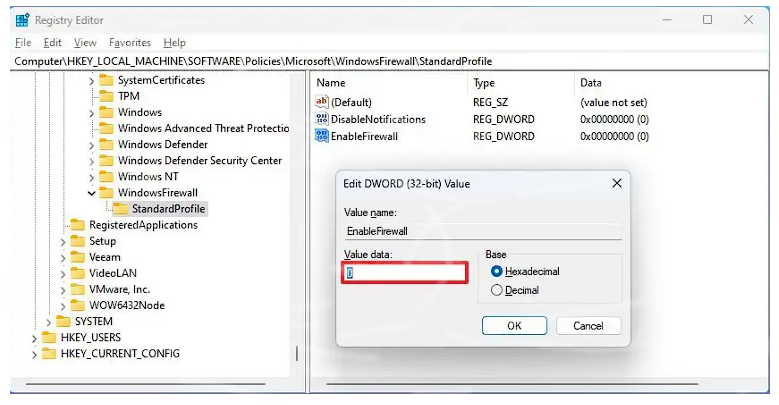
To turn off the Windows 11 (Pro) firewall through the Registry, use these steps:

  1. Open Start
  2. Search for regedit and click the top result to open the Registry
  3. Open the following path:
    HKEY_LOCAL_MACHINE\SOFTWARE\Policies\Microsoft\WindowsFirewall
  4. Right-click the “WindowsFirewall” key, select the New menu, and choose the Key option.
  5. Name the key StandardProfile and press Enter
  6. Right-click the “StandardProfile” key, select the New menu, and choose the “DWORD (32-bit) Value” option.
  7. Name the EnableFirewall name and press Enter
  8. Double-click the newly created key and make sure the value is set to “0”.
  9. Click the OK button.
  10. Restart the computer.

Once you complete the steps, the firewall will be disabled after the device startup process.

Enable firewall using Registry

To turn on the Windows 11 firewall through the Registry, use these steps:

  1. Open Start
  2. Search for regedit and click the top result to open the Registry
  3. Open the following path:
    HKEY_LOCAL_MACHINE\SOFTWARE\Policies\Microsoft\WindowsFirewall\StandardProfile
  4. Right-click the EnableFirewall key and choose the Delete option.
  5. Click the OK button.
  6. Restart the computer.

After you complete the steps, the system firewall will enable on Windows 11.

[mai mult...]