Soluții
How to permanently turn off the green light on Apple Watch
Here’s how to switch off heart rate monitoring on your Apple Watch, which turns off the green light:
[mai mult...][Fix] Error 0x800F0954 Installing .NET Framework 3.5 or Any Optional Feature
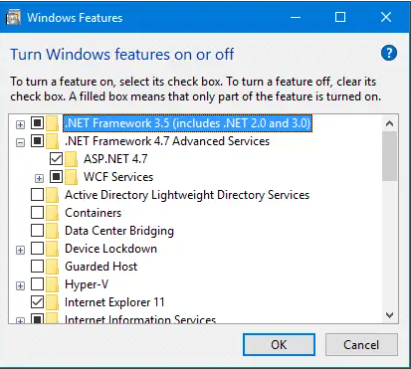
When you attempt to install .NET Framework 3.5 or any other optional feature using “Windows Features” (optionalfeatures.exe) dialog or using DISM command-line, error 0x800F0954 may popup.
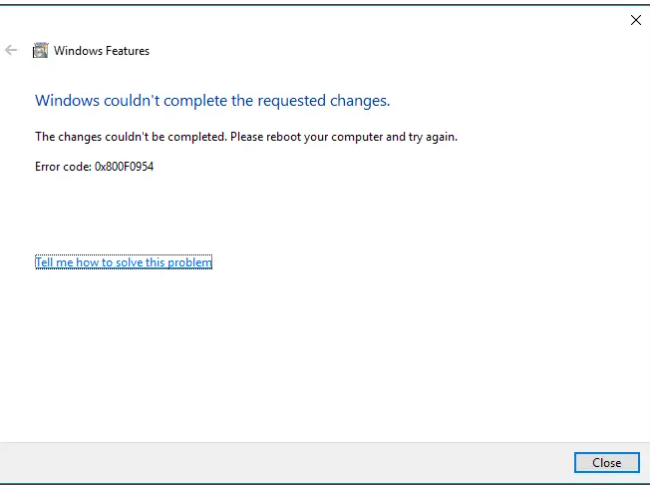
After enabling .NET Framework 3.5 and clicking OK, the following error may appear:
Windows couldn’t complete the requested changes.
The changes couldn’t be completed. Please reboot your computer and try again.
Error code: 0x800F0954
The same error may occur when attempting to install additional speech recognition or supplemental fonts using Optional features in the Settings page or using DISM command-line. For instance, you run the following command to install .NET Framework 3.5 from an elevated or administrator Command Prompt.
DISM /Online /Enable-Feature /FeatureName:NetFx3 /All
After pressing ENTER, here is the full error message you might see:
Version: 10.0.16299.15
Image Version: 10.0.16299.192
Enabling feature(s)
[==========================100.0%==========================]
Error: 0x800f0954
DISM failed. No operation was performed.
For more information, review the log file.
The DISM log file can be found at C:\Windows\Logs\DISM\dism.log
The DISM.log file would show these entries/errors:
xxxx, Info DISM DISM Package Manager: PID=12956 TID=12296 Further logs for online package and feature related operations can be found at %WINDIR%\logs\CBS\cbs.log - CPackageManagerCLIHandler::ExecuteCmdLine xxxx, Error DISM DISM.EXE: DISM Package Manager processed the command line but failed. HRESULT=800F0954
And the CBS.log file would have recorded these errors:
xxxx, Info CBS DWLD:Failed to do Windows update search [HRESULT = 0x800f0954 - CBS_E_INVALID_WINDOWS_UPDATE_COUNT_WSUS] xxxx, Info CBS FC: WindowsUpdateDownloadFromUUP returns. [0x800F0954]
Note that the error 0x800f0954 refers to CBS_E_INVALID_WINDOWS_UPDATE_COUNT_WSUS which indicates that your system might have been configured to use a WSUS server (on your domain network) to get updates instead of connecting to Windows Update servers directly.
How to Fix the Error Code 0x80072f8f – 0x20000 on Windows
The Windows Media Creation Tool prepares installation media for upgrading your PC or creating a USB drive to perform a clean Windows installation. It is the perfect tool to make sure you are using the latest Windows version and is quite easy to use.
However, there are times when users can run into errors while using the Media Creation Tool. One such error is the error code 0x80072f8f – 0x20000, which appears when users attempt to launch the MediaCreationTool.exe file.
[mai mult...]How to Connect Joy-Cons to Your Nintendo Switch
There are multiple ways to connect your Joy-Cons to your Nintendo Switch. You can use the “Sync” buttons, slide them into a Joy-Con grip and press any buttons, or attach them directly to your Nintendo Switch.
[mai mult...]How to Connect a Third-Party Controller to Your Nintendo Switch
There are two ways to connect a Switch Pro Controller to your Nintendo Switch: wirelessly with the “Sync” button and with a USB-C cable, however, for some third-party controllers that imitate the Switch Pro Controller, you may only have one option: using the “Sync” button or that third-party controller’s unique equivalent.
[mai mult...]