Soluții

Cum detectam si eliminam orice software antivirus

Suntem in situatia in care trebuie sa instalam un nou antivirus pe o statie, insa pentru a evita eventualele conflicte cu alte softuri tip antivirus, dorim sa le eliminam cat mai minutios pe cele care sunt instalate in prezent.

Dezinstalarea obisnuita a esuat si am ramas cu un sistem defect

Dezinstalarea obisnuita s-a incheiat, dar acum avem probleme legate de antivirusul pe care tocmai l-am dezinstalat; Statia nostra are probleme deoarece are doua sau mai multe programe antivirus instalate si active pe care nu le putem elimina complet. Cu programul Antivirus Removal Tool putem sa identificam si sa dezinstalam orice software antivirus.

[mai mult...]

How to install and manage extensions – Chrome

Install Extension

  1. Open the Chrome web
  2. Find and select the extension you want
  3. Click Add to Chrome
  4. Some extensions will let you know if they need certain permissions or data. To approve, click Add extension
    • Important: Make sure you only approve extensions that you trust.

To use the extension, click the icon to the right of the address bar. If you’re using a computer through your work or school, your organization might block some extensions.

Manage extension:

  1. On your computer, open Chrome.
  2. At the top right, click More  > More tools > Extensions.
  3. Make your changes:
    • Turn on/off: Turn the extension on or off.
    • Allow incognito: On the extension, click Details. Turn on Allow in incognito.
    • Fix corruptions: Find a corrupted extension and click Repair. Confirm by clicking Repair extension.
    • Allow site access: On the extension, click Details. Next to “Allow this extension to read and change all your data on websites you visit,” change the extension’s site access to On click, On specific sites, or On all sites.
[mai mult...]

How to delete EFI partition from USB drive

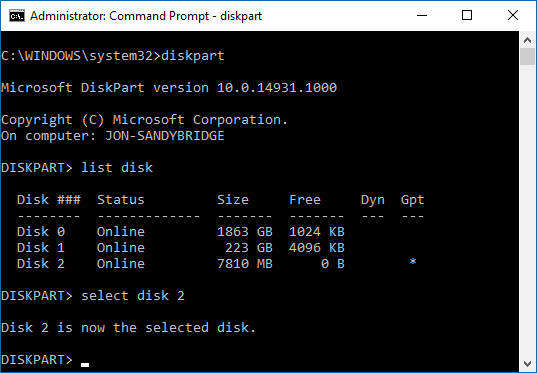
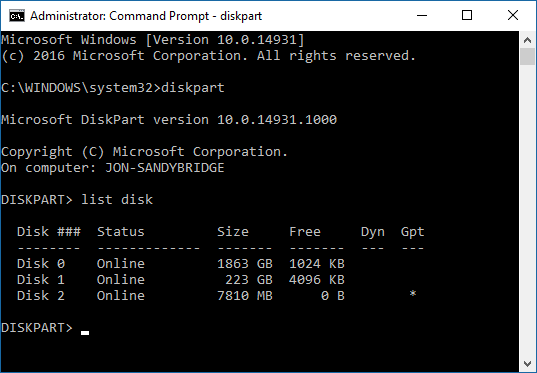
Launch Command Prompt as Administrator> type “diskpart”

Next, you want to list all the disks connected to your PC by type the next command “list disk”

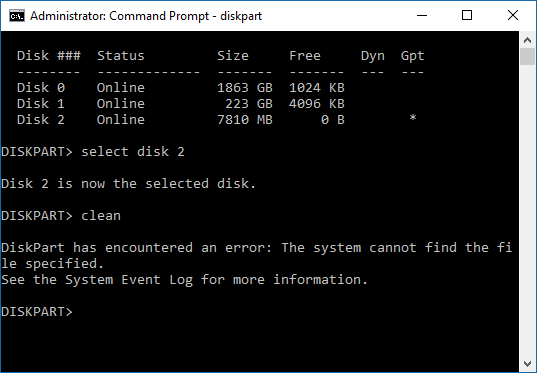
It shows all the disks currently on your system. Find the USB drive and select the disk by typing “select disk x”.Here is my USB drive showing as Disk 2, so for me, I enter “select disk 2“, yours might be different.

Next type in “clean”, and this is it.At the end you might need to format the USB stick again.

[mai mult...]

How to send photos in ‘original quality’ on WhatsApp – iOS

Meta-owned instant messaging platform WhatsApp is gradually rolling out various features and improvements for the app to enhance the user experience. The company has recently released features like ‘search messages by date’ on iPhone, split view for Android beta for tablets, and more.

In the past, WhatsApp has often been pointed out by its users for compressing their photo quality. However, the instant messenger now lets users share pictures without losing their original quality and resolution. WhatsApp does so by allowing users to pick their preferred media upload quality between ‘Auto’, ‘Best quality’ and ‘Data saver’.

[mai mult...]

How to send photos in ‘original quality’ on WhatsApp – Android

Meta-owned instant messaging platform WhatsApp is gradually rolling out various features and improvements for the app to enhance the user experience. The company has recently released features like ‘search messages by date’ on iPhone, split view for Android beta for tablets, and more.

In the past, WhatsApp has often been pointed out by its users for compressing their photo quality. However, the instant messenger now lets users share pictures without losing their original quality and resolution. WhatsApp does so by allowing users to pick their preferred media upload quality between ‘Auto’, ‘Best quality’ and ‘Data saver’.

[mai mult...]