
Soluții

How to find if your Earphones or Headphones are causing ear damage

Earphones and headphones have become a pervasive part of our life. Most people use them to listen to songs, watch videos, movies, and play games. Some prefer low sound, while some prefer high volumes. And you must be aware using earphones, or TWS, at high volumes can cause severe ear damage over the long term.

Find if Your Earphones or Headphones are Causing Ear Damage

If you use earphones or headphones for longer hours, you must keep the volume level between 60-85 decibels to keep your ears safe. According to World Health Organization, if you listen to your headphones at an 85 decibels volume level, limit the usage for up to 8 hours.

In general terms, earphones or headphones can have a volume level as high as 100 decibels or more, so you should always keep the volume at a maximum of 50-60 percent. To prevent ear damage, it’s important to know the decibel value of your earphones or headphones.

While there’s no direct way to determine if earphones are safe for your ears, we have curated some handy ways to know what volume level is safe enough to listen to music.

[mai mult...]
How to control your Android Phone using Wear OS Smartwatch

Smartwatches are meant to be exceptional watches that can do many more things than ordinary watches. That’s why these are called smartwatches, right? You can use features like music control, Bluetooth calling, playing games, making notes, setting alarms, and so many other features. But do you know you can even control your smartphone using a smartwatch?

How to Control Android Phone Using Wear OS Smartwatch

Suppose you are using an Android Wear smartwatch running Wear OS. In that case, you can install a third-party app on the same that lets you control the connected Android phone and remotely perform tasks like turning on the flashlight, locking the device, changing the volume, opening, and closing apps, and more directly via the watch.

[mai mult...]

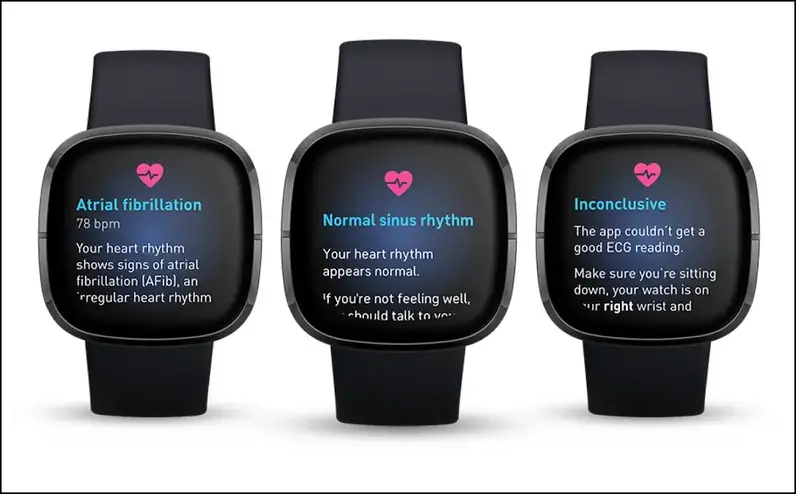
How to detect Afib or Irregular Heartbeat with or without Smartwatch

Modern-day smartwatches and gadgets can measure your heart rate throughout the day and alert you of an irregular heartbeat. This is also known as atrial fibrillation or Afib.

Detect Irregular Heartbeat With or Without Smartwatch

Before going to the ways to detect irregular heartbeat, let us give you a short brief about what atrial fibrillation is and how ECG tracking can help to detect it.

Atrial fibrillation is a type of irregular heartbeat rhythm that can cause blood clots, heart stroke, and complete heart failure. To detect any symptoms of Arrhythmias (irregular heart rhythm), ECG tracking comes into place.

An ECG machine or sensor-based ECG device can track your heart rhythm and check whether it is going in flow or has some ups and downs, which is known as irregular heartbeat rhythm. Let’s check how to detect irregular heartbeat with or without a smartwatch at home.

[mai mult...]

How to install Snapchat on Samsung Galaxy Watch 4 or 5

The Samsung Galaxy Watch 4 and Watch 5 run Google’s Wear OS, which opens many capabilities, including the option to download apps from Play Store directly on the watch. And, if an app isn’t available on the watch’s Play Store, you can sideload it, which we’ve used to install Snapchat on the Galaxy Watch 4.

Snapchat is not officially available for Galaxy Watch yet, but you can easily sideload the APK and use it on your Galaxy watch 4 and 5. And while it’s a little tough to operate on such a small circular screen, you can still use many features like watching snaps, friends list, messages, sharing snaps, etc.

[mai mult...]

How to Generate Random Number in Java

In Java programming, we often required to generate random numbers while we develop applications. Many applications have the feature to generate numbers randomly, such as to verify the user many applications use the OTP. The best example of random numbers is dice. Because when we throw it, we get a random number between 1 to 6.

In this section, we will learn what is a random number and how to generate random numbers in java

Random numbers are the numbers that use a large set of numbers and selects a number using the mathematical algorithm. It satisfies the following two conditions:

  • The generated values uniformly distributed over a definite interval.
  • It is impossible to guess the future value based on current and past values.
Generating Random Number in Java

In Java, there is three-way to generate random numbers using the method and classes.

  • Using the random() Method
  • Using the Random Class
  • Using the ThreadLocalRandom Class
  • Using the ints() Method (in Java 8)
Using the Math.random() Method

The Java Math class has many methods for different mathematical operations. One of them is the random() method. It is a static method of the Math class. We can invoke it directly. It generates only double type random number greater than or equal to 0.0 and less than 1.0. Before using the random() method, we must import the java.lang.Math class.

[mai mult...]

How to Compare Two Objects in Java

Java Object class is the super class of all the Java classes. All Java classes implements the Object class by default. The Java Object class provides the two important methods to compare two obiects in java, i.e. equals() and hashCode() method. In this section, we will learn how equals() and hashCode() method works. Along with this, we will also learn how to compare two objects in Java with proper examples.

Java provides the two methods of the Object class to compare the objects are as follows:

  • Java equals() Method
  • Java hashCode() Method
Java equals() Method

The equals() method of the Object class compare the equality of two objects. The two objects will be equal if they share the same memory address.

Syntax:

  1. public boolean equals(Object obj)

The method parses a reference object as a parameter. It returns true if the objects are equal, else returns false.

It is also possible that an object is equal to another given object, then the equals() method follow the equivalence relation to compare the objects.

    • Reflexive: If x is a non-null reference, the calling of x.equals(x) must return true.
    • Symmetric: If the two non-null references are x and y, x.equals(y) will return true if and only if y.equals(x) return true.
    • Transitive: If the three non-null references are x, y, and z, x.equals(z) will also return true if x.equals(y) and y.equals(z) both returns true.
    • Consistent: If the two non-null references are x and y, the multiple calling of x.equals(y) constantly returns either true or false. It does not provide any information used in the comparison.
    • For any non-null reference x, x.equals(null) returns false.

In short, for any non-null reference say x and y, it returns true if and only if both references refer to the same object.Remember: When we override the equals() method, it is necessary to override the hashCode() method. Overriding follow the convention for the hashCode() method that states, the equal object must have equal hash code.

Example of equals() method

In the following example, we have created constructor of the Double and Long class and passes corresponding values, as an argument that stored in their objects, respectively.

After that, in the first println statement, we have invoked equals() method and parse an object y as a parameter that compares the object x and y. It returns false because x holds the double value and y holds the long value that is not equal.

Similarly, in the second println statement, we have invoked equals() method and parse the same value as in the constructor of the Double class. It returns true because the object of double class i.e. x holds the same value as we have passed in the equals() method.

[mai mult...]