
Soluții

Dysfunctional USB Port

Dezinstalarea driverului portului USB va forța Windows să-l reinstaleze când veți reporni computerul. Acest lucru poate rezolva problema. Iată cum să o faci:

1. Apăsați tastele Windows + R și introduceți devmgmt.msc în caseta de dialog Run pentru a deschide Device Manager.

2. Aici, extindeți opțiunea controlere Universal Serial Bus.

3. Acum faceți click dreapta pe intrarea USB Host Controller și apoi faceți click pe Uninstall.

4. Repetați acest lucru pentru toate intrările cu USB Host Controller pentru a dezinstala driverele pentru toate porturile USB.

5. Odată ștearsă, reporniți computerul, iar Windows va reinstala automat driverele și va rezolva orice probleme legate de drivere.
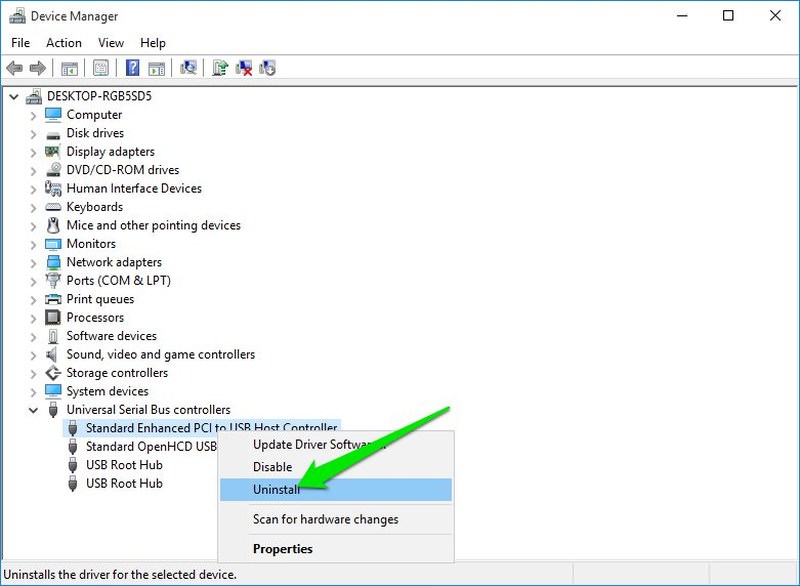
hardware problem uninstall
[mai mult...]

How to enable and use HDR on Windows 11

HDR content is growing in popularity and is now widely available and supported by many devices and streaming services. With HDR, you get richer and more vivid picture from your games, videos and apps. With Windows 11, enjoying HDR content is just a matter of enabling the feature through a toggle if your display supports it.

[mai mult...]

How to Fix Bluetooth Keeps Disconnecting on Windows 11

Bluetooth is a wireless technology that allows you to connect your Windows computer to different wireless devices such as keyboard, mouse, headphones, etc allowing you to perform various actions. However, there may be instances when Bluetooth may stop working or turning off randomly creating an annoying experience. What to do in such scenario?

[mai mult...]