
Soluții

How to Flush DNS in Linux

Is your internet browsing experience slow on your Linux device, or are the websites you’re visiting outdated or the wrong website altogether? Let’s discuss flushing the DNS cache on Linux, and how to know whether you really need to.

[mai mult...]
How to Enable Battery-Saving Mode in Google Chrome

Chrome is notorious for using a lot of resources and taking a chunk out of your device’s battery life. Google Chrome 108 added an “Energy Saver” mode for Chrome on Windows, Mac, Linux, and Chromebooks. We’ll show you how it works.

As the name implies, “Energy Saver” is a special mode designed to stretch battery life a little longer. It does this by limiting background activity, visual effects, and video frame rates. Chrome will feel a little less polished, but you’ll get some extra juice out of your computer.

[mai mult...]

How to update your Apple watch

First, make sure that your Apple Watch works with the latest software. watchOS 9 is compatible with these Apple Watch models:

  • Apple Watch Series 4 and later
  • Apple Watch SE (1st generation) and later
  • Apple Watch Ultra

Updating to watchOS 9 also requires one of these iPhone models:

  • iPhone 8 or later with iOS 16
  • iPhone SE (2nd generation) or later with iOS 16

If your Apple Watch isn’t compatible with the latest version of watchOS, Software Update will show you the newest version that your watch can use.

Get ready to update

Next, check these things:

  1. Make sure that your iPhone is updated at last version of iOS.
  2. Make sure that your Apple Watch is at least 50 % battery charged.
  3. Make sure that your iPhone is connected to wi-fi/internet.
Update your Apple Watch using your iPhone

You can wait until Apple Watch notifies you when a new update is available. Tap Update Tonight in the notification, then go to your iPhone to confirm that you want to update overnight. At the end of the day, leave your Apple Watch and iPhone charging overnight so the update can complete.

Or you can update your Apple Watch with your iPhone manually:

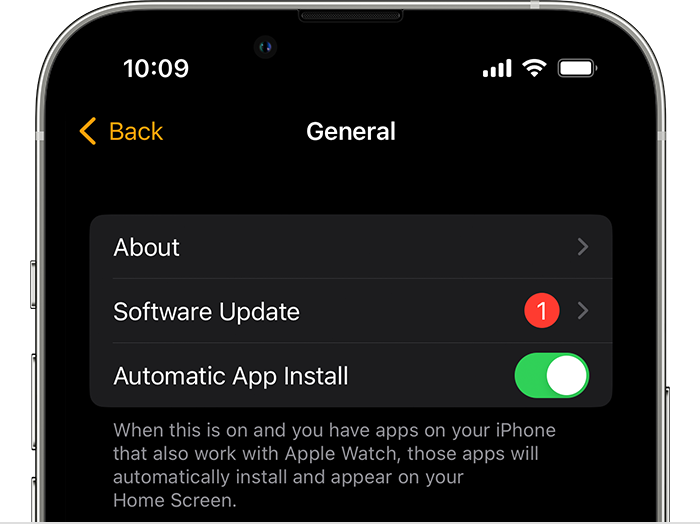
  1. On your iPhone, open the Apple Watch app, then tap the My Watch tab.
  2. Tap General > Software Update.
  3. Download the update. If asked for your iPhone passcode or Apple Watch passcode, enter it.
  4. Wait for the progress wheel to appear on your Apple Watch. It could take from several minutes to an hour for the update to complete.
Update directly on your Apple Watch

If your Apple Watch has watchOS 6 or later, you can install updates without your iPhone:

  1. Make sure that your watch is connected to internet/wi-fi.
  2. On your watch, open the Settings app.
  3. Tap General > Software Update.
  4. Tap Install if a software update is available, then follow the onscreen instructions.
[mai mult...]

How to troubleshoot PC Motherboard

Common symptoms of motherboard issues are similar to CPU problems: The system does not display anything; an error code appears; one or more beeps occur; the system locks; the system reboots; a Windows BSOD (blue screen of death) appears; or one or more of the ports, expansion slots, or memory modules fails.

Motherboard problems and power problems are probably the most difficult issues to troubleshoot. Because various components are located on the motherboard, many things can cause errors. POST (power-on self-test) is one of the most beneficial aids for troubleshooting a motherboard.Here are some of the things you need to do:

  • Is the motherboard receiving power? Check the power supply to see if the fan is turning. If the CPU or motherboard has a fan, see if it is turning. Check voltages going from the power supply to the motherboard.
  • Check the BIOS/UEFI settings  for accuracy.
  • Check for overheating. Power down the computer and allow the computer to cool. Power on the computer with the cover off.
  • Check the motherboard for distended capacitors. These are small components that might appear to be bulging. If sighted, replace the motherboard as soon as possible.
  • Reseat the CPU, adapters, and memory chips.
  • Remove unnecessary adapters and devices and boot the computer.
  • Plug the computer into a different power outlet and circuit, if possible.
  • Check to determine whether the motherboard is shorting out on the frame.
  • Check the CMOS battery .
  • With a motherboard that has diagnostic LEDs, check the output for any error code. Refer to the motherboard documentation or online documentation for the problem and possible solution.
[mai mult...]