

Soluții
How to add friends to the Walkie-Talkie app
Whether you’re out shopping or trying to find someone in a crowd, use the Walkie-Talkie app to get in touch with just a tap. Add friends, then manage when you want to talk.
[mai mult...]Change your Apple ID
If you no longer use the email address that’s associated with your Apple ID, you can change it. You won’t lose access to your contacts, purchases, or other account information.
[mai mult...]Disable the Control Panel for Windows 10 home users
[mai mult...]How to block access to Windows 10 settings and control panel
[mai mult...]How to enable Desktop Background Image
Start by enabling the “show desktop background image” option. Here are the steps for enabling the desktop wallpaper:
- Press Win + I to open the System Settings.
- Click the Ease of Access option from the menu items.
- Next, click the Display option on the left-hand side pane.
- Locate the Show desktop background image button and then switch it on.
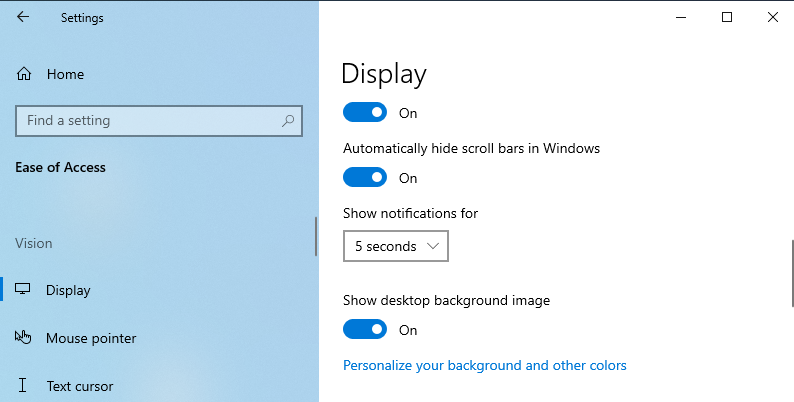
5. Restart your device to save these new changes.
Configure the Display Settings via the Ease of Access Center
You can also resolve the “black desktop background display” issue by configuring the Ease of Access settings. Here’s how:
- Press Win + R to open the Run command dialog box.
- Type Control Panel and click Enter.
- Next, click the View by drop-down menu and select Small icons.
- Select the Ease of Access Center from the menu items.
- Scroll down and click the Make the computer easier to see option (below the Explore all settings option.)
- Next, scroll down and uncheck the Turn off all unnecessary animations and the Remove Background images options.
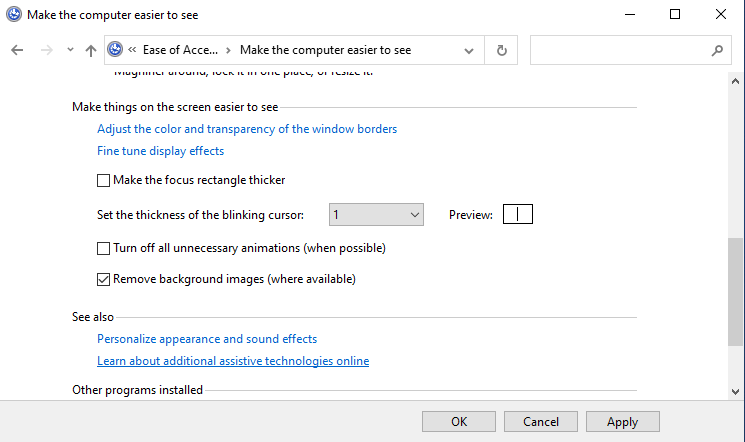
Click Apply, click OK, and then restart the device to save these changes.
[mai mult...]