Follow Us

Soluții pentru problemele tale IT

Home /Windows Server/Active Directory

Active Directory

Creare cont utilizator in domeniu 3 Solutii

Configurare Active Directory Recycle Bin 1 Solutii

Verificare Replication Health (AD Settings) 3 Solutii

Verificare Domain Controller Health 0 Solutii

Marire Forest Functional Level 1 Solutii

Marire Domain Functional Level 0 Solutii

Mutare toate FSMO Roles 1 Solutii

Mutare un singur FSMO role 1 Solutii

Configurare Alternative UPN Suffix 0 Solutii

Configurare New Site in Active Directory 2 Solutii

Instalare Domain Services Role 5 Solutii

Resetare parola Domain User 3 Solutii

Setare server ca Domain Controller 3 Solutii

Depanare Domain User account lockout cu ajutorul Event Viewer 2 Solutii

Deblocare cont Domain User 3 Solutii

Reparare trust relationship dintre o statie de lucru si un domeniu primar 1 Solutii

Contul Domain User nu se poate loga in domeniu 0 Solutii

Dezactivare cont Domain User 6 Solutii

Redenumire cont Domain User 2 Solutii

Adaugare Domain User intr-un grup 6 Solutii

Mutare Domain User la alt OU (Organizational Unit) 3 Solutii

Reparare Active Directory Database 0 Solutii

How to check Failed Login attempts in Windows Server 2012 R2

  • Data 02/06/2019
  • Autor Ciprian Zoican
  • -11
  • 1737

You can run into a lot of people telling you that the account keeps getting locked out without typing the wrong password.

Here is how to check the reasons for the account lockout if you’re using Windows Server 2012 as an Active Directory.

First thing that needs to be done is to enable auditing for login attemps.

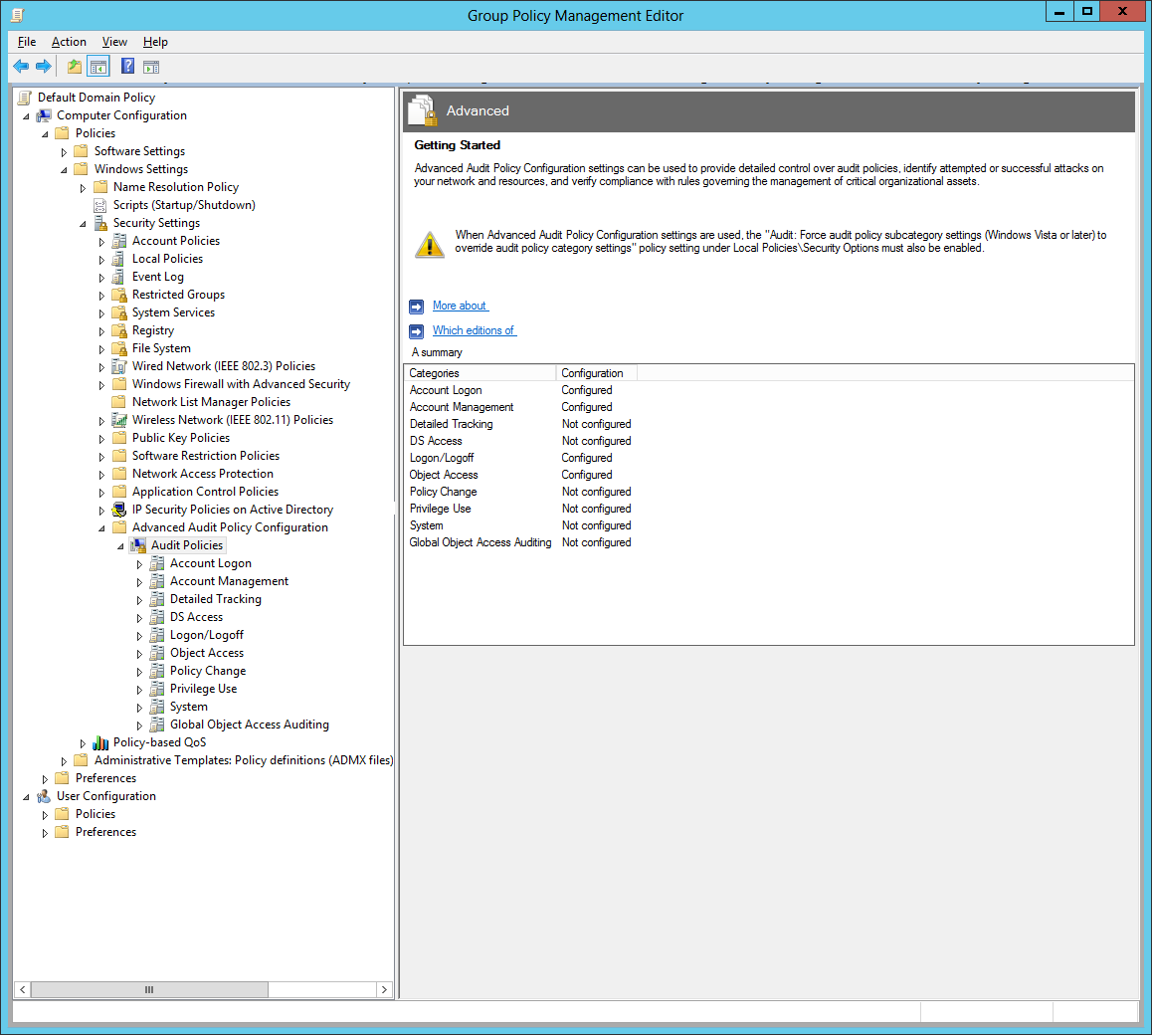
In order to do this, go to Start, and type gpmc to launch Group Policy Management Console.

Here, you can either edit your Default Domain Policy, or create a new policy.

Either way, in the Group Policy Management Editor, go to Computer Configuration >Policies >Windows Settings > Security Settings >Advanced Audit Policy Configurator >Audit Policies

All the audit policies are on the right pane. Here,you have to enable the following policies for Successful and Failed events

-In Logon/Logoff – Enable Audit Logon

– In Object Access enable Audit Detailed File Share; Audit File Share; Audit File System

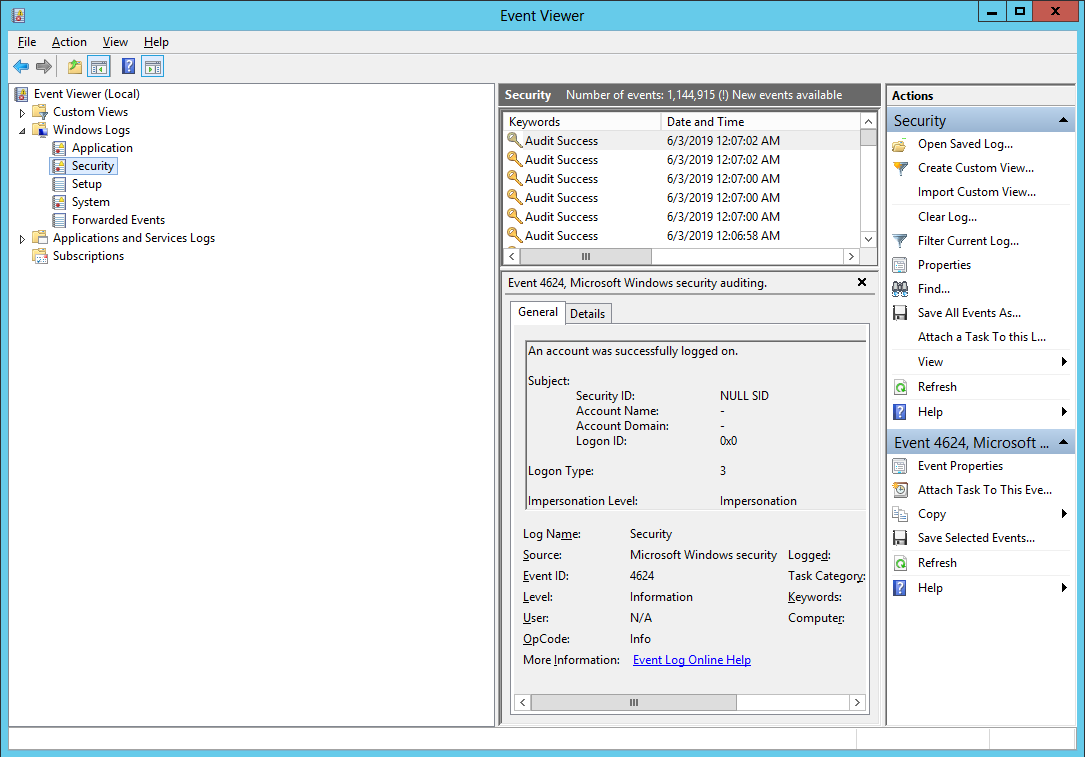
After applying these policies, you can check the login attempts by using Event Viewer and navigating to

Windows Logs >Security on the left pane.

[mai mult...]

Deblocarea unui cont de Active Directory dintr-un domeniu

  • Data 17/04/2019
  • Autor catalin nechita
  • -31
  • 1126

Imposibilitatea logarii unui utilizator in domeniu

[mai mult...]

Cum sa resetam parola unui utilizator de domeniu din Active Directory

  • Data 24/09/2018
  • Autor Constantin Cr.
  • -32
  • 6254

Sa presupunem ca un utilizator nu isi mai amiteste parola si trebuie sa o resetam.

[mai mult...]

Cum sa creezi un nou utilizator in Windows Active Directory

  • Data 24/09/2018
  • Autor Constantin Cr.
  • -10
  • 1532

Sa presupunem ca avem un nou angajat si trebuie sa ii cream un utilizator pentru a avea acces la resursele companiei.

[mai mult...]

Replication Troubleshoting(Nonauthoritative FRS restore)

  • Data 24/09/2018
  • Autor Gabriel Nitu
  • -15
  • 768

Restoring FRS replicas nonauthoritative restore

[mai mult...]

Replication Troubleshoting(Authoritative FRS restore)

  • Data 24/09/2018
  • Autor Gabriel Nitu
  • -10
  • 845

Use authoritative restores only as a final option, such as in the case of directory collisions.

[mai mult...]
  • Previous
  • 1
  • 2
  • 3
  • 4
  • 5
  • 6
  • 7
  • …
  • 15
  • Next

29534

Soluții Disponibile

0 Articole

In ultima saptamana

Cele mai recente soluții

  • How to clean temporary files on Windows 11
    • 226
    • 17/04/2025
  • How to update iOS on your iPhone
    • 266
    • 17/04/2025
  • Cum deschidem un RDP in full screen folosind Command Prompt in Windows 10
    • 282
    • 16/04/2025
  • Cum deschidem fereastra Sound folosind Run in Windows 10
    • 256
    • 16/04/2025
  • How to enter text with your voice on a Chromebook
    • 416
    • 16/04/2025
© Askit.ro, 2014 - 2025. All rights reserved. Done by Class IT