
Configurare program

Cum se instalează Internet Information Services (IIS) pe Windows 8, 10 sau 11

Instalarea IIS

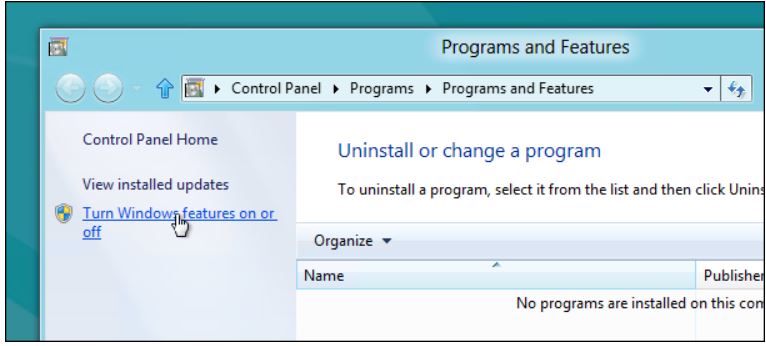
În conformitate cu designul modular al Microsoft, IIS în Windows este încă o “Funcție Windows” opțională pe versiunile moderne de Windows. Pentru a-l instala, apăsați Windows+r, tastați appwiz.cpl în caseta de execuție și apoi apăsați Enter.

Aceasta va deschide partea Program și caracteristici din Panoul de control. Faceți click pe link-ul “Turn Windows features on or off” (Activează sau dezactivează funcțiile Windows) din partea stângă.
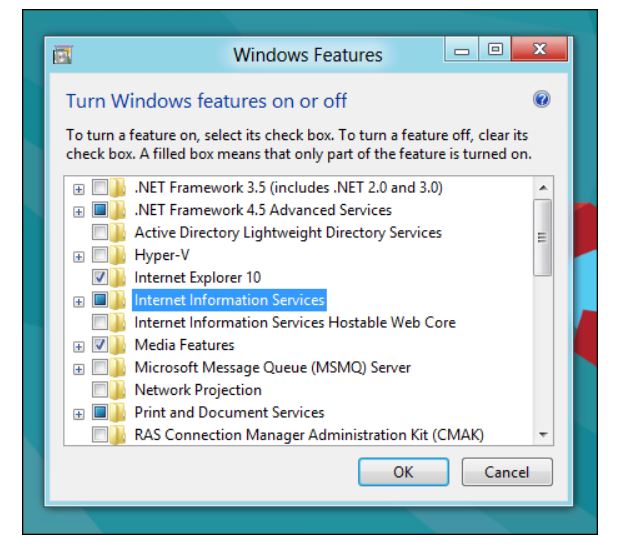
Acum faceți click pe caseta de selectare Internet Information Services.
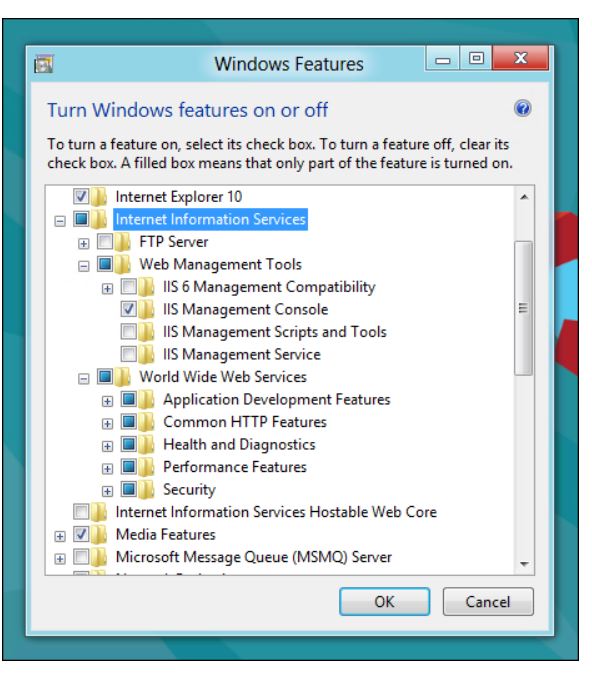
Dacă sunteți un dezvoltator, veți dori să o extindeți și să explorați și subcomponentele. În mod implicit, se instalează toate componentele necesare pentru a găzdui un site web, dar probabil că veți avea nevoie și de unele dintre componentele mai orientate către dezvoltator.
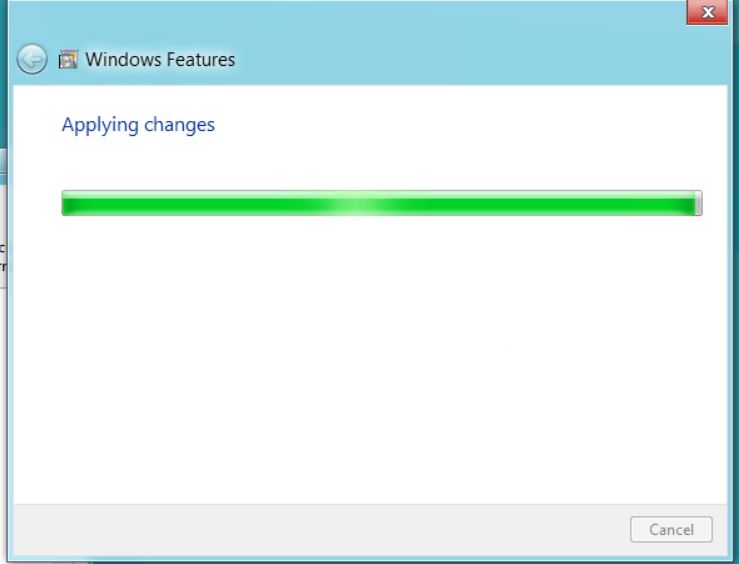
După ce faceți click pe OK, acest dialog va apărea pe ecran pentru o perioadă de timp.
Reporniți calculatorul pentru a finaliza instalarea. Porniți browserul și navigați la localhost când instalarea este gata.

Asta e tot ce trebuie făcut.

[mai mult...]

5 Ways to Underline in Microsoft Word

Underlining seems like a simple enough task in Microsoft Word, but many times there’s more involved. You can underline words, spaces, words with spaces, and words without spaces. We’ll show you several ways to use underline in Word.

Many people reserve underlining for web links while others find it a good way to emphasize text in a document. Along with the options for underlining words and spaces, you can format it as a double, bold, or dotted line and remove an underline you’ve added.

[mai mult...]

How to Reset the TikTok Algorithm

The TikTok algorithm is the secret sauce that makes the social network so popular. It quickly figures out what you like and it’s scarily good at it. We’ll show you some tips to refresh your “For You” page.

If the algorithm is so good at getting to know people, you may be wondering why you’d ever need to “reset” it. Shouldn’t it just change with you? That’s not always how it works. Sometimes it takes a wrong turn down and there’s nothing you can do to correct the course. Sadly, there’s no big “RESET” button to press. The only way to truly start over would be to create a brand new account. The good news is there are some things you can do to help rewire your FYP a bit.

[mai mult...]

How to Cancel Your Subscriptions on PayPal

If you no longer wish to use a service you subscribed to, PayPal makes it easy to cancel your automatic subscription payments. You can cancel a subscription up until the day before the next scheduled payment. Also, note that you must pay for the services you’ve received even if you cancel your subscription.

[mai mult...]