How to turn on/off camera on windows 10
How to turn on camera on/off windows 10.
[mai mult...]
Soluții pentru problemele tale IT
How to turn on camera on/off windows 10.
[mai mult...]Many people on Twitch stream as a hobby. If you’re thinking about going full-time, though, you’ll need to raise some cash. Setting up donations on Twitch is one way you can do it!
Along with Twitch’s built-in subscription service, some streamers can accept donations using the platform’s built-in currency (Bits), which is purchased with real money.
If you don’t want Twitch taking a cut of your donations, or you’re unable to accept subscriptions or Bits, you’ll need to look at other methods. PayPal is one of the best ways, but there are other third-party donation services that make it easy for people to send you some cash.
[mai mult...]Deschidere pagini multiple cu Internet Explorer folosind VBScript
Pasul 1
Intr-un editor de text copiem codul urmator:
Const NewTab = &h800
Dim objExplorer
Set objExplorer = CreateObject(“InternetExplorer.Application”)
NavigateIE_Tabs “http://www.google.com”,””
NavigateIE_Tabs “https://askit.ro”,NewTab
NavigateIE_Tabs “http://www.stackoverflow.com”,NewTab
NavigateIE_Tabs “https://www.facebook.com”,NewTab
NavigateIE_Tabs “https://www.yahoo.com”,NewTab
Sub NavigateIE_Tabs(URL,Arg)
Const NewTab = &h800
with objExplorer
.Navigate2 URL,Arg
.AddressBar = 1
.Visible = 1
.ToolBar = 1
.StatusBar = 1
end with
End Sub
Pasul 2
Salvam fisierul cu extensia .vbs.
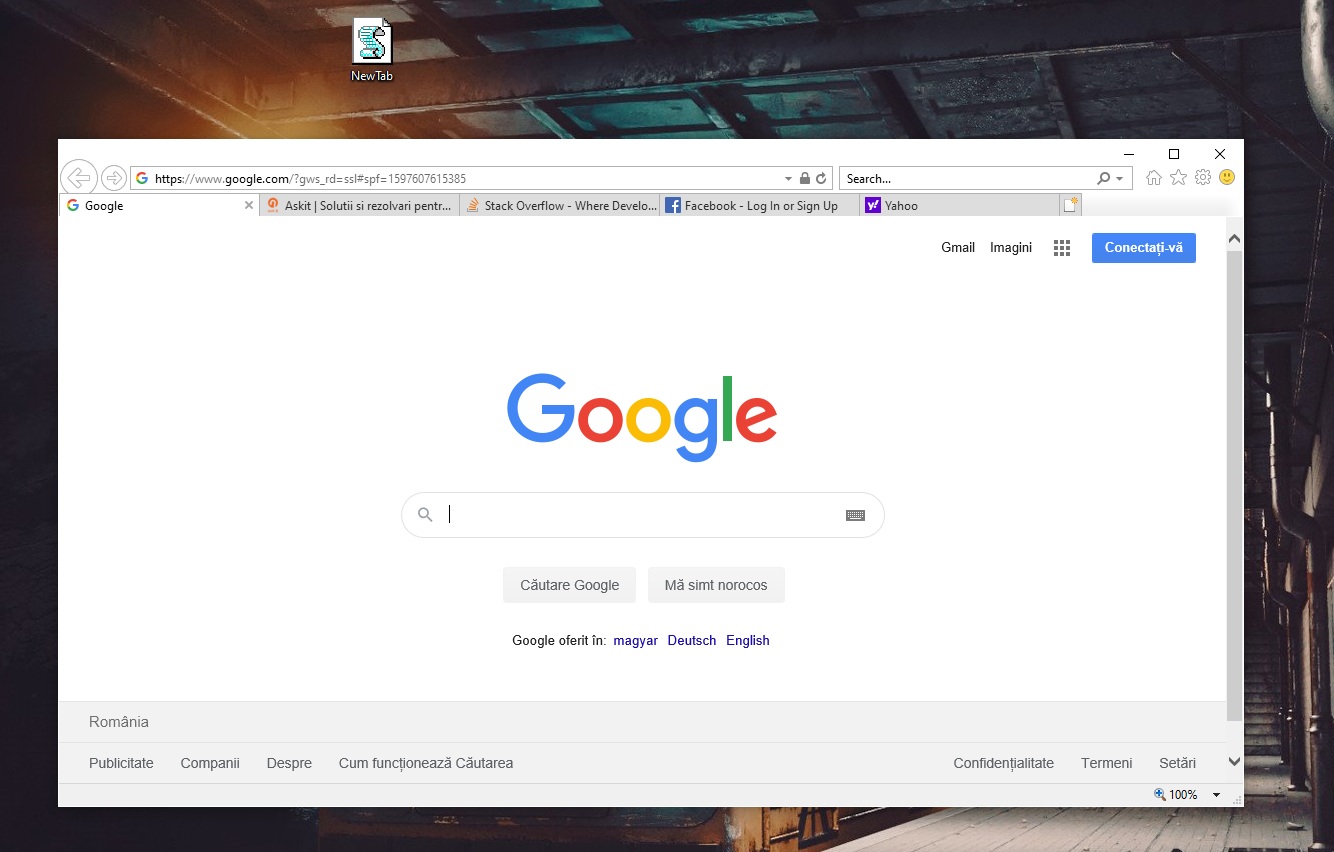
In cazul in care codul nu functioneaza, trebuie sa inlocuim manual simbolul ” ,deoarece site-ul ii schimba formatul.
[mai mult...]
If you’re playing an Xbox game on a Windows 10 PC—like the ones in Microsoft’s Game Pass for PC service—you’ll likely see pop-up notifications for your Xbox achievements. Here’s how to turn off those achievement notifications.
These are controlled from Windows 10’s built-in Game Bar, which is more of a full-screen game overlay at this point. To open it, press Windows+G.
(If you don’t see the Game Bar, head to Settings > Gaming > Xbox Game Bar. Here, you can turn the Game Bar on and control the shortcut that opens it—Windows+G by default.)

Click the gear-shaped “Settings” icon at the right side of the bar at the top of your screen.

Select “Notifications” at the left side of the Game Bar Settings window. Uncheck “Notify me when I unlock achivements” to hide achievement notifications.
You can also uncheck other types of Game Bar notifications here to hide them, including Xbox social messages, party invites, and new people following you.
You’re done. To leave the Game Bar overlay interface, click outside the window or press Windows+G again.

Even after disabling achievements notifications, you can still see detailed achievements statistics in the Xbox app on your Windows 10 PC. You can open it from your Start menu by searching for “Xbox.”
Some games may also show in-game information about your unlocked achievements, too.
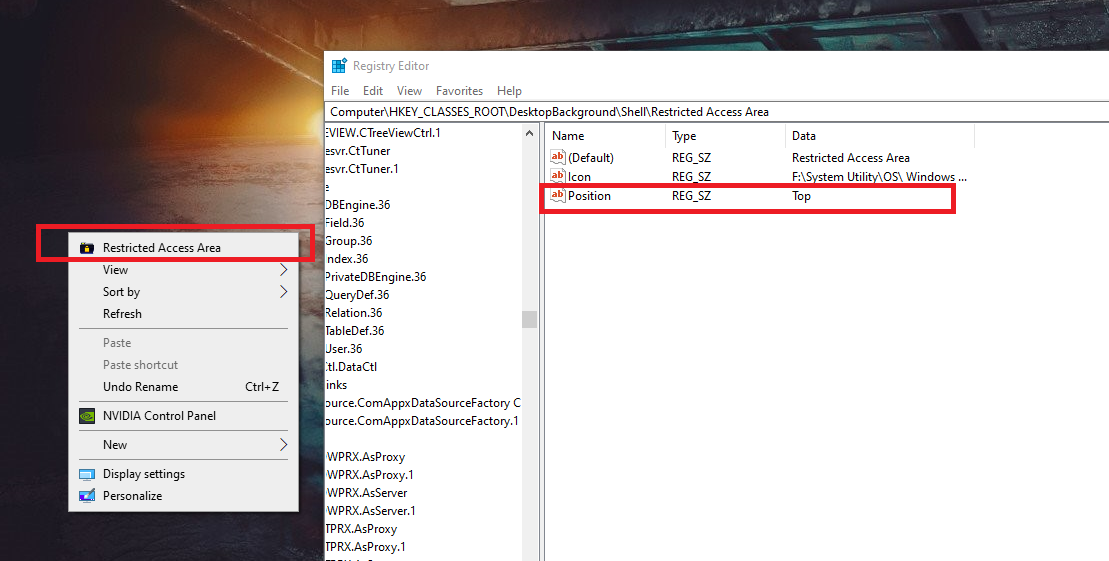
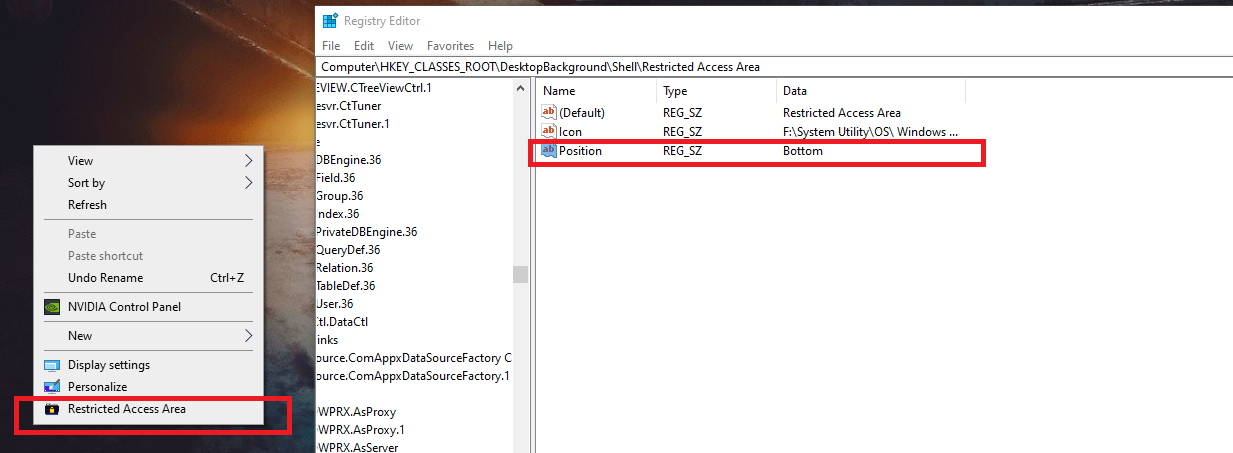
[mai mult...]Cum putem schimba pozitia unei aplicatii (sus, mijloc sau jos) afisate in Context Menu
Pasul 1
Deschidem regedit si mergem pe calea programului nostru, in cazul de fata – HKEY_CLASSES_ROOT\DesktopBackground\Shell\Restricted Access Area
Pasul 2
Click dreapta – New – String Value
Pasul 3
Modificam New Value #1 in Position, apoi dam dublu click, iar la Value data scriem – Top, Middle sau Bottom, in functie de cum dorim sa fie pozitionata.
Cum putem ascunde o aplicatie afisata in Context Menu:

In cazul in care dorim sa ascundem o aplicatie din Context Menu, putem face urmatorul lucru:
Pasul 1
Deschidem regedit si mergem pe calea programului nostru, in cazul de fata – HKEY_CLASSES_ROOT\DesktopBackground\Shell\Restricted Access Area
Pasul 2
Click dreapta – New – String Value
Pasul 3
Modificam New Value #1 in Extended
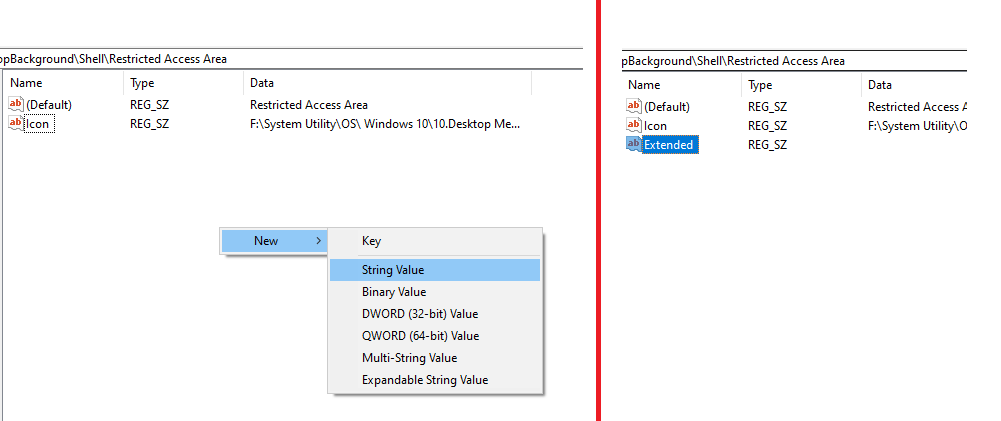
Pentru a aparea programul, tinem apasat tasta Shift si apasam click dreapta.