
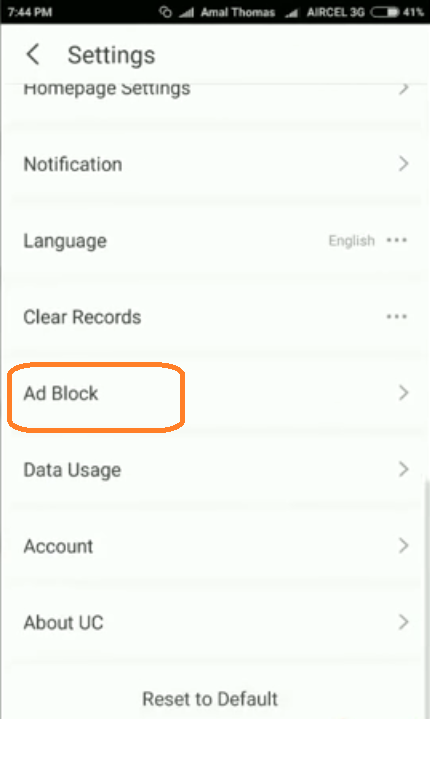
Activeaza ADBlock in UC Browser Data 10/11/2016 Autor Radu A Categorie Aplicații -2 1629 Configurare noua (How To) SituatieDesi UC Browser incorporeaza software pentru blocarea AD-urilor, acesta trebuie activat manual. Iata cum facem asta pe Android: Solutie Pasi de urmat deschidem UC Browser. Apasam pe butonul din partea de jos a ecranului, din centru. Apasam iconita de la “Settings” Dam Scroll in sus pana vedem sectiunea “AD Block”. Apasam pe ea El este dezactivat. Il activam apasand cele 2 butoane AD Blocker este activ! Tip solutiePermanent Etichetare: Activeaza ADBlock in UC BrowserAD Blockadblockandroidaskitaskit.roUC Browser Voteaza Up Down (21 din 44 persoane apreciaza acest articol) ShareTweetShare Despre Autor Radu A Solutii Asemanatoare O metoda de vizualizare a valorii frecventelor orizontale si verticale de reimprospatare a imaginii in Windows 4 Adding emotes to a personal Twitch channel 0 How to stop awkward Games showing up on next year’s Steam replay 2 How to use LAMBDA in Excel to create your own functions -1 How to customize the Always-on Display on a Samsung Galaxy Phone -3 How to create a New File in macOS Finder 3 Leave A Comment? × Cancel Reply Save my name, email, and website in this browser for the next time I comment. 7 + = fifteen

Leave A Comment?