
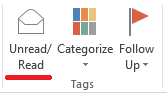
Afla cum poti sa marchezi un mail ca necitit in outlook Data 07/04/2015 Autor Radu P Categorie E-mail, Aplicații, Configurare client Email 0 1986 Configurare noua (How To) SituatieSe doreste ca un mail sa apara ca necitit Solutie Pasi de urmat Se selecteaza mail-ul dorit si se apasa butonul mark as read/ unread (din meniul Home) O alta solutie (in cazul in care nu gasim butonul mentionat mai sus): se da click dreapta pe mail-ul dorit si se selecteaza mark as unread Tip solutiePermanent Voteaza Up Down (33 din 66 persoane apreciaza acest articol) ShareTweetShare Despre Autor Radu P Solutii Asemanatoare O metoda de vizualizare a valorii frecventelor orizontale si verticale de reimprospatare a imaginii in Windows 3 Adding emotes to a personal Twitch channel 0 How to stop awkward Games showing up on next year’s Steam replay 2 How to use LAMBDA in Excel to create your own functions -1 How to customize the Always-on Display on a Samsung Galaxy Phone -7 How to create a New File in macOS Finder 4 Leave A Comment? × Cancel Reply Save my name, email, and website in this browser for the next time I comment. four + 9 =
Leave A Comment?