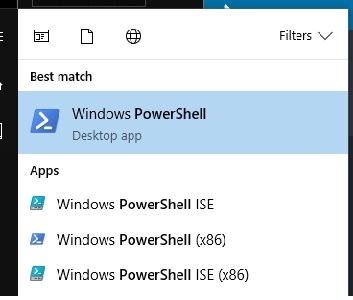
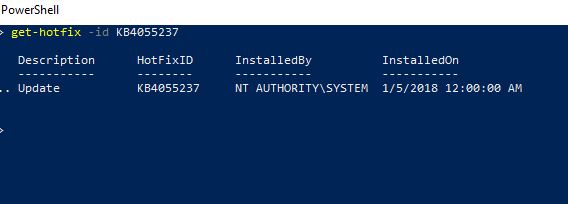
Cum afli daca un update de windows(KB) este instalat deja pe sistemul de operare Data 11/02/2018 Autor Marian Chitu Categorie Soluții 6 1039 Configurare noua (How To) SituatieVrei sa te asiguri ca ai instalat un anume update (KB) pe sistemul de operare Solutie Pasi de urmat Deschizi powershell(in start scrii powershell si apesi pe Windows PowerShell) Scrie: get-hotfix -id numeKB exemplu pentru KB4055237: Tip solutiePermanent Etichetare: askitaskit.roCum afli daca un update de windows(KB) este instalat deja pe sistemul de operareget-hotfix -id numeKBpowershellupdate de windowsWindows Powershell Voteaza Up Down (30 din 54 persoane apreciaza acest articol) ShareTweetShare Despre Autor Marian Chitu Solutii Asemanatoare Cum deschidem un RDP in full screen folosind Command Prompt in Windows 10 5 Cum deschidem fereastra Sound folosind Run in Windows 10 0 How to enter text with your voice on a Chromebook 6 Can’t Delete a Windows File or Folder? 3 Top 10 Linux Easter Eggs 2 How to fix – Reading a File: Permission Denied on Linux 1 Leave A Comment? × Cancel Reply Save my name, email, and website in this browser for the next time I comment. × nine = 72
Leave A Comment?
