
Follow Us

Soluții pentru problemele tale IT

Home /Stații de lucru/OS - Windows/Cum dezactivezi optiunea de a introduce parola cand calculatorul iese din sleep

Cum dezactivezi optiunea de a introduce parola cand calculatorul iese din sleep

  • Data 09/03/2018
  • Autor Mihai Geambasu
  • Categorie OS - Windows
  • -8
  • 1539
Configurare noua (How To)

Situatie

Cand calculatorul intra in sleep trebuie sa iti reintroduci parola de utilizator

Solutie

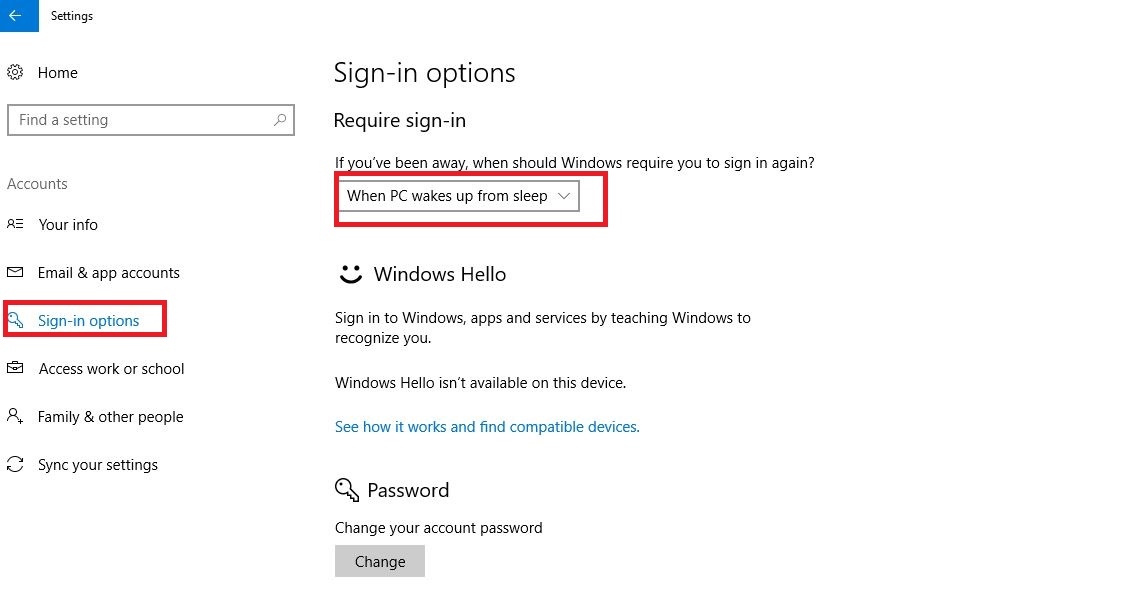
Apesi pe Start->Settings->Accounts-< Sign-in Options si selectezi “When PC wakes up from sleep” in loc de never
Tip solutie

Permanent

Plan de restaurare in caz de nefunctionare

Procesul este reversibil

Etichetare: accountaskitaskit.rocalculatorCum dezactivezi optiunea de a introduce parola cand calculatorul iese din sleepparolasettingsSign inSleepWhen PC wakes up from sleep

Voteaza

Up Down
(29 din 66 persoane apreciaza acest articol)
Share
Tweet
Share

Despre Autor

Mihai Geambasu

Solutii Asemanatoare

  • How to clean temporary files on Windows 11 -9
  • Cum deschidem un RDP in full screen folosind Command Prompt in Windows 10 3
  • Cum deschidem fereastra Sound folosind Run in Windows 10 0
  • Cum pot activa modul Dark in Microsoft Office? -1
  • Cum pot rezolva problema cu conexiunea la retea in Windows 10? -2
  • Reducerea deseurilor rezultate din echipamente electronice (e-waste): corectarea software a disfunctionalitatilor butoanelor perifericelor -4

Leave A Comment? × Cancel Reply

29534

Soluții Disponibile

0 Articole

In ultima saptamana

Cele mai recente soluții

  • How to clean temporary files on Windows 11
    • 374
    • 17/04/2025
  • How to update iOS on your iPhone
    • 409
    • 17/04/2025
  • Cum deschidem un RDP in full screen folosind Command Prompt in Windows 10
    • 425
    • 16/04/2025
  • Cum deschidem fereastra Sound folosind Run in Windows 10
    • 355
    • 16/04/2025
  • How to enter text with your voice on a Chromebook
    • 633
    • 16/04/2025
© Askit.ro, 2014 - 2026. All rights reserved. Done by Class IT
Share
Tweet
Share