Situatie
1.Deschidem Chrome-ul.
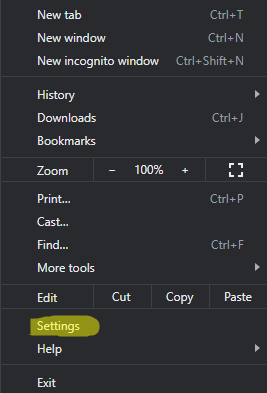
2. In dreapta sus, dam click pe cele trei puncte si alegem settings:
Solutie
Pasi de urmat
3. Dam click pe appearance:

4.Click pe Reset to default. Iar google chrome va reveni la tema clasica.


Soluții pentru problemele tale IT
1.Deschidem Chrome-ul.
2. In dreapta sus, dam click pe cele trei puncte si alegem settings:
3. Dam click pe appearance:
4.Click pe Reset to default. Iar google chrome va reveni la tema clasica.