
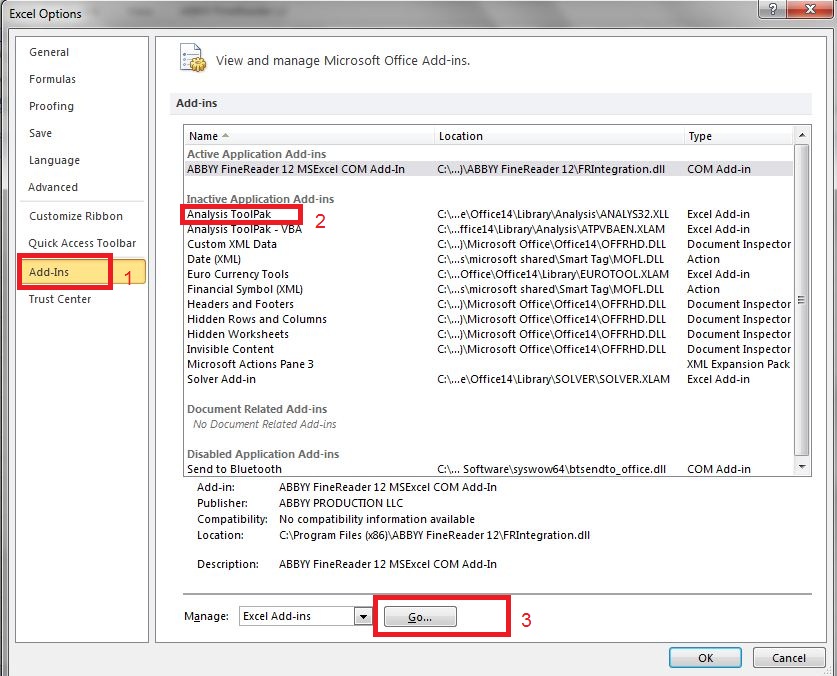
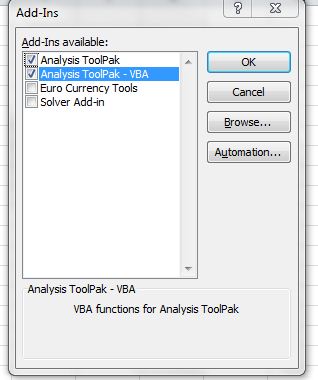
Cum sa adaugi tab-ul Data Analysis,pentru functii complexe in Excel Data 02/05/2016 Autor Adrian In. Categorie Aplicatii specifice 10 11661 Configurare noua (How To) SituatieDaca vrei sa faci o analiza statistica(o regresie, o anova, etc.) excelul nu-ti instaleaza automat acest tab. Solutie Pasi de urmat Pasul 1 Se deschise un document Excel si se da click pe File si selectam Options. Pasul 2 Click pe Add-ins, selectam Analysis ToolPak si click pe Go. Pasul 3 Bifam Analysis Toolpak si Analysis Toolpak – VBA si dam click pe OK. Pasul 4 Daca am facut totul bine, ar trebuie sa avem tab-ul in Data. Spor la functii.:) Tip solutiePermanent Etichetare: excelData AnalysisFunctii Voteaza Up Down (72 din 134 persoane apreciaza acest articol) ShareTweetShare Despre Autor Adrian In. Solutii Asemanatoare Cum deschidem un RDP in full screen folosind Command Prompt in Windows 10 5 Cum deschidem fereastra Sound folosind Run in Windows 10 -1 O metoda de vizualizare a valorii frecventelor orizontale si verticale de reimprospatare a imaginii in Windows 4 Probleme de Upgrade .NET Framework în Windows 11 11 OneNote can completely replace 3 different kinds of Apps 3 How to use Auto-Highlight with Find and Replace in Excel -10 Leave A Comment? × Cancel Reply Save my name, email, and website in this browser for the next time I comment. − two = 5
Leave A Comment?