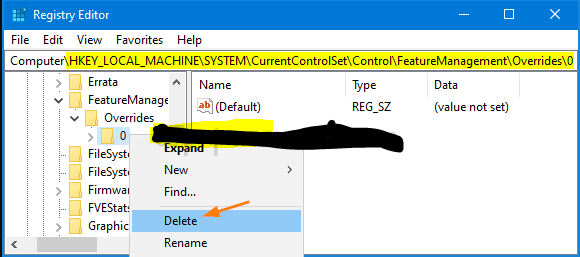
Cum sa dai Disable la noua interfata de “Start” din Windows 10 Data 12/08/2020 Autor Gabriel Burtea Categorie OS - Windows, Configurare program, Stații de lucru, Configurare Sistem de operare, Depanare -8 892 Configurare noua (How To) SituatieAi activat noua interfata “Start” windows 10 version 2004, iar acum doresti dezactivarea acesteia. Solutie Apasam tasta Windows + R (RUN) Tastam regedit.exe Navigam in calea” HKEY_LOCAL_MACHINE\SYSTEM\CurrentControlSet\Control\FeatureManagement\Overrides Dam click dreapta pe subkeyul 0 si DELETE Tip solutiePermanent Voteaza Up Down (26 din 59 persoane apreciaza acest articol) ShareTweetShare Despre Autor Gabriel Burtea Solutii Asemanatoare How to clean temporary files on Windows 11 -6 Cum deschidem un RDP in full screen folosind Command Prompt in Windows 10 0 Cum deschidem fereastra Sound folosind Run in Windows 10 2 Cum pot activa modul Dark in Microsoft Office? -1 Cum pot rezolva problema cu conexiunea la retea in Windows 10? 1 Reducerea deseurilor rezultate din echipamente electronice (e-waste): corectarea software a disfunctionalitatilor butoanelor perifericelor -3 Leave A Comment? × Cancel Reply Save my name, email, and website in this browser for the next time I comment. 6 − = four
Leave A Comment?