Situatie
Cum putei sa deblocati Macbook-ul cu ajutorul ceasului Apple.
Solutie
Pasi de urmat
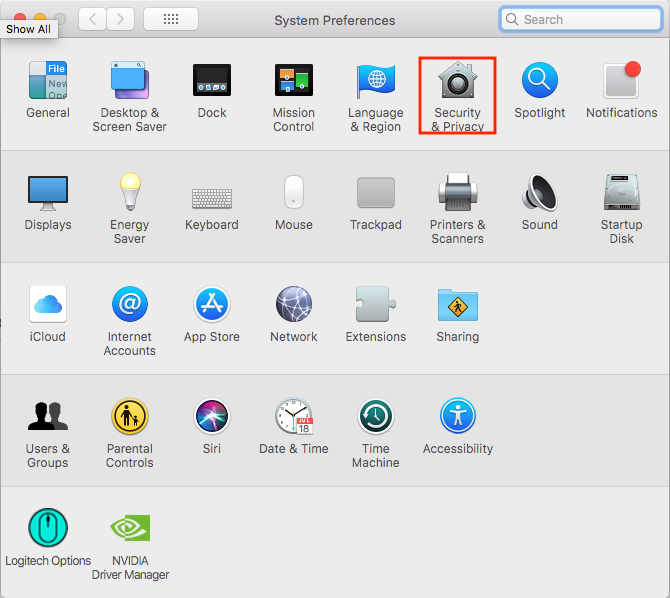
Deschideti “System Preferences”.

Intrati in “Security & Privacy”.
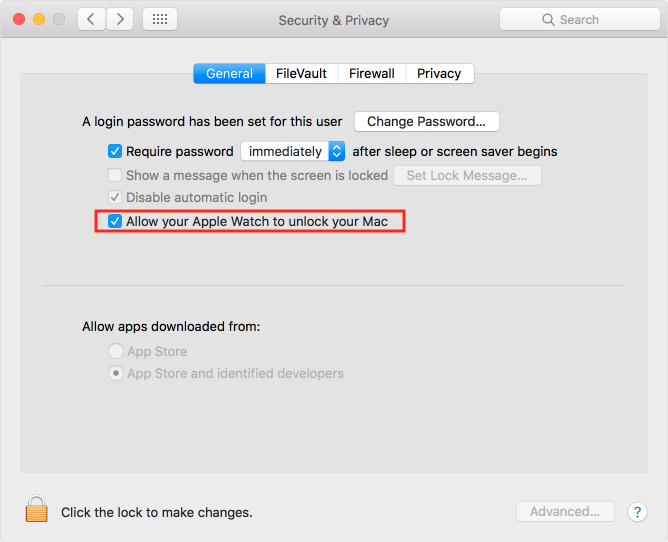
Bifati “Allow your Apple Watch to unlock your Mac”.
Introduceti parola si apasati “OK”.

Soluții pentru problemele tale IT
Cum putei sa deblocati Macbook-ul cu ajutorul ceasului Apple.
Deschideti “System Preferences”.
Intrati in “Security & Privacy”.
Bifati “Allow your Apple Watch to unlock your Mac”.
Introduceti parola si apasati “OK”.