
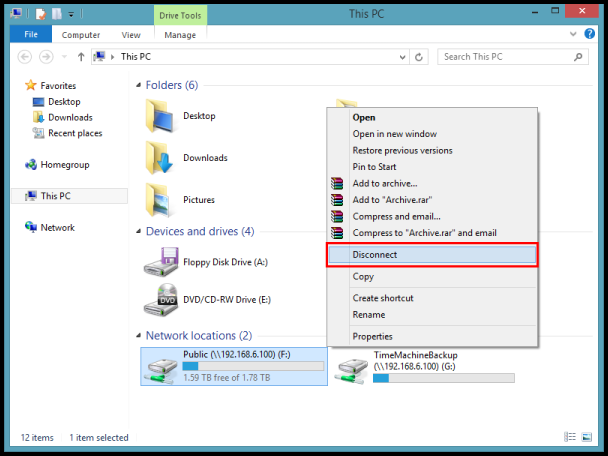
Cum sa demapati un Shared Drive in Windows 7 sau 10 Data 25/06/2018 Autor Gherghe Robert Petre Categorie OS - Windows, Stații de lucru, Configurare Sistem de operare -8 813 Configurare noua (How To) SituatieAtunci cand se doreste stergerea unui drive de retea mapat anterior, se procedeaza conform urmatorilor pasi: Solutie Click pe butonul Start si apoi deschideti Computer Localizati drive-ul de retea pe care doriti sa il demapati. Click dreapta pe el si selectati Disconnect din lista. Drive-ul va disparea. Tip solutiePermanent Voteaza Up Down (17 din 42 persoane apreciaza acest articol) ShareTweetShare Despre Autor Gherghe Robert Petre Solutii Asemanatoare How to clean temporary files on Windows 11 -3 Cum deschidem un RDP in full screen folosind Command Prompt in Windows 10 2 Cum deschidem fereastra Sound folosind Run in Windows 10 4 Cum pot activa modul Dark in Microsoft Office? -1 Cum pot rezolva problema cu conexiunea la retea in Windows 10? 2 Reducerea deseurilor rezultate din echipamente electronice (e-waste): corectarea software a disfunctionalitatilor butoanelor perifericelor -3 Leave A Comment? × Cancel Reply Save my name, email, and website in this browser for the next time I comment. two + = nine
Leave A Comment?