
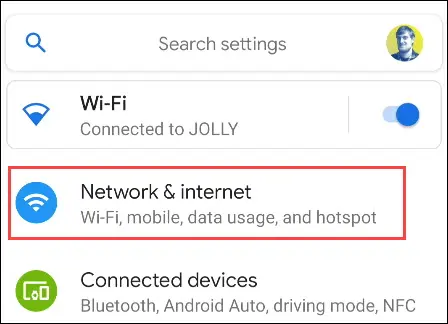
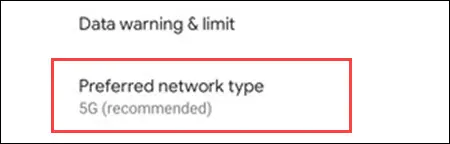
Cum dezactivezi 5G pe un Google Pixel Data 23/01/2023 Autor preda silviu Categorie Soluții -3 262 Configurare noua (How To) Situatie Solutie Pasi de urmat Mai întâi, deschideți meniul Settings glisând în jos din partea de sus a ecranului de două ori. De acolo, atinge pictograma rotita. Apoi, selectați „Network & Internet” din meniul setari. Alegeți „Mobile netowork”. Numele operatorului dvs. va fi listat aici. Atingeți „Preferred Network Type”. În cele din urmă, selectați „LTE” din meniul pop-up. Pixelul dvs. va alege acum LTE peste 5G. Tip solutiePermanent Etichetare: Google Pixel Voteaza Up Down (14 din 31 persoane apreciaza acest articol) ShareTweetShare Despre Autor preda silviu Solutii Asemanatoare Cum deschidem un RDP in full screen folosind Command Prompt in Windows 10 5 Cum deschidem fereastra Sound folosind Run in Windows 10 0 How to enter text with your voice on a Chromebook 6 Can’t Delete a Windows File or Folder? 3 Top 10 Linux Easter Eggs 2 How to fix – Reading a File: Permission Denied on Linux 1 Leave A Comment? × Cancel Reply Save my name, email, and website in this browser for the next time I comment. one × = 1
Leave A Comment?