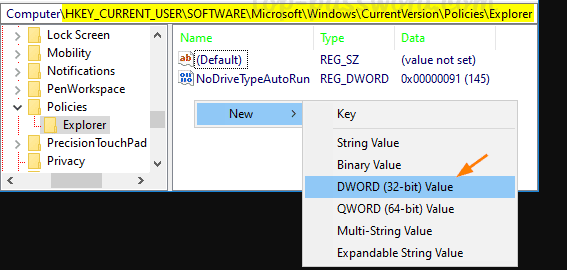
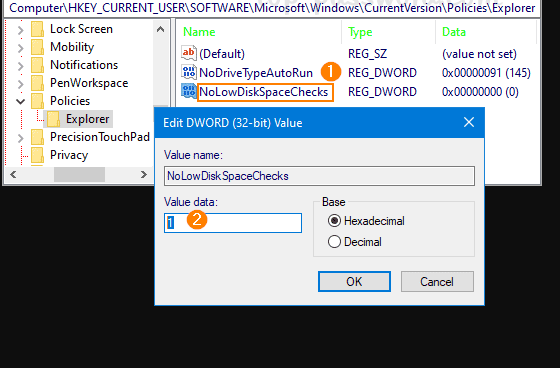
Cum sa scapi de alerta “low disk space” in Windows 10 Data 11/05/2020 Autor Gabriel Burtea Categorie Soluții, Stații de lucru, Configurare Sistem de operare, Depanare -9 1099 Configurare noua (How To) SituatieNu mai avem spatiu pe una dintre partitii, dar dorim ca windows-ul sa nu ne mai avertizeze. EX: Solutie Apasam tasta windows + R, iar in fereastra deschisa scriem regedit Se deschide Registry Editor si navigam in calea: HKEY_CURRENT_USER\SOFTWARE\Microsoft\Windows\CurrentVersion\Policies\Explorer Creem o noua valoare DWORD (32-bit) (click dreapta pe spatiul alb) dupa cum urmeaza: Tip solutiePermanent Voteaza Up Down (21 din 53 persoane apreciaza acest articol) ShareTweetShare Despre Autor Gabriel Burtea Solutii Asemanatoare How to clean temporary files on Windows 11 -5 Cum deschidem un RDP in full screen folosind Command Prompt in Windows 10 5 Cum deschidem fereastra Sound folosind Run in Windows 10 0 How to enter text with your voice on a Chromebook 6 Can’t Delete a Windows File or Folder? 3 Top 10 Linux Easter Eggs 2 Leave A Comment? × Cancel Reply Save my name, email, and website in this browser for the next time I comment. nine − three =
Leave A Comment?