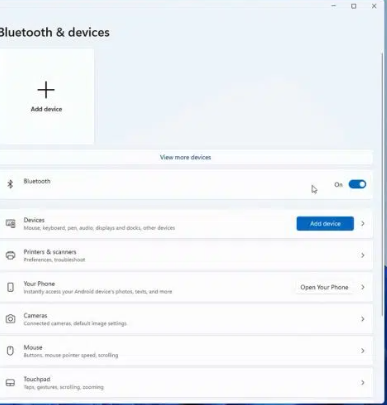
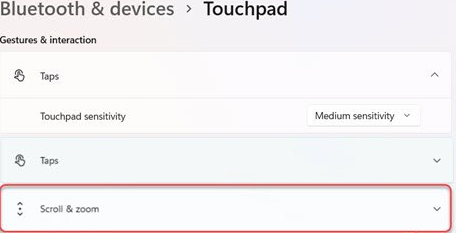
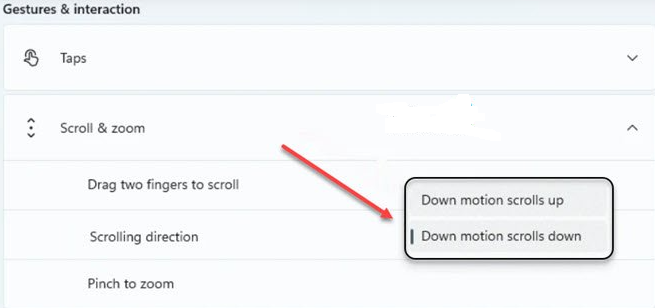
Cum schimbam directia scroll-ului touchpad-ului in Windows 11 Data 27/08/2024 Autor catalin nechita Categorie OS - Windows 2 411 Configurare noua (How To) Situatie Solutie 1.Accesam Bluetooth and devices -> Touchpad; 2.Accesam Scroll & zoom; 3.Setam directia cum dorim, in sus sau jos. Tip solutiePermanent Plan de restaurare in caz de nefunctionareSe reiau pasii Voteaza Up Down (19 din 37 persoane apreciaza acest articol) ShareTweetShare Despre Autor catalin nechita Solutii Asemanatoare How to clean temporary files on Windows 11 -8 Cum deschidem un RDP in full screen folosind Command Prompt in Windows 10 4 Cum deschidem fereastra Sound folosind Run in Windows 10 0 Cum pot activa modul Dark in Microsoft Office? -1 Cum pot rezolva problema cu conexiunea la retea in Windows 10? -2 Reducerea deseurilor rezultate din echipamente electronice (e-waste): corectarea software a disfunctionalitatilor butoanelor perifericelor -4 Leave A Comment? × Cancel Reply Save my name, email, and website in this browser for the next time I comment. nine × 4 =
Leave A Comment?
