
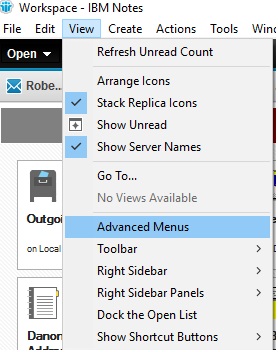
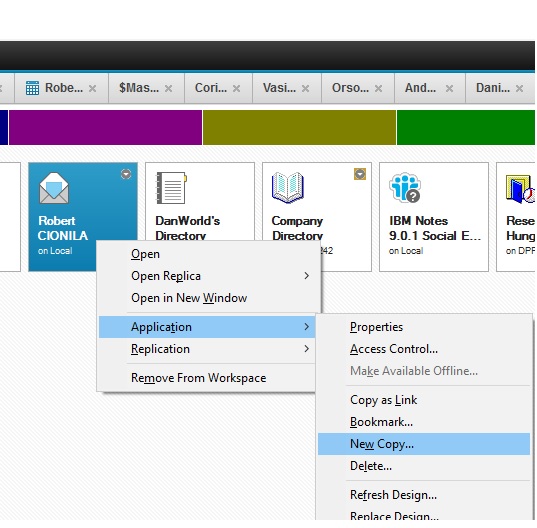
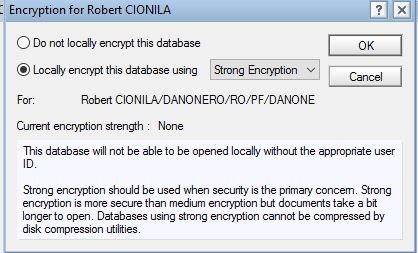
Cum se poate decripta un fisier din lotus notes (.nsf) Data 12/12/2017 Autor Robert Ci. Categorie E-mail, Aplicatii specifice -2 1150 Configurare noua (How To) SituatieFisierele ce contin email uri sunt criptate.Ele pot fi decriptate pentru a putea fi deschise de orice utilizator urmand aceasta procedura Solutie Pasi de urmat Trebuie activata optiunea advanced menus din meniul view. Click dreapta pe aplicatia ce urmeaza sa fie decriptata, application->new copy Se alege optiune encryption Se alege optiunea do not localy encrypt Tip solutiePermanent Etichetare: askitaskit.roCum se poate decripta un fisier din lotus notes (.nsf)encryptionlotus notes Voteaza Up Down (23 din 49 persoane apreciaza acest articol) ShareTweetShare Despre Autor Robert Ci. Solutii Asemanatoare Cum deschidem un RDP in full screen folosind Command Prompt in Windows 10 7 Cum deschidem fereastra Sound folosind Run in Windows 10 1 O metoda de vizualizare a valorii frecventelor orizontale si verticale de reimprospatare a imaginii in Windows 5 Probleme de Upgrade .NET Framework în Windows 11 10 OneNote can completely replace 3 different kinds of Apps 4 How to use Auto-Highlight with Find and Replace in Excel -10 Leave A Comment? × Cancel Reply Save my name, email, and website in this browser for the next time I comment. × 7 = seven
Leave A Comment?