
Follow Us

Soluții pentru problemele tale IT

Home /Stații de lucru /Eroare Disk I/O la logarea pe skype

Eroare Disk I/O la logarea pe skype

  • Data 13/11/2017
  • Autor Alexandru Licher
  • Categorie Stații de lucru
  • -6
  • 917
Rezolvare problema (Fix IT)

Situatie

Incerci sa te loghezi pe skype si primesti urmatoarea eroare : ” Unable to sign in due to a disk I/O error…”

Solutie

Primul pas este sa inchizi skype fie din task bar> click dreapta> ” Quit skype” fie din task manager>click dreapta skype.exe> end proccess.

Accesezi locatia C:Users”numele userului tau din computer”AppDataRoamingSkype unde va trebui sa stergi folderul cu acelasi nume ca username-ul tau de skype .Daca vrei sa pastrezi istoricul chatului va trebui sa copiezi fisierele “main.db” si “chatsync” si sa le salvezi.
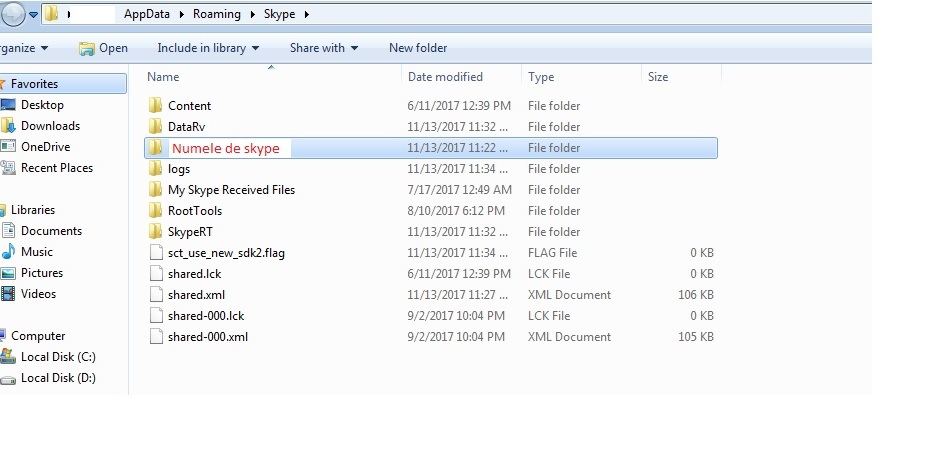
Acum te poti loga din nou pe skype iar folderul cu numele tau se va creea automat in aceeasi locatie.

Pentru a avea istoricul chaturilor va trebuii sa copiezi fisierele de mai sus in locul celor existente in folderul nou creat.


Spor!

Tip solutie

Permanent
Etichetare: askitaskit.rochatsyncEroare DiskEroare Disk I/O la logarea pe skypelogarea pe skypeQuit skypeskypeUnable to sign in due to a disk

Voteaza

Up Down
(22 din 52 persoane apreciaza acest articol)
Share
Tweet
Share

Despre Autor

Alexandru Licher

Solutii Asemanatoare

  • How to clean temporary files on Windows 11 -3
  • Cum deschidem un RDP in full screen folosind Command Prompt in Windows 10 7
  • Cum deschidem fereastra Sound folosind Run in Windows 10 1
  • Cum pot activa modul Dark in Microsoft Office? -1
  • Cum pot rezolva problema cu conexiunea la retea in Windows 10? 0
  • Reducerea deseurilor rezultate din echipamente electronice (e-waste): corectarea software a disfunctionalitatilor butoanelor perifericelor -2

Leave A Comment? × Cancel Reply

29534

Soluții Disponibile

0 Articole

In ultima saptamana

Cele mai recente soluții

  • How to clean temporary files on Windows 11
    • 234
    • 17/04/2025
  • How to update iOS on your iPhone
    • 276
    • 17/04/2025
  • Cum deschidem un RDP in full screen folosind Command Prompt in Windows 10
    • 292
    • 16/04/2025
  • Cum deschidem fereastra Sound folosind Run in Windows 10
    • 257
    • 16/04/2025
  • How to enter text with your voice on a Chromebook
    • 437
    • 16/04/2025
© Askit.ro, 2014 - 2025. All rights reserved. Done by Class IT
Share
Tweet
Share