
Follow Us

Soluții pentru problemele tale IT

Home /Aplicații/E-mail/Fix: Outlook cannot log on
Home /Soluții /Fix: Outlook cannot log on

Fix: Outlook cannot log on

  • Data 23/12/2020
  • Autor Alexandru Oancea
  • Categorie E-mail, Soluții
  • -16
  • 782
Configurare noua (How To)

Situatie

Being unable to log into the outlook application.I ran into this problem a while ago and wondered what to do about it. I managed to find a 100% working fix that is fast and easy to apply.

Solutie

Press the windows key+r and open the run command. Run the “regedit” command. You can also simply search using the search bar, whichever is easier for you.
Now that you’re in the registry editor, use the left side navigation pane to go to the following folder:

HKEY_CURRENT_USER\SOFTWARE\Microsoft\Office\16.0\Outlook\Profiles\Outlook

**Note that 16.0 is for Office 2016 (Outlook 2016). If you’re using an older or newer version, the number will be a different number, as follows:
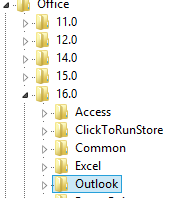
Outlook 2007 = \12\
Outlook 2010 = \14\
Outlook 2013 = \15\
Outlook 2016 = \16\

Delete all the keys inside that folder. It’s that simple and you will be able to open outlook again and will be prompted to log back in.

Tip solutie

Permanent
Etichetare: erroroutlook log in

Voteaza

Up Down
(15 din 46 persoane apreciaza acest articol)
Share
Tweet
Share

Despre Autor

Alexandru Oancea

Solutii Asemanatoare

  • Cum deschidem un RDP in full screen folosind Command Prompt in Windows 10 5
  • Cum deschidem fereastra Sound folosind Run in Windows 10 0
  • How to enter text with your voice on a Chromebook 7
  • Can’t Delete a Windows File or Folder? 3
  • Top 10 Linux Easter Eggs 3
  • How to fix – Reading a File: Permission Denied on Linux 2

Leave A Comment? × Cancel Reply

29534

Soluții Disponibile

0 Articole

In ultima saptamana

Cele mai recente soluții

  • How to clean temporary files on Windows 11
    • 305
    • 17/04/2025
  • How to update iOS on your iPhone
    • 336
    • 17/04/2025
  • Cum deschidem un RDP in full screen folosind Command Prompt in Windows 10
    • 369
    • 16/04/2025
  • Cum deschidem fereastra Sound folosind Run in Windows 10
    • 313
    • 16/04/2025
  • How to enter text with your voice on a Chromebook
    • 554
    • 16/04/2025
© Askit.ro, 2014 - 2026. All rights reserved. Done by Class IT
Share
Tweet
Share