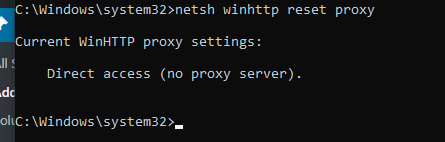
How to Reset WinHTTP Proxy Server Settings in Windows 10 Data 09/02/2022 Autor razvan martes Categorie Soluții -3 688 Configurare noua (How To) Situatie Press Start key and type cmd. Right-click on it and select the option Run as administrator. Type the following command and hit enter: netsh.exe winhttp show proxy Solutie Tip solutiePermanent Article Attachments netsh-2 Voteaza Up Down (28 din 59 persoane apreciaza acest articol) ShareTweetShare Despre Autor razvan martes Solutii Asemanatoare Cum deschidem un RDP in full screen folosind Command Prompt in Windows 10 4 Cum deschidem fereastra Sound folosind Run in Windows 10 0 How to enter text with your voice on a Chromebook 9 Can’t Delete a Windows File or Folder? 2 Top 10 Linux Easter Eggs 2 How to fix – Reading a File: Permission Denied on Linux 4 Leave A Comment? × Cancel Reply Save my name, email, and website in this browser for the next time I comment. five − 4 =
Leave A Comment?
