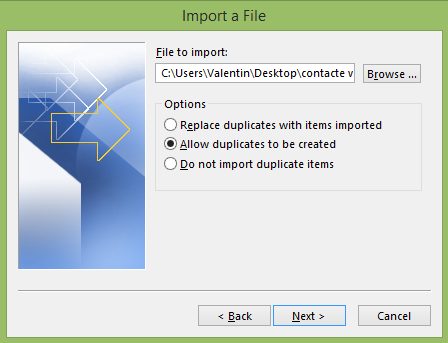
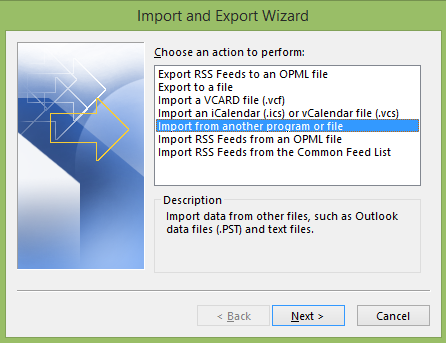
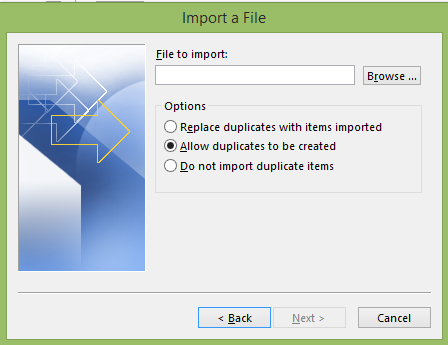
Import contacte in clientul de Outlook 2013 Data 16/03/2015 Autor Valentin Bozanchi Categorie E-mail, Aplicații 11 1257 Configurare noua (How To) SituatieAveti deja un backup al contactelor? Pentru accesarea lor urmati pasii de mai jos Solutie Pasi de urmat Deschide clientul de Outlook 2013 si merge in Tabul “File” Apoi click pe “Open & Export” –> “Import/Export” Se alege “Import from another program or file” –> Next Daca backup-ul este sub exensie CSV se alege “Comma Separated Values” –> Next Pentru import click Browse –> Next Tip solutiePermanent Voteaza Up Down (32 din 53 persoane apreciaza acest articol) ShareTweetShare Despre Autor Valentin Bozanchi Solutii Asemanatoare O metoda de vizualizare a valorii frecventelor orizontale si verticale de reimprospatare a imaginii in Windows 4 Adding emotes to a personal Twitch channel -1 How to stop awkward Games showing up on next year’s Steam replay 3 How to use LAMBDA in Excel to create your own functions -1 How to customize the Always-on Display on a Samsung Galaxy Phone -3 How to create a New File in macOS Finder 2 Leave A Comment? × Cancel Reply Save my name, email, and website in this browser for the next time I comment. × one = 7
Leave A Comment?