
Follow Us

Soluții pentru problemele tale IT

Home /Stații de lucru/Aplicatii specifice/Solicitare credentiale de fiecare data cand deschidem Outlook

Solicitare credentiale de fiecare data cand deschidem Outlook

  • Data 10/08/2017
  • Autor Stefan S
  • Categorie Aplicatii specifice
  • 4
  • 1175
Configurare noua (How To)

Situatie

Dorim ca de fiecare data cand accesam Outlook sa ne solicite credentialele (server email Exchange)


Solutie

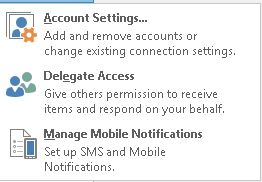
Se deschide Outlook – Account Settings
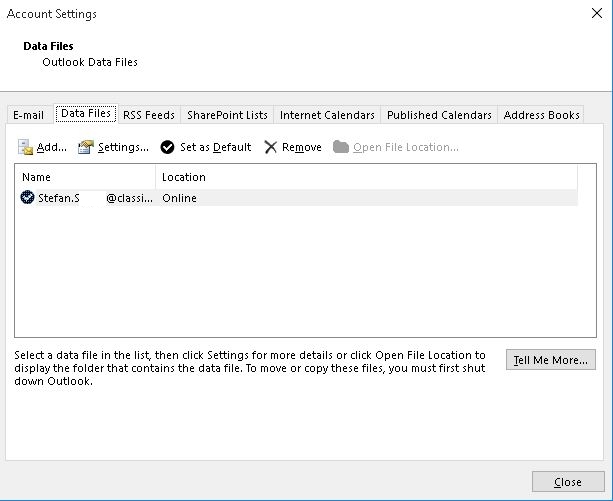
Ne ducem pe tabul Data Files
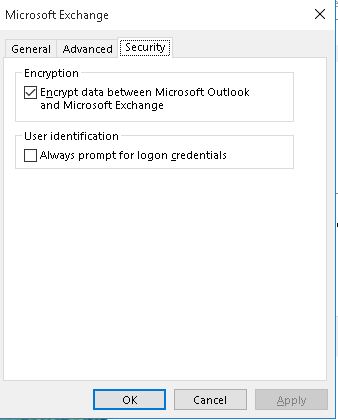
Dublu click pe data file – Security si bifam optiunea “Always prompt for logon credentials”
Tip solutie

Permanent
Etichetare: Account SettingsAlways prompt for logon credentialsaskitoutlookserver email ExchangeSolicitare credentialeSolicitare credentiale de fiecare data cand deschidem Outlook

Voteaza

Up Down
(32 din 60 persoane apreciaza acest articol)
Share
Tweet
Share

Despre Autor

Stefan S

Solutii Asemanatoare

  • Cum deschidem un RDP in full screen folosind Command Prompt in Windows 10 7
  • Cum deschidem fereastra Sound folosind Run in Windows 10 1
  • O metoda de vizualizare a valorii frecventelor orizontale si verticale de reimprospatare a imaginii in Windows 5
  • Probleme de Upgrade .NET Framework în Windows 11 10
  • OneNote can completely replace 3 different kinds of Apps 3
  • How to use Auto-Highlight with Find and Replace in Excel -10

Leave A Comment? × Cancel Reply

29534

Soluții Disponibile

0 Articole

In ultima saptamana

Cele mai recente soluții

  • How to clean temporary files on Windows 11
    • 228
    • 17/04/2025
  • How to update iOS on your iPhone
    • 270
    • 17/04/2025
  • Cum deschidem un RDP in full screen folosind Command Prompt in Windows 10
    • 282
    • 16/04/2025
  • Cum deschidem fereastra Sound folosind Run in Windows 10
    • 256
    • 16/04/2025
  • How to enter text with your voice on a Chromebook
    • 422
    • 16/04/2025
© Askit.ro, 2014 - 2025. All rights reserved. Done by Class IT
Share
Tweet
Share