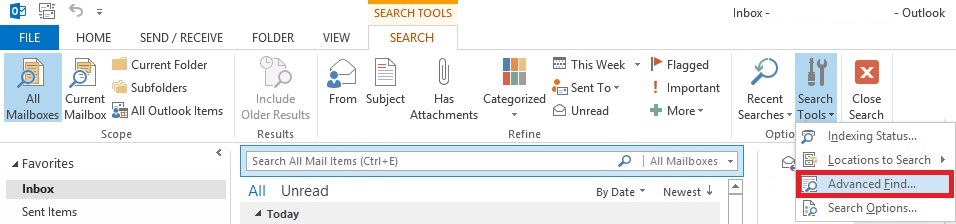
Unde se gaseste “Advanced Search” in Outlook 2013 Data 16/12/2014 Autor Vlad H Categorie E-mail, Aplicații -2 1573 Configurare noua (How To) SituatieSe doreste o cautare mai avansata a unui anumit mail. Solutie Pasi de urmat Se apasa butonul de Find (lupa) din dreptul casutei de “Search All Mail Items”. Se selecteaza butonul “Search Tools” Se apasa butonul “Advanced Find” Tip solutiePermanent Voteaza Up Down (37 din 76 persoane apreciaza acest articol) ShareTweetShare Despre Autor Vlad H Solutii Asemanatoare O metoda de vizualizare a valorii frecventelor orizontale si verticale de reimprospatare a imaginii in Windows 4 Adding emotes to a personal Twitch channel 0 How to stop awkward Games showing up on next year’s Steam replay 3 How to use LAMBDA in Excel to create your own functions -1 How to customize the Always-on Display on a Samsung Galaxy Phone -3 How to create a New File in macOS Finder 2 Leave A Comment? × Cancel Reply Save my name, email, and website in this browser for the next time I comment. − 5 = zero
Leave A Comment?
