
Follow Us

Soluții pentru problemele tale IT

Home /Soluții /User account not loaded correctly

User account not loaded correctly

  • Data 12/07/2018
  • Autor Visan Alexandru
  • Categorie Soluții
  • 1
  • 871
Rezolvare problema (Fix IT)

Situatie

Solutie

  1. Uneori, la logarea cu userul respectiv putem primi urmatoarea eroare: Your user profile was not loaded correctly! You have been logged on with a temporary profile. Changes you make to this profile will be lost when you log off. Please see the event log for details or contact your administrator. Acest lucru se poate datora fie faptului ca profilul userului a fost sters accidental, fie pentru ca profilul a fost corupt din diverse motive.
  2. Pentru a remedia aceasta situatie avem nevoie in primul rand sa ne logam cu un cont cu drepturi de administrator.
  3. In acest cont accesam editorul de registri –  Start-Run-Regedit. Atentie la lucrul cu registri, pentru ca o modificare incorecta a acestora va poate crea probleme, inclusiv compromiterea sistemului de operare.

  1. In Regedit extindem arborele HKEY_LOCAL_MACHINESOFTWAREMicrosoftWindows NTCurrentVersionProfileList.
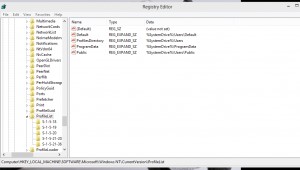
  1. Una dintre subcheile acestei chei va avea o extensie .bak la sfarsit:
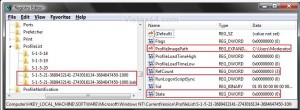
In partea dreapta verificam ProfileImagePath pentru a fi siguri ca acesta este profilul care ne intereseaza.

Tip solutie

Permanent
Etichetare: accounterrornot loaded correctlyuseruser account errorwindows

Voteaza

Up Down
(21 din 42 persoane apreciaza acest articol)
Share
Tweet
Share

Despre Autor

Visan Alexandru

Solutii Asemanatoare

  • Cum deschidem un RDP in full screen folosind Command Prompt in Windows 10 4
  • Cum deschidem fereastra Sound folosind Run in Windows 10 0
  • How to enter text with your voice on a Chromebook 9
  • Can’t Delete a Windows File or Folder? 2
  • Top 10 Linux Easter Eggs 2
  • How to fix – Reading a File: Permission Denied on Linux 4

Leave A Comment? × Cancel Reply

29534

Soluții Disponibile

0 Articole

In ultima saptamana

Cele mai recente soluții

  • How to clean temporary files on Windows 11
    • 341
    • 17/04/2025
  • How to update iOS on your iPhone
    • 373
    • 17/04/2025
  • Cum deschidem un RDP in full screen folosind Command Prompt in Windows 10
    • 390
    • 16/04/2025
  • Cum deschidem fereastra Sound folosind Run in Windows 10
    • 334
    • 16/04/2025
  • How to enter text with your voice on a Chromebook
    • 595
    • 16/04/2025
© Askit.ro, 2014 - 2026. All rights reserved. Done by Class IT
Share
Tweet
Share