Soluții

Cum scrieți și rulați un program C în Linux

C este unul dintre cele mai vechi și mai utilizate limbaje de programare din lume. A fost folosit pentru a dezvolta nenumărate aplicații, de la sisteme de operare la dispozitive încorporate. Chiar și astăzi, mulți dezvoltatori încă se bazează pe C pentru flexibilitatea și fiabilitatea sa ca limbaj de programare.

[mai mult...]

Cum verificați grupul (grupurile) de utilizatori din care face parte un utilizator Ubuntu

În calitate de administrator de sistem, puteți crea și gestiona grupuri pentru conturile de utilizator de pe sistemul dumneavoastră Linux. În acest fel, puteți atribui drepturi administrative și de configurare utilizatorilor Ubuntu și permisiuni de acces la fișiere și foldere unui întreg grup, mai degrabă decât unui singur utilizator la un moment dat. Uneori ar putea fi nevoie să știți din ce grup de utilizatori aparține un utilizator pentru a verifica sau a efectua operațiuni de gestionare a grupului sau pentru a atribui/de-atribui drepturi de utilizator. Acest articol va descrie pas cu pas comenzile care pot fi utilizate pentru a determina din ce grup este membru un utilizator.

Deschideți terminalul Ubuntu prin Ctrl+Alt+T sau Dash sau conectați-vă la sistemul Ubuntu prin SSH. Introduceți următoarea comandă pentru a vedea din ce grup aparține utilizatorul curent:

[mai mult...]

How to disable USB Storage by Using the Group Policy Editor

To disable the USB storage by using the Group Policy Editor, open “Run.” Once it’s open, type gpedit.msc. On the left pane click on “Computer Configuration -> Administrative Templates -> System -> Removable Storage Access.”

When you click on “Removable Storage Access,” new options will appear in the right pane. Look for and click on the options that say “Removable Disks: Deny execute access,” “Removable Disks: Deny read access,” and “Removable Disks: Deny write access.”

Click on each one of them to configure them. After clicking on one, a window with the name of the option should appear. To the left, there will be three options: Not Configured, Enabled, and Disabled.

Click on “Enabled” to disable it. If you ever change your mind and want to enable them again, choose the “Not Configured” or “Disabled” option.

[mai mult...]

How to connect your Xbox controller to your PC via Wireless

f Xbox Wireless is your preferred connection method, follow these steps:

  1. Hold down Xbox on your controller for three seconds until the Xbox button starts flashing.
  2. Press and hold the Pair button on your controller. When the Xbox button starts flashing more quickly, that means the controller is searching for your PC.
  3. Select Start on your computer.
  4. Select Settings > Bluetooth & devices.
  5. Select Add device.
  6. Find your controller by selecting Everything else.
  7. From here, choose either Xbox Wireless Controller or Xbox Elite Wireless Controller. When your controller is connected to your PC, the Xbox button will stay lit.
[mai mult...]

How to Import Photos from iPhone to Windows 10

  • Connect your iPhone to the computer

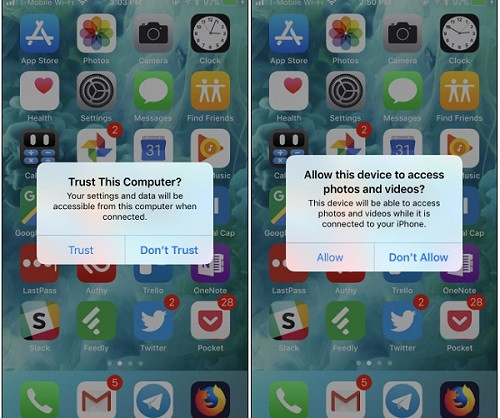
To start with, just connect your iPhone to the system using a working lightning cable. If you are connecting it for the first time, then you need to tap on the “Trust” button once you get a prompt on your device. Also, allow the connected PC to access photos and videos on your iPhone.

  • Transfer photos from iPhone to Windows

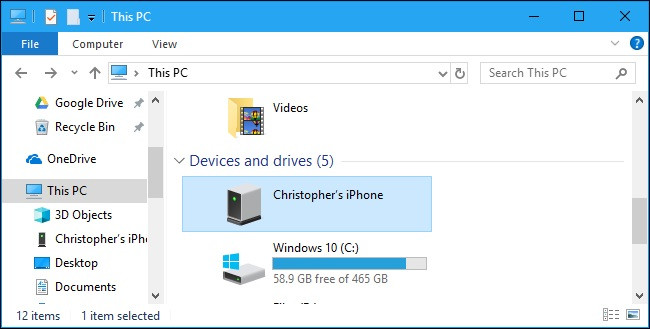
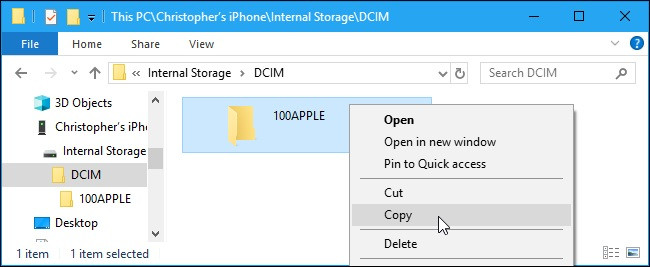
Open the iPhone storage and browse to its Internal Storage > DCIM folder to explore the available photos and videos. You can now right-click, copy this content, and paste it on your Windows storage.

[mai mult...]

Cum se remediaza eroarea Bootrec/Fixboot

Bootrec este un utilitar de reparare în linia de comandă disponibil în Windows Recovery Environment. Puteți utiliza comanda Bootrec /fixboot pentru a remedia erorile de pornire a sistemului și erorile de pornire pe Windows 10 și 11.

Cu toate acestea, atunci când executați comanda, este posibil să întâlniți eroarea „Accesul Bootrec/Fixboot este refuzat”. Această eroare poate apărea dacă structura EFI este ruptă. Un alt motiv ar fi problemele fișierelor cu datele de configurare de boot (BCD).

[mai mult...]