
Configurare program

How to Play Retro Games on Your NVIDIA SHIELD TV with Emulators
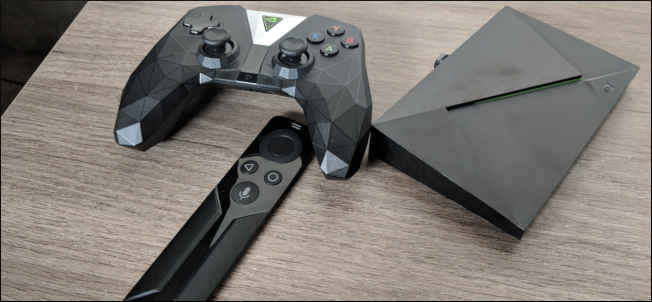
Short of an HTPC, the NVIDIA SHIELD TV is the most versatile box you can put in your entertainment console. It supports 4K HDR playback from Netflix and YouTube. You can play games from Google Play Store and stream games from your PC or NVIDIA’s servers. And you can even set up an emulator for retro gaming.

While we’ve seen retro consoles like the PlayStation Classic and NES Classic, their single use case may be a bit of a turn-off. There’s nothing wrong with just wanting to plug something in and dive into games, but other options are better if you want a more multipurpose system. And the NVIDIA SHIELD might be the best of them.


[mai mult...]

How to Use Google Lens on the iPhone

If you’re a fan of Google Lens, you now have another avenue for accessing the feature in iOS, because it’s now included in the Google Search app on the iPhone. Here’s how to use it.

Google Lens is a neat little feature that can identify real-world objects, like signs, buildings, books, plants, and more using your phone’s camera. And it gives you more information about the object. It’s available in the Google Photos app, but if you don’t use Google Photos, you can now access Google Lens in the regular Google Search app. We’ll show you how to use Google Lens in both apps.

[mai mult...]

Seteaza luminozitatea monitorului cu F.lux

F.lux reprezinta un program ce are rolul de a adapta luminozitatea si contrastul monitorului tau in functie de perioada zilei. F.lux ajusteaza automat temperatura culorilor, in vederea modificarii luminozitatii monitorului, pentru a oferii un confort vizual propice ochilor , in functie de perioada zilei in care lucrezi la calculator. Concret, in timpul zilei cand soarele este pe cer, f.lux va seta cea mai ridicata temperatura a culorilor, rezultand astfel o luminozitate ridicata, iar odata cu lasarea serii, temperatura culorilor va scadea treptat, astfel incat impactul vizual sa nu fie puternic si ochii sa fie protejati.

[mai mult...]

Cum sa salvezi informatii tale bancare in browser

Cumparaturile online nu reprezinta nimic iesit din comun pentru noi in ziua de astazi. Mereu exista acel moment in care ajungi pe un nou site de cumparaturi si trebuie sa completezi mereu informatiile tale bancare ca sa finalizezi comanda.Acum acest lucru se poate face cu doua click-uri , fara sa mai fim nevoiti sa introducem nimic.

[mai mult...]